
UniProt entries and their isoforms
A UniProtKB entry is the field's reference description of a protein: its residues, its curated feature table, its cross-references, and the alternative sequences it produces. This page is about what happens when you open one here, in either of the two forms UniProt distributes, and about the part of the record that is usually invisible: the isoforms, which the entry names and describes but never spells out.
The two serialisations, and why both matter
UniProt serves every entry in two forms, and the download button you happen to press decides which you get:
| Form | What it is | How it arrives |
|---|---|---|
| Flat file | The line-oriented text format Swiss-Prot has used since 1986 | rest.uniprot.org/uniprotkb/P01375.txt, and the .dat of the bulk releases |
| XML | The same record against UniProt's published schema | rest.uniprot.org/uniprotkb/P01375.xml |
Both open here, and both open as the same protein: the same residues, the same feature
coordinates, the same organism and cross-references. You can check that yourself — the UniProt
entries sample project carries P16152 in both forms so you can open each and compare.
Neither is routed by its file extension, because neither extension is distinctive. UniProt serves
the flat file as a bare .txt, and .xml is claimed by half a dozen unrelated formats. What
identifies them is their content: a UniProtKB ID line states its length in AA. where an EMBL
record states BP., and the XML declares UniProt's own namespace. So a file keeps working whatever
you renamed it to.
They also use different words for the same feature types, and that no longer shows. The flat
file writes MOD_RES where the XML writes modified residue; UniProt's schema says outright that
the two are equivalent, and then lists only the XML half. Rather than translate through a table
written from memory, the correspondence is read off UniProt's own records: the same entry is
downloaded in both forms, its features line up one for one, and the pairing falls out: all 39
feature types, read off 3,573 real features with every coordinate cross-checked. So a map drawn
from the XML and a map drawn from the flat file are the same map, down to the colour of each
feature.
Three of those types take a longer route, and it is worth knowing about if you work with older
records. calcium-binding region, metal ion-binding site and nucleotide phosphate-binding region were folded into the general binding site type in release 2022_03, so no entry served
today carries one and no current download can be used to read the correspondence off. UniProt keeps
every past release, though, and publishes each of them in both forms, so the pairing for these three
is read from the last release that still used them. An archived record still opens with its
feature types named the way the flat file names them, which is what the equivalence above claims
and would otherwise quietly stop being true the moment you opened something from before 2022.
Isoforms: the part of the entry that is named but not written down
Most eukaryotic entries describe more than one protein. Human p53 (P04637) names nine, and
none of their sequences appear anywhere in the file. What the file carries instead is:
- an
ALTERNATIVE PRODUCTSblock naming each isoform, its synonyms, its stable identifier (P04637-7), and the list of splice variants that produce it; - a set of
VAR_SEQfeatures, each stating a span of the canonical sequence and what replaces it — either a run of different residues, or nothing at all.
Opening the entry applies those variants and gives you every isoform as its own document, from
either serialisation — the XML states the same pairing in its own way. Isoform 7 is P04637-7:
261 residues, the canonical 393 with residues 1–132 removed.
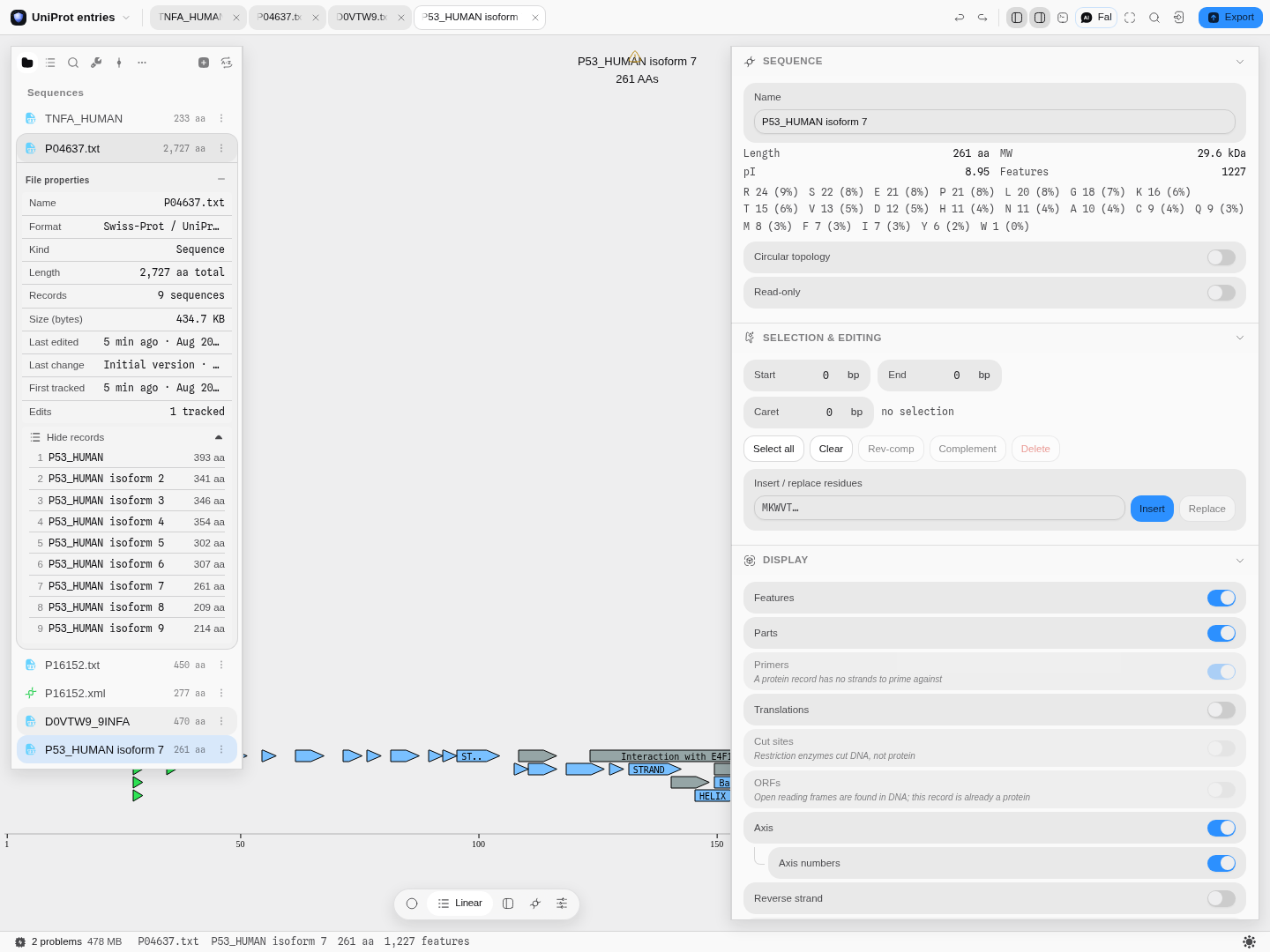
Human p53 opened from its UniProt flat file. The record list is the file's own: one canonical protein and the eight alternative sequences rebuilt from its splice variants, each openable as a document of its own.
The three rules, and the check the entry gives you for free
- Variants are applied from the far end backwards. Every
VAR_SEQstates its coordinates against the canonical sequence, so applying them in file order would shift each later span by the length change of the earlier one. Isoform 5 applies three at once; it is only correct because the last one is applied first. - A variant that replaces residues states the residues it replaces. That is a checksum the entry hands you, and it is verified: if the stated original does not match the canonical sequence at those coordinates, the isoform is refused with that reason rather than built out of two halves that disagree.
- An isoform whose sequence the entry does not describe is not invented.
Sequence=Not describedandSequence=Externalare real values in this block, and both are reported as unbuildable, by name, rather than quietly skipped.
Annotation carries across, and what it costs is stated
The canonical entry's features are carried onto each isoform at its own coordinates. A feature that lies after a deletion is shifted; one the splice overlaps is dropped, because a disulfide bond whose partner residue was spliced out is not a shorter bond, it is a statement that is no longer true. Every isoform records what it lost and to which variant: isoform 7 reports 290 annotations did not survive the splice (290 where VSP_040833 removes residues 1-132). They are all still on the canonical record, one tab away.
The splice variants themselves are not carried onto the product. A VAR_SEQ describes how the
isoform was made; annotating the isoform with it would be describing the sequence with the edit that
produced it.
Opening one, step by step
-
Open the UniProt entries sample, or drag in any
.txt,.dator.xmlyou downloaded from UniProt. Nothing is converted; the file opens as it is. -
Read the notes the import leaves. The status bar names them. A curated entry usually has some: opening TNF-α (
P01375) reports 2 features could not be placed on the sequence: 2 CHAIN: The end is recorded as unknown ("?") in the entry — because the format allows a feature to end at an unknown position, and a feature with no coordinate is reported rather than drawn at a guessed one.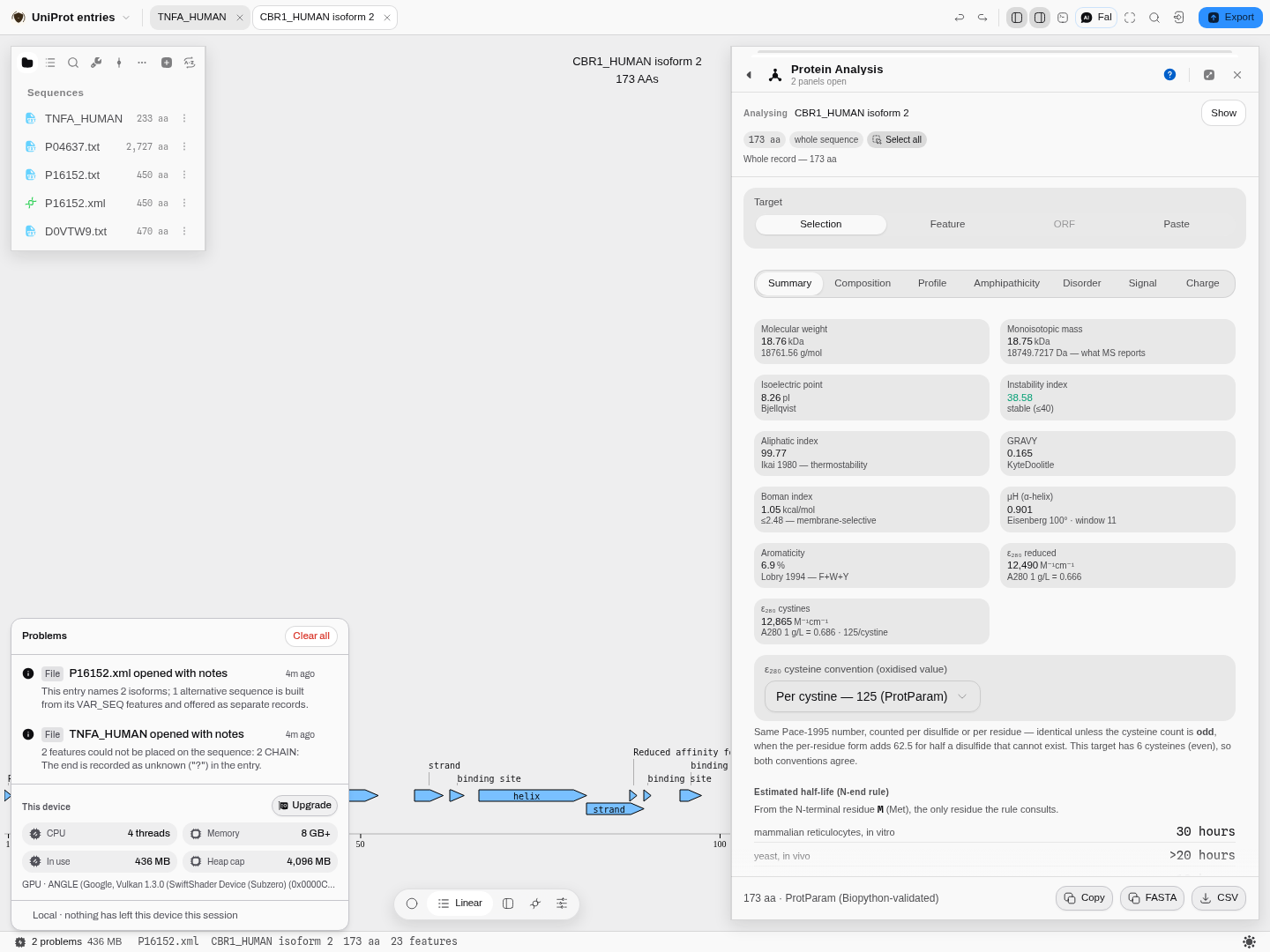
Both notes at once. Nothing here is an error — the files opened. They are the things about a record you would otherwise have to notice were missing.
-
Look at the feature table on the sequence. The entry's curation is now real annotation, drawn in one lane per section of the entry, in the order UniProt files them: Molecule processing (signal, propeptide, chains), Regions (topological domains, transmembrane spans, domains, motifs), Sites, Amino acid modifications (modified residues, glycosylation, disulfide bonds), Natural variations, Experimental info (mutagenesis, sequence conflicts) and Secondary structure. Each lane is named with its feature count, packed on its own, and folds to a single row from its name. Natural variants, mutagenesis and sequence conflicts are lollipops on the residue they change, each kind named in the lane's caption; the note UniProt wrote for each is on its hover, and a feature with no name of its own is labelled by its UniProt type and its residue numbers (
Sequence conflict 94). -
Ask for the variants' clinical class. The flat file does not say whether a variant is pathogenic, so the natural variants start grey. Press Clinical class from UniProt in that lane and the EMBL-EBI Proteins API is asked for the entry's variants (nothing is sent before you press it); each curated variant is then colored by the class UniProt's own feature viewer gives it: likely pathogenic or pathogenic, likely benign or benign, uncertain significance, or predicted consequence when only SIFT and PolyPhen have spoken. The caption counts each class and says how many curated variants could be placed. On TNF-α both of its two are predicted consequence: P84L carries a benign clinical significance (from Ensembl) but no disease association, and that is the rule the viewer applies.
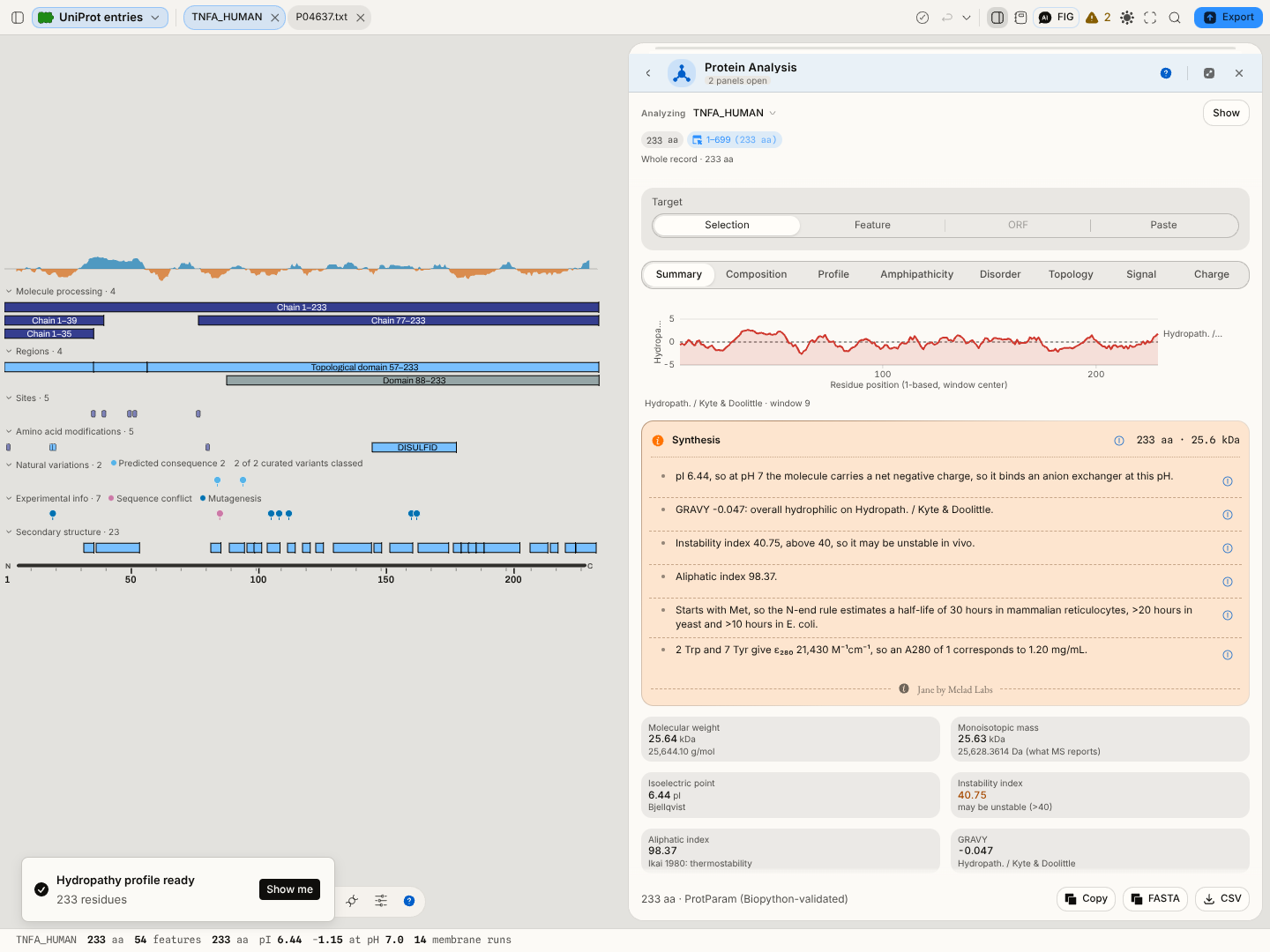
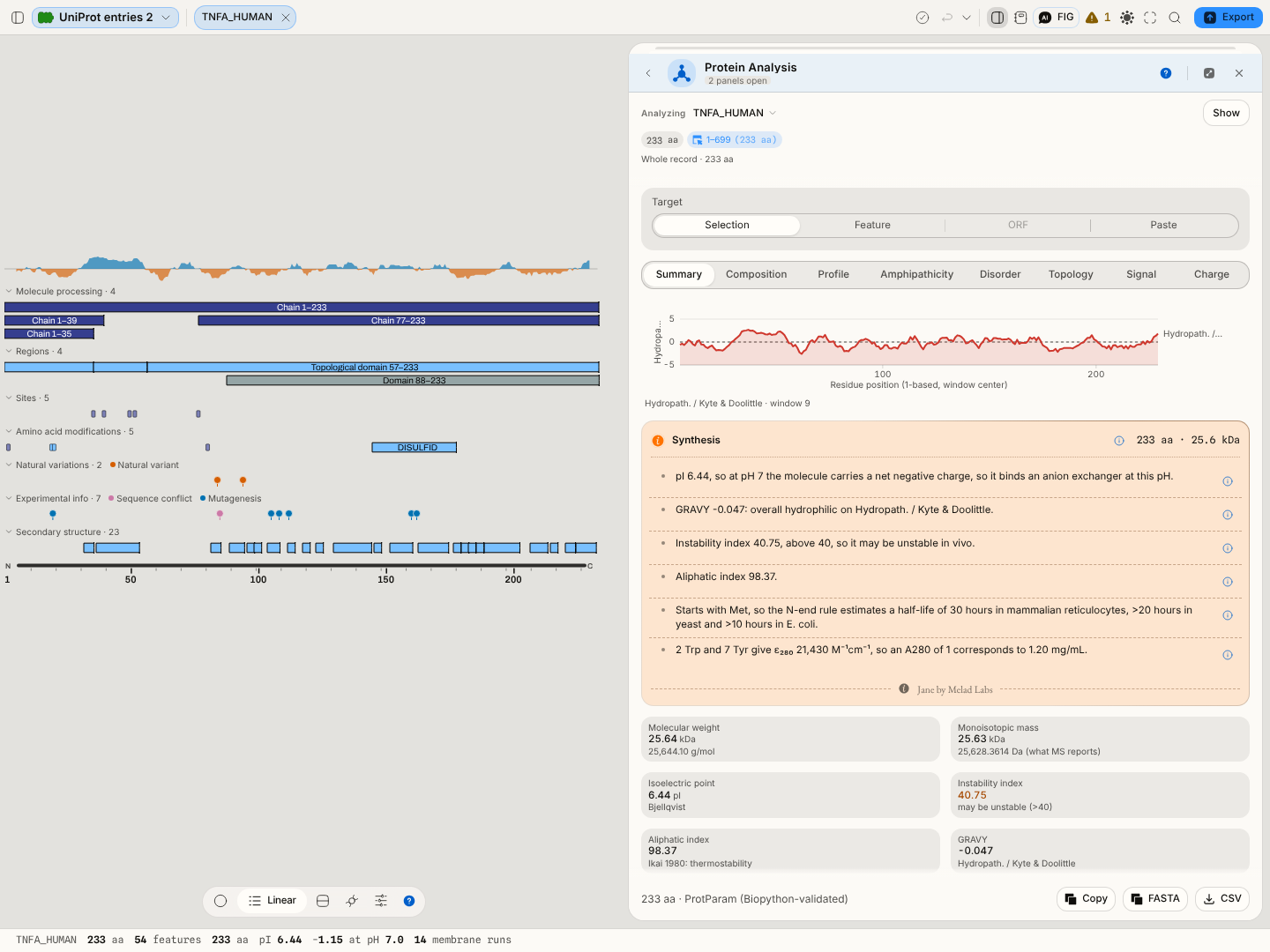
Human TNF-α, 233 residues and 54 features. The sections are UniProt's own, taken from its documentation of the feature table rather than invented here.
-
Open an isoform from the file's record list (File properties → Show records). It is an ordinary document from that point on.
-
Send it somewhere. A UniProt record is a protein, so Protein Analysis, Protease Digest, Protein Domains and Back-translate all take it directly, as does an alignment against another isoform of the same entry.
Entries change, and some of them stop existing
UniProtKB is curated, so a record you cited last year may not be the record served under that accession today. Three things can have happened, and they need different answers:
| What happened | What UniProtKB serves now | What to do |
|---|---|---|
| Re-annotated | the same accession, a higher entry version | compare, and pull the current one if you want it |
| Merged | a different protein's entry, because the accession was folded into it | follow the successor the authority names |
| Deleted | an empty record — the text routes answer with nothing at all | read the archive |
Ask the question from the file itself. Open File properties on any UniProt record in a project and use Check for a newer one on the Revision row. It works on records you fetched and on the ones the UniProt starter brings with it — a bundled entry states which accession and release it is a copy of, so it can be checked against the authority exactly like a fetched one, and a copy that cannot say what it is a copy of is not evidence of anything. For a live entry it compares your copy's version with UniProtKB's, distinguishing the sequence version (which moves only when residues change) from the entry version (which moves on every annotation edit) — an entry can be a hundred revisions old with a sequence untouched since version 2, and treating those as one number is how people conclude they are behind when they are not.
For a withdrawn entry it says so, in UniProt's own words, and tells you where the record still is:
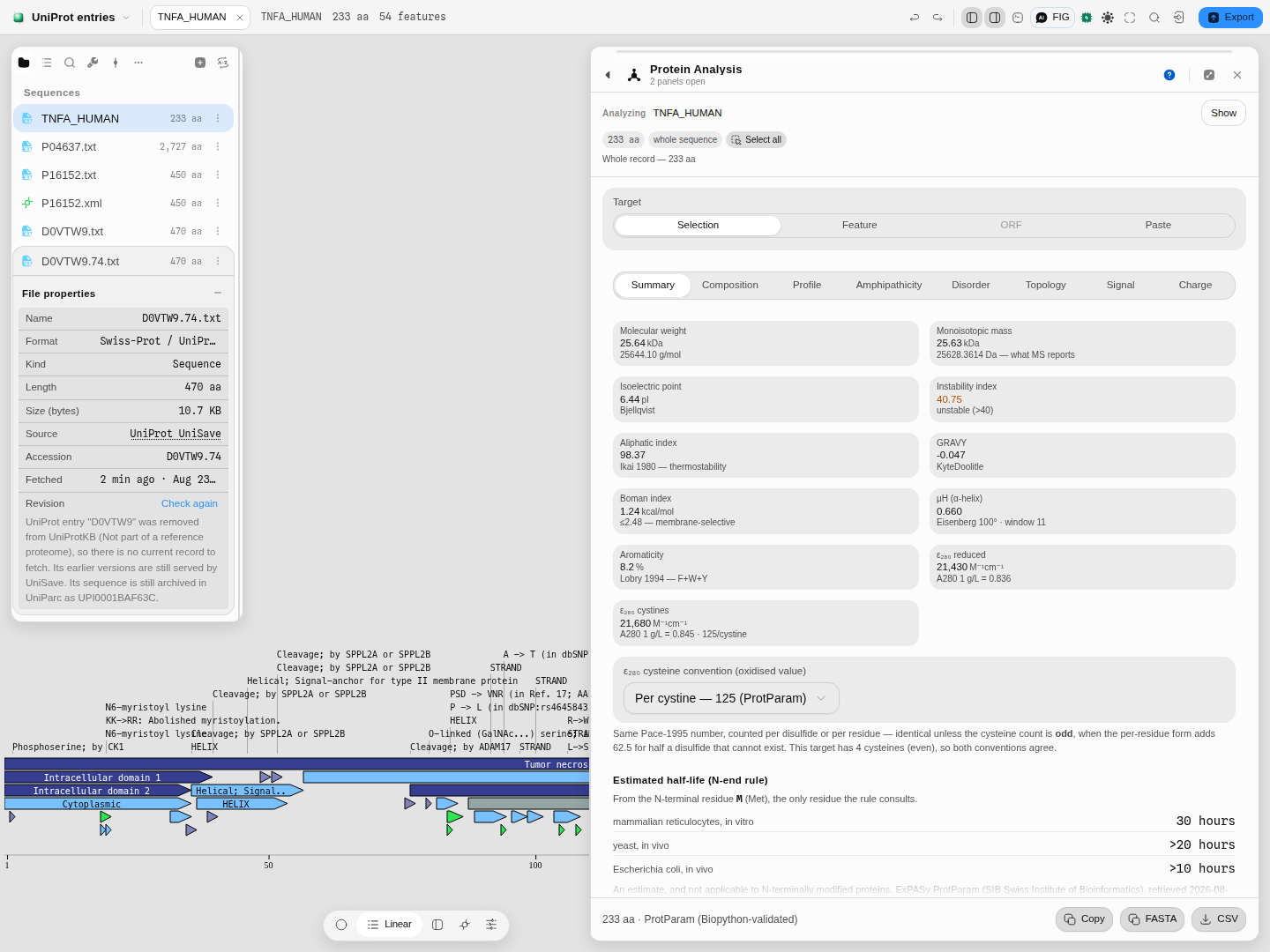
A deleted accession is not a missing one. The reason is the authority's; so is the UniParc
identifier, which is where the sequence itself survives. This record came from the UniProt starter,
not from a fetch — the accession and release under Source are what let it be checked at all.
And the row hands you the way out. Earlier releases (UniSave) opens the archive already pointed at that accession, so the one route a deleted entry still has is a click from the file rather than something you have to know exists:
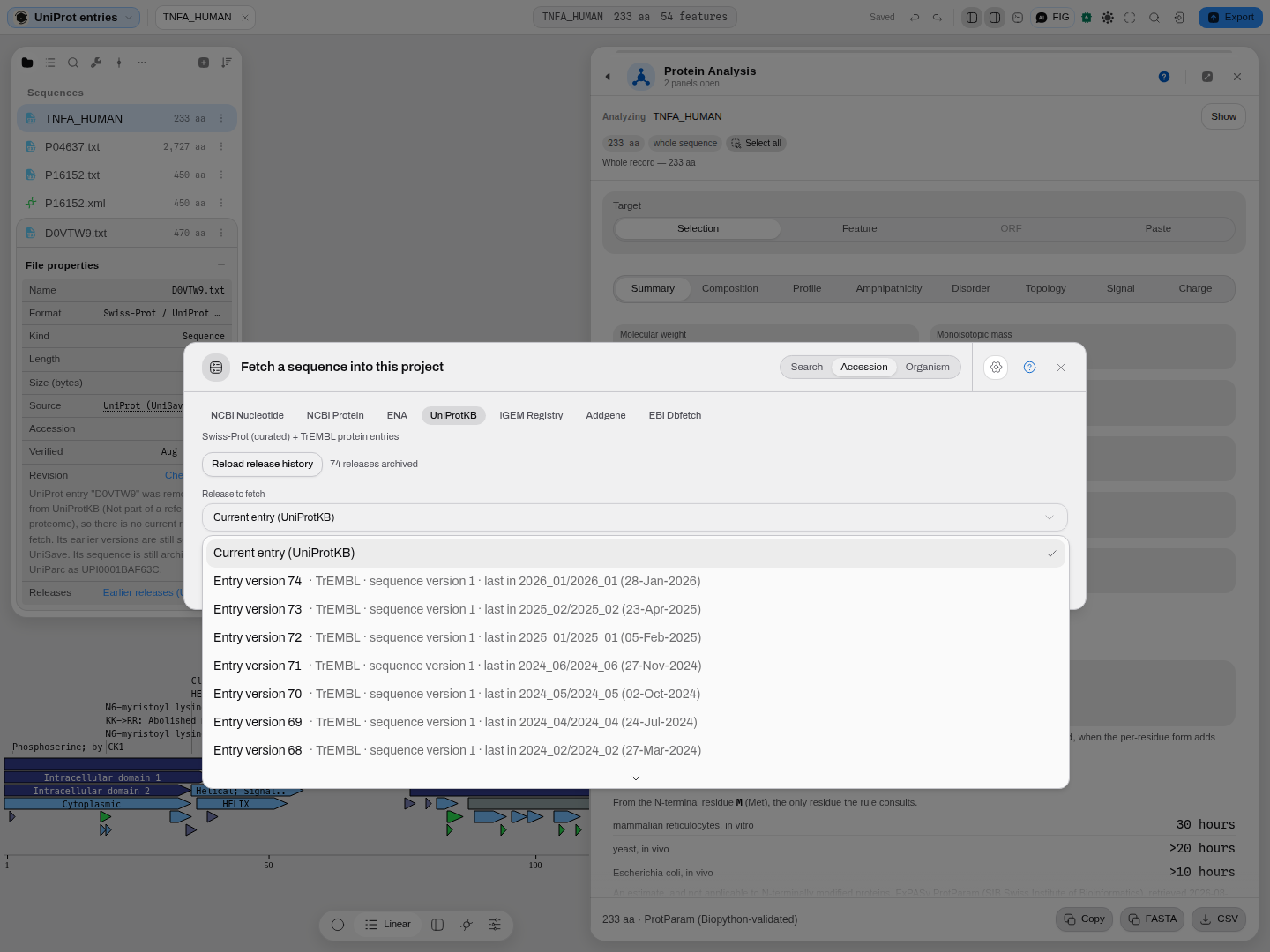
Nothing was typed into the dialog. The file said which accession it was, and the archive answered for it.
For a merged accession it names the entry yours became, and offers to bring it in beside your copy rather than quietly replacing it:
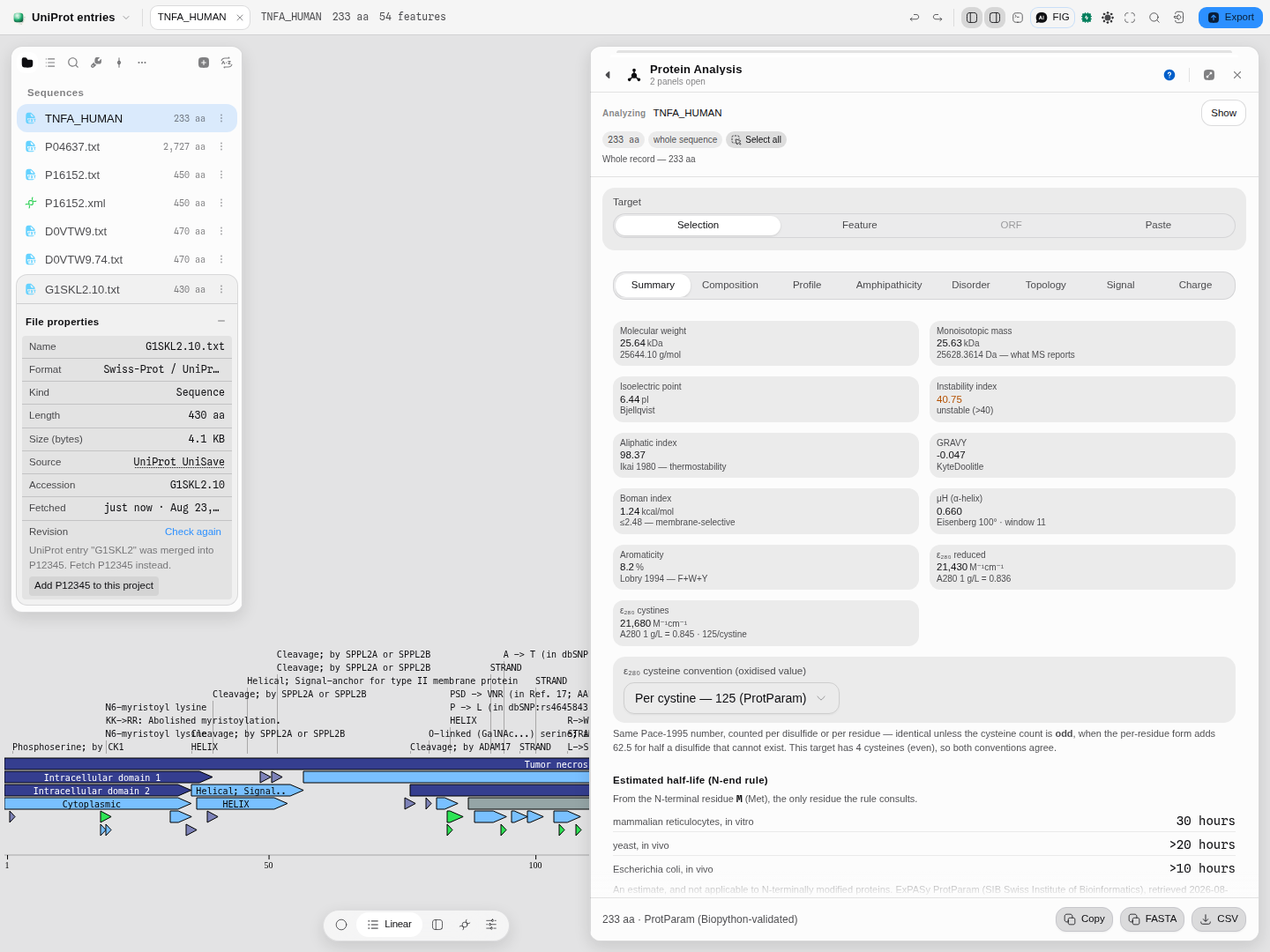
Both records stay in the project. Which one your result was computed against is a fact about the result, so nothing is overwritten on your behalf.
Reading an old release, from the archive
UniProt keeps every release of every entry it has ever served, in UniSave — including entries it later deleted. In Fetch from database → Accession → UniProtKB, type the accession and choose Earlier releases (UniSave): you get the authority's own release list, and any one of them opens as an ordinary document. If the record is already in your project, skip the typing — the Revision row on the file opens the same control with the accession filled in.
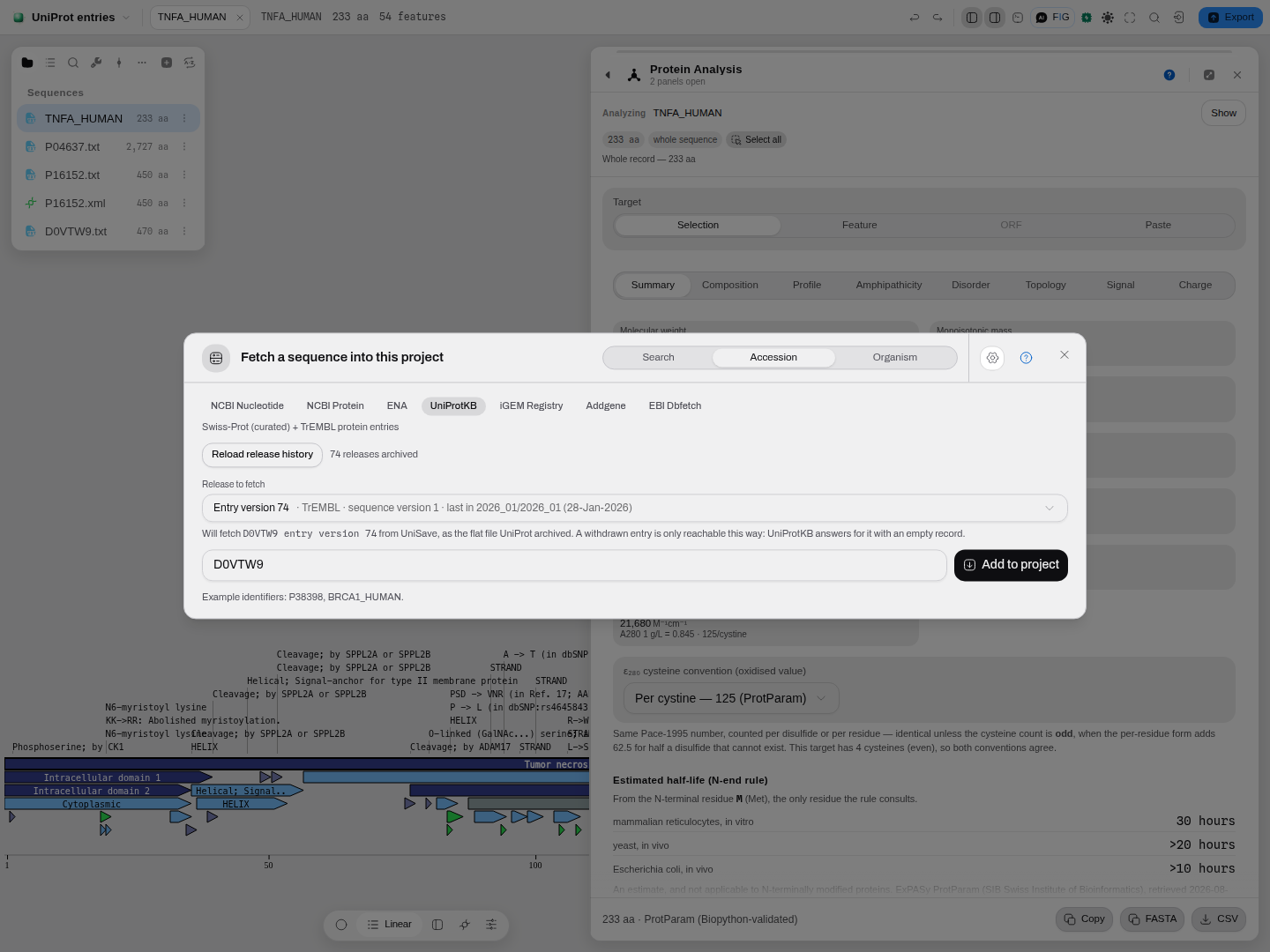
D0VTW9 was deleted, so UniProtKB has nothing to give you. UniSave still has all 74 releases it
ever served, dated by the release each was last seen in.
Two reasons to reach for this rather than for a copy on your disk:
- Reproducing a published result. A paper's methods pin a UniProt release; that release is fetchable, so the numbers can be recomputed against the record the authors actually used rather than against today's annotation.
- Seeing what changed, and when. The list is release-dated, so the release in which a sequence version moved is visible without diffing anything.
The imported file records the exact release it came from, and stays askable: a document fetched as
D0VTW9.74 still asks UniProtKB about D0VTW9 when you check it, which is how a deleted entry can
answer at all.
When a residue is ambiguous, you get two masses
A sequence can carry X (any residue), B (Asp or Asn), Z (Glu or Gln) or J (Leu or
Ile) — normal in a record built from a draft assembly, or from a peptide read where two residues
were not distinguishable. A molecular weight then has two honest answers, and the workbench shows
both rather than picking one:
- The exact mass of what is known, printed as a subtraction:
14.2 kDa − 5 × X. Nothing is guessed; the five unknown residues are counted in the length and left out of the mass, the atom counts and the GRAVY. This is the convention Biopython follows, which refuses those letters outright. - An estimate that includes them, printed after it:
· ≈14.8 kDa. Each ambiguous letter is weighed by the average of the residues it stands for —Bis the mean of aspartate and asparagine,Xthe mean over all twenty. This is the convention EMBOSSpepstatsuses, and the numbers are its published table, so a mass you compare againstpepstatswill agree.
Which to quote. The exact one, whenever you are reporting a measurement — an average over what a residue might be is not a property of your molecule. The estimate is for comparing against a tool that made the same assumption, and for a rough expectation before a gel.
Pro tips, and the things that quietly go wrong
-
Compare isoforms by aligning them. The nine p53 isoforms are nine documents in one project; putting several into a multiple alignment shows exactly which region each splice changes, which is faster to read than nine feature tables.
-
A UniProt entry can be deleted, and the archive will still have it. Accessions are retired, merged and demerged. The TrEMBL record in the sample project,
D0VTW9, is one — UniProt dropped it for not being part of a reference proteome. What makes this worth knowing is how UniProt says so: a withdrawn accession does not come back as "not found". Ask for its sequence and you get an empty file, which is indistinguishable from a record with nothing in it. Checking such a record here reports what actually happened — deleted, and UniProt's stated reason, or merged, with a one-click way to fetch the accession it became — and the older versions stay readable, because UniProt's version archive keeps serving them long after the entry itself is gone.D0VTW9still has all 74 of its releases there. -
An archived version is a refreshed record, not the original bytes. The archive re-writes each version with today's formatting conventions, so a 2019 entry pulled back today has the same facts and not the same file. Fine for reading and for provenance; not something to diff against a copy you saved at the time.
-
The unreviewed records are a different kind of evidence. A TrEMBL entry's feature table comes from automatic annotation rules, not a curator. It is worth having and worth knowing about; the record says which it is.
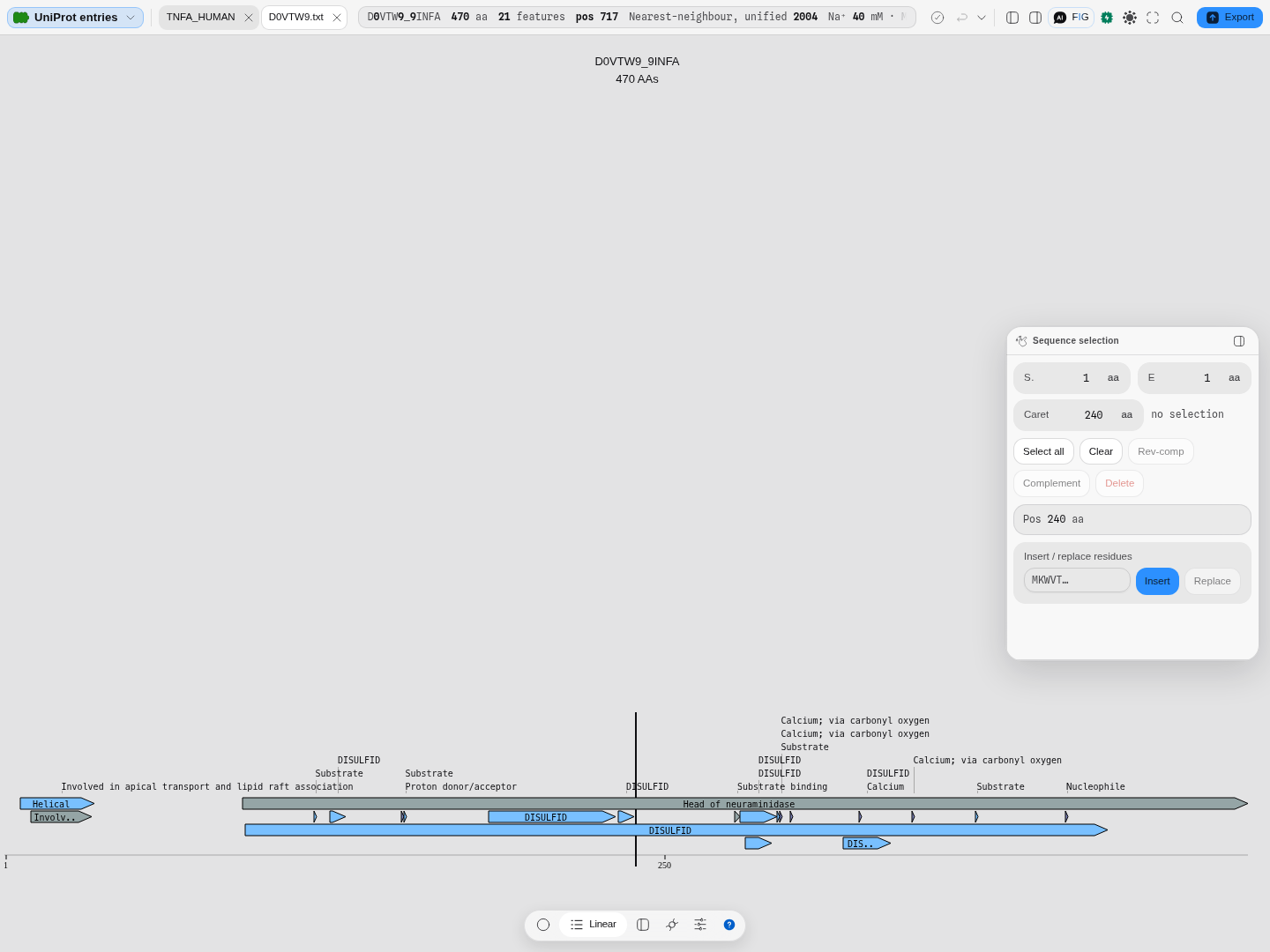
D0VTW9, an unreviewed influenza protein. Fewer features, and all of them rule-derived. -
Isoform numbering is UniProt's, not positional.
P04637-4is not the fourth-longest; it is the fourth isoform the entry names. Use the identifier, not the order. -
A bulk release opens, but only its head.
uniprot_sprot.datis hundreds of thousands of entries in one file, and every one of them becomes a document with its full feature table — which is far more than a browser tab can hold. Drop one in and the first 200 entries open, with the file card stating how many the file really holds. Use it to look; to work on a particular protein, fetch it by accession. -
A download that was cut off still opens. An interrupted transfer leaves a file whose last entry stops mid-record. Rather than refusing the whole thing, the complete entries open and you are told which entry the file ends inside — so a 17 MB download that lost its tail is still 999 usable records, and you know to fetch it again.
What you get here that you would otherwise script
-
Both serialisations, one protein. Most tools read one form and convert the other, if they read it at all.
-
The isoforms as documents, from either download. Reconstructing an isoform from
VAR_SEQis a script most people write once and then distrust; here they are already built, and checked against the sequences UniProt serves for them, residue for residue — and the flat file and the XML are checked against each other as well, so the route you took cannot change the answer.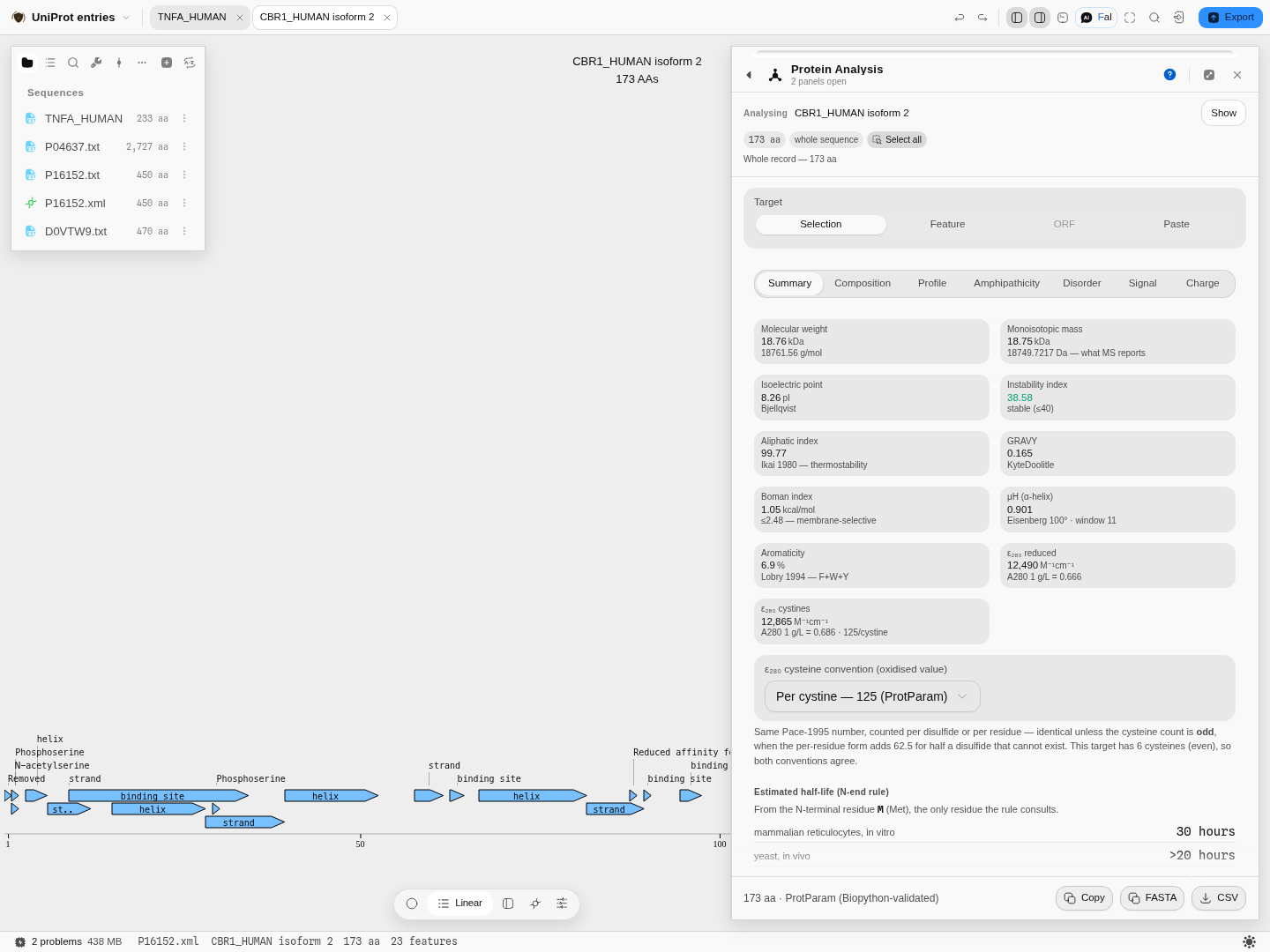
CBR1_HUMAN isoform 2, built fromP16152.xml. The same entry's.txtsits above it in the file list reporting the same 450 residues across the same two records. -
Annotation carried onto the isoform, with the losses named rather than silently absorbed.
-
Nothing placed at a guessed coordinate. Fuzzy bounds (
<1,>250) are drawn where the entry says and flagged as approximate; unknown ones (?) are reported instead of drawn.
Correctness here is not a claim about our code: every field of every record is checked against Biopython, the reference the Python bioinformatics ecosystem reads these formats with, and every isoform against UniProt's own published sequence for it.