
Export
Read a file in one format and write it in another without a round trip through a server.
| Reached by | File → Export… |
| Formats | GenBank FASTA FASTQ EMBL GFF3 GTF BED / BED12 SnapGene .dna CLUSTAL NEXUS · and the GenBank submission set (.fsa + .tbl) |
| Sample project | Feature files |
What it does
Writes whatever the editor is currently showing, in whichever formats you pick, entirely in the browser. Nothing is uploaded: the bytes are built where the file already is.
It is polymorphic, not sequence-only. The panel resolves the focused tab to a real source — a sequence, a trace, an alignment, a comparison, a window of an alignment file, or a raw file — and offers exactly the formats that source can be written as. A trace tab offers FASTA and its untouched original; an alignment tab offers aligned FASTA and CLUSTAL. No tab silently falls back to writing the first plasmid in the project, which is the failure this design exists to prevent.
When you'd use this
- Sending a construct to a collaborator who uses different software. GenBank is the safest interchange; SnapGene's own format is the one to send someone who uses SnapGene.
- Handing coordinates to a genome browser or a pipeline. GFF3, GTF and BED write the annotations as intervals without the sequence.
- Archiving. Export the record and keep the file; a project is local-first, and a written file is the copy that outlives the browser.
- Making a figure. The figure section rasterises the live map at a chosen size.
What this computes
Per format, live, as soon as you select it
- the bytes themselves, built immediately rather than on download, so the panel can report the real byte size before you commit
- a per-format phase — building, ready with its size, or failed with a retry — because several formats are usually selected at once and one failing must not look like all of them failing
- what the format will DROP, named. An annotation-only format loses the sequence; a sequence-only format loses the annotations; a format with no notion of circularity loses topology. The warning is stated inline and out loud, because on a long format list the inline note sits below the fold and silent loss is the thing this panel is for
- why a format is unavailable, on the format itself. A format with nothing to write is disabled and says why, rather than downloading an empty file
For the figure: the map rendered at the size you choose, with the label and site options you set.
For a deposit (the Submission set section, one archive at a time)
- GenBank: the fasta and five-column feature table
table2asnreads, with every migrated, relabelled, refused or dropped feature and qualifier named with its reason - ENA: the ENA flat file and the Webin-CLI manifest, with every feature ENA's validator would refuse (an unknown key, a missing mandatory qualifier, a duplicate, a deletion written as an empty replacement) left out and named, and every value rewritten to a form ENA accepts named
- ENA's pre-flight checks: a description under 10 characters, an entry under 100 bp and a missing study, each reported before the file is written
- Addgene: Addgene's own deposit spreadsheet, one row per plasmid, with the columns written and the columns left for you named, and any answer the sheet's own drop-down or length rule would refuse left out and named
Where it lives
File → Export…, and from the map's right-click menu, and from each file's own menu in the left sidebar — which focuses that file's tab first, so the thing being exported is always the thing you are looking at.
Inputs and outputs
Accepts the focused tab, whatever kind it is.
Produces one file per selected format, or — when several are selected — a single .zip
containing all of them.
Refuses out loud. A format that cannot represent the source is disabled with its reason attached. A format that can represent it but will lose something is enabled, with the loss stated before you download rather than discovered afterwards.
Depositing in GenBank
Exporting a GenBank file and submitting to GenBank are different things, and the difference catches
people out. GenBank's submission pipeline does not take a .gb file. Its converter, table2asn,
reads a submission set: a fasta whose header line carries the source information, and a
five-column feature table beside it carrying the annotation. The panel writes both, from the
record you have open, under GenBank submission set.
The two fields you must fill in
Since December 2024 every GenBank sequence submission requires two pieces of information about the sample, not about the molecule — so no file in your project contains them and nothing can infer them:
- Collection date — when the sample was collected.
DD-Mmm-YYYY,Mmm-YYYYorYYYY, an ISO date or time, or two of them separated by/for a range. - Geographic location — a country, ocean or major sea from the INSDC controlled vocabulary,
optionally followed by
:regionand, locality.
A construct built at the bench was not collected anywhere, and inventing a date and a country for it
would be a false statement in a public record. INSDC publishes a missing-value vocabulary for
exactly this, and both fields accept it: missing: lab stock is the honest answer for a vector, and
it is what the panel starts with. The location field completes against the full vocabulary, and a
value outside it is refused before a file is written rather than by NCBI days later.
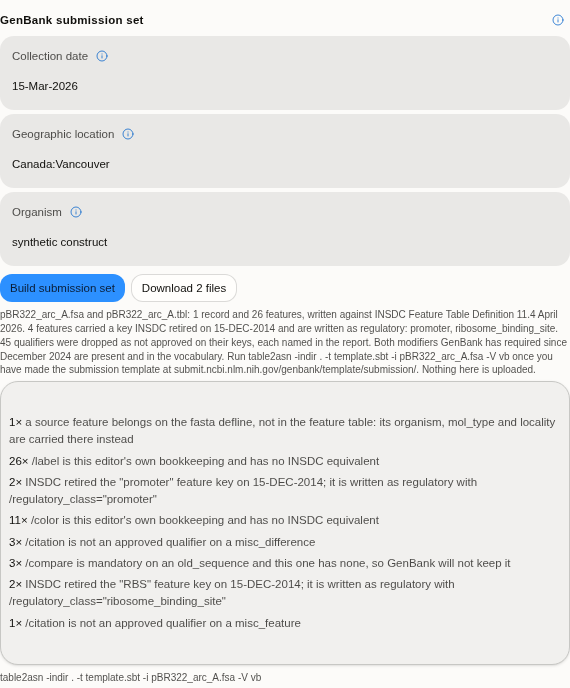 A 2,240 bp annotated pBR322 arc written as a submission set. The reading is generated from the run,
not from the form: 1 record and 26 features against Feature Table Definition 11.4, four features
migrated off keys INSDC retired in 2014, and every dropped qualifier counted by reason underneath.
The command at the bottom is the one to run next, and it names the template you still have to make.
A 2,240 bp annotated pBR322 arc written as a submission set. The reading is generated from the run,
not from the form: 1 record and 26 features against Feature Table Definition 11.4, four features
migrated off keys INSDC retired in 2014, and every dropped qualifier counted by reason underneath.
The command at the bottom is the one to run next, and it names the template you still have to make.
What the writer changes, and why it tells you
Annotation as a plasmid editor holds it is not annotation as GenBank accepts it, and the gap is silent unless someone names it. Three things happen, and each one is reported per feature:
| What | Why |
|---|---|
promoter, terminator, RBS and nine others become regulatory | INSDC retired twelve feature keys on 15 December 2014 in favour of a single regulatory key carrying a /regulatory_class. Almost every plasmid map still uses the old names, and a submission carrying one is refused |
| A qualifier not approved on its key is dropped, by name | The approved set is per key. Your editor's own bookkeeping — colours, labels, ApEinfo_* — has no INSDC equivalent at all, and is named as your editor's rather than as GenBank's objection |
A key GenBank does not have becomes misc_feature | The original key is kept in a /note, so nothing you drew is discarded — it is relabelled |
Two things are refused rather than rewritten, because any rewrite would assert something untrue: a feature that crosses the origin (a feature table is a flat coordinate list and has no notation for a circular join — rotate the record first), and a feature with no key at all.
Circularity, which is easy to lose here
A plasmid submitted without its topology stated is deposited as a linear molecule, and nothing
reports it. The set writes [topology=circular] from the record's own topology, so a circular
record stays circular through the converter.
What you do next
The panel gives you the two files and the exact command. It does not upload anything, and it
never will: table2asn runs on your machine, and the submission is yours to make.
It also does not write the third file table2asn wants — the submission template (.sbt),
which carries the author list and a contact email address. That is not ours to generate on your
behalf. NCBI publishes a form that produces it in a minute, at
submit.ncbi.nlm.nih.gov/genbank/template/submission/, and the command the panel shows names it.
Correctness
The writer is graded against NCBI's own table2asn, not against a reading of the specification:
every nucleotide record bundled with this application is written as a submission set, converted by
the real binary, and the annotations are read back out of the flat file it produces and compared
with what went in. The approved set of feature keys and qualifiers is compiled from the
DDBJ/ENA/GenBank Feature Table Definition (version 11.4, April 2026), and the location and
missing-value vocabularies from INSDC's published lists.
Depositing with ENA
The European Nucleotide Archive takes an annotated sequence through Webin-CLI, in its sequence context: an ENA flat file (gzipped) and a manifest naming your study, the submission's name and the file. Choose ENA in the Submission set section, give the accession of the study you registered in the Webin Portal and, if the record's own definition is not a good one, a description; then build.
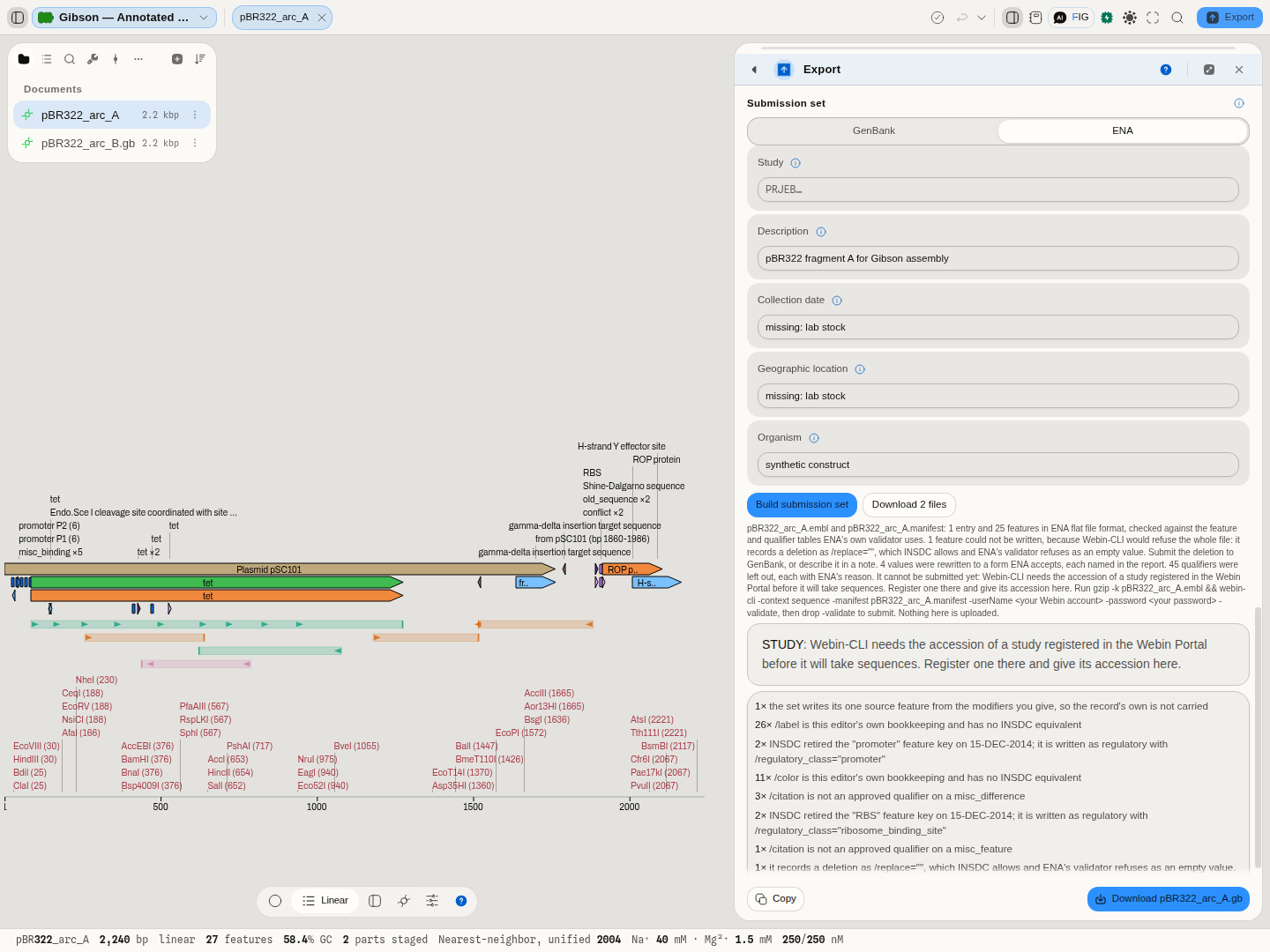
What the panel checks first. ENA refuses a description line shorter than 10 characters and an entry shorter than 100 bp, and Webin-CLI will not take sequences without a study. Each is reported before you run anything. The collection date and location are optional for ENA, but a value you give must still be legal.
What the writer changes. ENA's validator reads its own tables of which qualifiers each feature
key takes, which are mandatory, which may appear once and which take no quotes. The writer applies
those tables, so a feature Webin-CLI would refuse is left out and named rather than failing the whole
file: an unknown key, a key missing a qualifier ENA requires, two identical features on one location,
or a deletion written as /replace="" (which INSDC allows and ENA's validator refuses; submit that
one to GenBank). A double quote inside a value becomes an apostrophe, several notes on one feature
are joined into one, and qualifiers ENA writes itself (the translation, the locus tag, database
cross-references) are left for it.
Correctness. Every nucleotide record bundled with this application is written as an ENA set and run through ENA's own validator, the check Webin-CLI makes, and the file is read back with ENA's own reader: every feature comes back with the key, location and qualifiers that were written. Where a record still fails, it fails on its own data (a description that is only a full stop, a translation table that disagrees with the organism), and the panel says so first.
What you do next. Gzip the flat file and run the command the panel shows, with -validate first;
your Webin account and password are yours to type. Nothing is uploaded from here.
Depositing with Addgene
Addgene takes a deposit as its own spreadsheet plus the DNA, shipped to them. Choose Addgene and the panel fetches Addgene's current spreadsheet, then shows the questions it asks of every plasmid: purpose, citation, and each of its drop-downs (plasmid type, vector type, cloning method, resistance, marker, copy number, growth temperature and strain, hazards, patents), with Addgene's own help text beside them. Each plasmid in the record gets a row with its name and full sequence; your answers are written into every row.
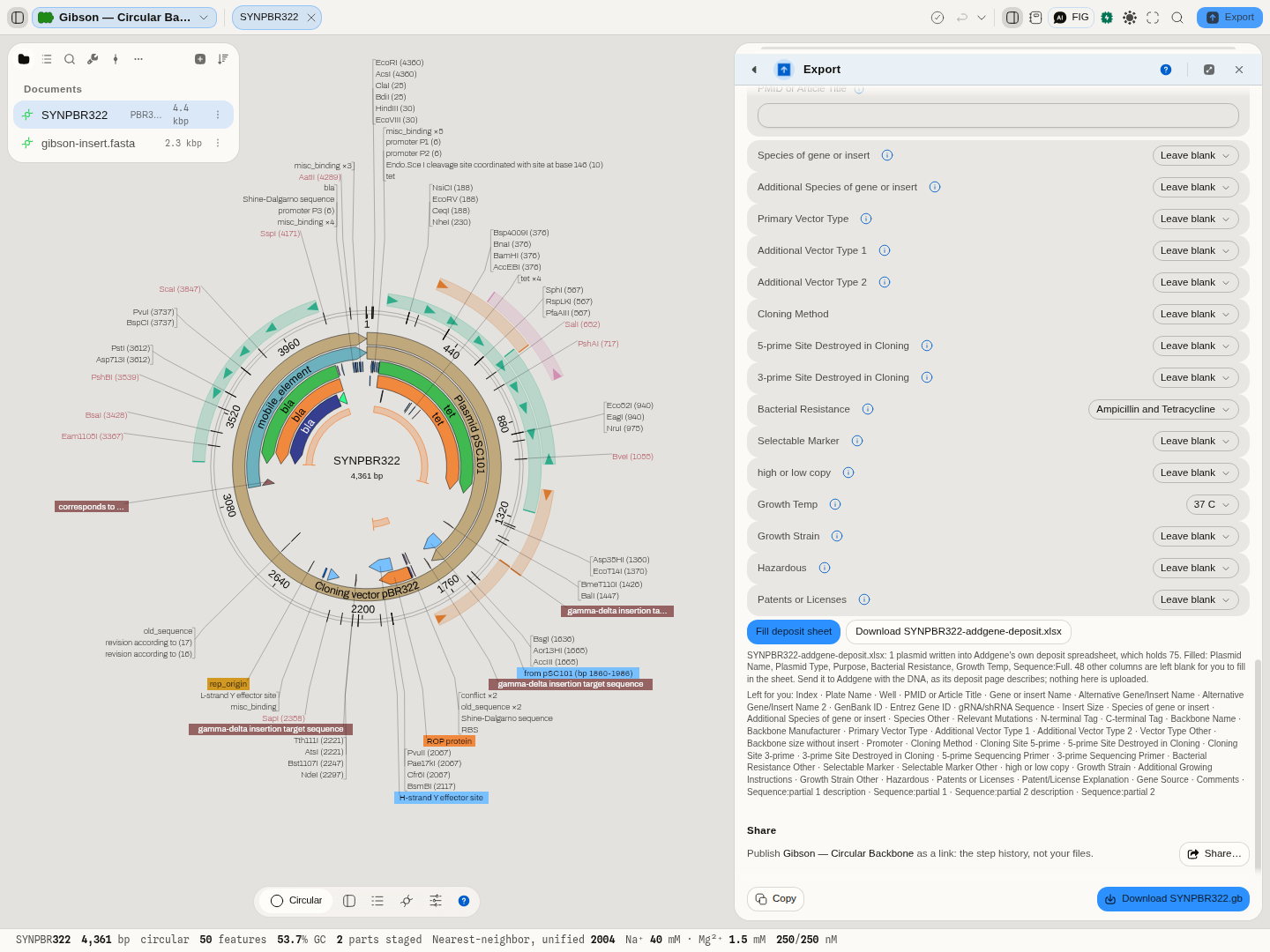
The questions are read from Addgene's file, not written into this application, so when Addgene changes its spreadsheet the panel follows. An answer the sheet would refuse (a choice not on its list, a purpose over its 200-character limit) is left out and named. The columns that differ per plasmid (insert name, tags, cloning sites, primers) are listed for you to fill in the sheet itself.
Demo
There is no screencast. Open any record and press Export: the format list is populated from what the tab actually is, which is most of what this page describes.
Worked example
Open the Feature files sample project and export the record as GenBank and BED together. GenBank comes back at its real size within a moment; BED reports that it is writing intervals only and the sequence will not be in the file. Both are selected, so the download is one zip.
Now switch to a trace tab and press Export again. The format list is different — the original trace file is offered untouched alongside FASTA — which is the polymorphism this panel is built around.
Controls
| Control | What it changes |
|---|---|
| Format checkboxes | which files get written. Selecting a format starts building it immediately |
| Multiple formats | more than one selected turns the download into a single zip |
| Figure size | the map figure's dimensions, which set how much room labels have |
| Figure title | the caption drawn on the figure |
| Transparent background | writes the figure with no background |
| Show labels / Show sites | whether feature names and restriction sites are drawn on the figure |
The footer arms only once the bytes exist. That is deliberate: a download button that is live before the file is built is a button that can hand you a partial file.
Algorithms you can choose
There is no algorithm to choose — a format is a specification and the writer implements it. What you are choosing is the trade-off, and that is what the panel makes explicit:
| You want | Write | You lose |
|---|---|---|
| everything, portable | GenBank, EMBL | nothing material |
| just bases | FASTA | annotations, topology |
| just intervals | GFF3, GTF, BED | the sequence |
| bases with quality | FASTQ | annotations |
| an alignment | CLUSTAL, NEXUS | anything not part of the alignment |
| a colleague's editor | SnapGene .dna | nothing material, but it is a vendor format |
The science
The one thing worth stating is coordinate conventions, because they differ between formats and an off-by-one here becomes an off-by-one in someone else's analysis. GFF and GTF are 1-based and inclusive of both ends. BED is 0-based with an exclusive end. GenBank is 1-based inclusive. The writers convert from the editor's internal convention into each format's own, so a feature exported to BED and re-imported comes back where it started.
Circularity is a property most interval formats have no way to express. An origin-spanning feature written to such a format must be split or truncated, and that is one of the losses the panel names before you download.
Limitations
- A format cannot carry what it has no field for. Everything under "you lose" above is a property of the format, not of this writer, and no option restores it.
- The figure is a snapshot. Change the construct afterwards and the exported figure does not change with it.
- Very large records take real time to build, and the panel shows the build phase rather than appearing to hang. A multi-format export of a large record builds each one.
- No compression options beyond the zip used for multi-format downloads.
- A deposit is a file, never an upload.
table2asn, Webin-CLI and the shipment to Addgene are yours to run; no account is asked for here. - Addgene's spreadsheet is fetched from Addgene each time, so that archive needs a network connection. It holds 75 plasmids; a longer list is cut at 75 and the panel says so.
- A spreadsheet cell holds 32,767 characters, so a plasmid longer than that is refused in the full-sequence column rather than cut; send Addgene the GenBank file instead.
Compared with other tools
The usual arrangement is a Save As dialog with one format at a time and no statement of what the format will lose. Two differences here: several formats at once, and the loss stated before the download rather than discovered when a collaborator asks why the annotations are missing. The cost is a busier panel than a file picker.
Export
This is the export surface. Files are written to your downloads; nothing leaves the browser on the way, so an export works with no network at all.
API
The writers are the same format modules the importers use, so a file written here and read back is handled by one implementation rather than two — which is what makes the round trip trustworthy rather than merely likely. Programmatic export is therefore reading the record and calling the format's writer directly.
Automation
Two related workflow nodes exist. export_map_svg writes the map figure, category record.
export_tree writes a phylogeny in its four formats. The three deposits are nodes too: build_genbank_submission, build_ena_submission and build_addgene_deposit. Record export inside a pipeline is
ordinarily implicit: a node that produces a record has it saved into the project as GenBank
automatically, so a pipeline's outputs are already files.
Provenance
Each format is written against its own published specification, and every writer is checked by round-tripping real files: a file read, written and read again must produce the same record. Where a vendor format is involved, the check is against files that vendor's software wrote.
Screenshots
No frame is committed for this surface yet. What one would show: a record leaving the editor as GenBank, FASTA or an image, with the format picker and what each one keeps.
The absence is stated rather than left as a blank heading: a picture that does not exist yet is worth knowing about, and a placeholder would be worse than either.
Related
Properties, for reading the record before you write it. The map image figure, which this panel also produces. File import, the other direction.