
Lab Notebook
Marked experimental: the surface can change.
The notebook sits in the same workbench as the constructs, so an entry can name the plasmid it was run on and that name is a link.
| Reached by | Tools → Lab Notebook (Experiments) |
| Formats | Markdown out |
| Sample project | Lab notebook |
What it does
It is a lab notebook that lives inside the workbench, so an entry can name the things it was about and those names are links. You write an experiment in Markdown, tag it, file it in a collection, and paste in the images you photographed at the bench. What makes it different from a document in another app is that a plasmid, a gel or a construction step written in an entry is a reference: click it and the thing itself opens.
Entries belong to the project they were written in, and the search box, the tag filter and the collections are how you find one again months later.
When you’d use this
- You are running an experiment on a construct that is open in front of you. Write it up here rather than in a separate document, and the write-up keeps its links to the construct, the gel you ran and the assembly step that made it.
- You are coming back to work you did months ago. The entry names the plasmid; the plasmid is one click away; the gel you ran on it is another. A document in another app names them in prose and leaves you to find them.
- You are handing work to someone else. Export the entry as Markdown and it reads as an ordinary protocol anywhere; keep it here and the references stay live.
If what you want is the machine-recorded history of how a construct was built, that is a different
tool: History & Provenance reads the construction steps the software
recorded, without you writing anything. The notebook is for what you did and why, which no software
can record for you. They complement each other, and the ! reference below is the join between them.
What this computes
Nothing scientific — this is a record. What it does compute is the resolution of references, and that is where its accuracy lives:
- which of the three reference kinds a token is —
@a construct,&a gel,!a construction step — extracted from the body live as you type - what each one resolves to, by one rule shared across all three: an exact id first, then the name with capitals and punctuation ignored
- whether it resolves at all. A reference that matches nothing is not left as a dead chip: the destination opens and says what the project does have
- which step an
!actionmeans when the token is ambiguous — the product it made beats the kind of step it was, and a kind resolves to the most recent step of that kind - the tag set and the collections across your entries, which is what the filter and the grouping are built from, and free-text search over titles, bodies and tags
- who wrote it, when the answer is "a run did." An entry written by a workflow or by the
assistant carries the tag
automated, shown on its row in the list and filterable like any other tag. It is the one thing a reader cannot recover from the text: a write-up you typed and one a pipeline left behind read the same, and they are not the same evidence
Images pasted into a body are stored with the project rather than linked to a path on your disk, so an entry with figures survives the file being moved.
It also formats citations. [cite: doi:10.1038/nmeth.1618; pmid:21850730] cites papers by DOI,
PubMed id or PMC id, and the entry computes:
- each paper's bibliographic record, from the authority that registered its identifier: the DOI's registration agency (Crossref, DataCite) for a DOI, NCBI's Literature Citation Exporter for a PubMed or PMC id. Nothing is assembled from search results. The record is kept with the notebook, so an entry still formats offline and carries its references when exported
- the in-text citations and the reference list, written by a CSL citation processor in the
chosen style: APA 7th edition, NLM/Vancouver or Harvard (Cite Them Right). A numbered style
numbers each paper by where it is first cited, so
(1)is always the first paper the text cites - what could not be formatted, named rather than dropped: a paper still being fetched, one the authority refused (with its reason), and text that is not a DOI, PubMed id or PMC id
Where it lives
Tools → Lab Notebook (Experiments), in the right rail. It does not need a construct open — an entry can be about anything — but references resolve against the project you are in.
Inputs and outputs
In: what you type. Markdown for the body, a title, tags, an optional collection, and images pasted straight from the clipboard — and any reading the workbench has just produced. Every panel and canvas that reports a result draws it in a block headed Reading; the note icon on that block files it here as a new entry, titled after the tool that produced it and tagged with the same name. What lands in the entry is what the run concluded, the caveats that run earned, and the derivation behind them, closed by a line naming the tool, the project and the time — so a reading you kept in March still says what it was about. Nothing is summarised on the way in: a run that produced no caveats writes no caveats section rather than an empty one.
A workflow or the assistant can write an entry too, or add to one you name, with the same
cross-references extracted from its body as if you had typed it; those arrive tagged automated.
Nothing else can be done to your notebook from a run: an entry is never deleted, duplicated or
overwritten from outside, and an addition is appended to what is already there.
Out: the entry, exported as a Markdown file that reads correctly in any editor.
What it refuses, and says so: a reference that matches nothing does not fail quietly. Click a
&gel that names no saved gel and the panel opens the Gel Bench and tells you which gels the project
does have, so a typo is something you can fix rather than a link that does nothing. The same for an
!action on a project where nothing has been built yet.
Demo
There is no screencast on this page. The Lab notebook starter is the demo: it opens with a real entry containing one of each reference kind, which is what the worked example below drives.
Worked example
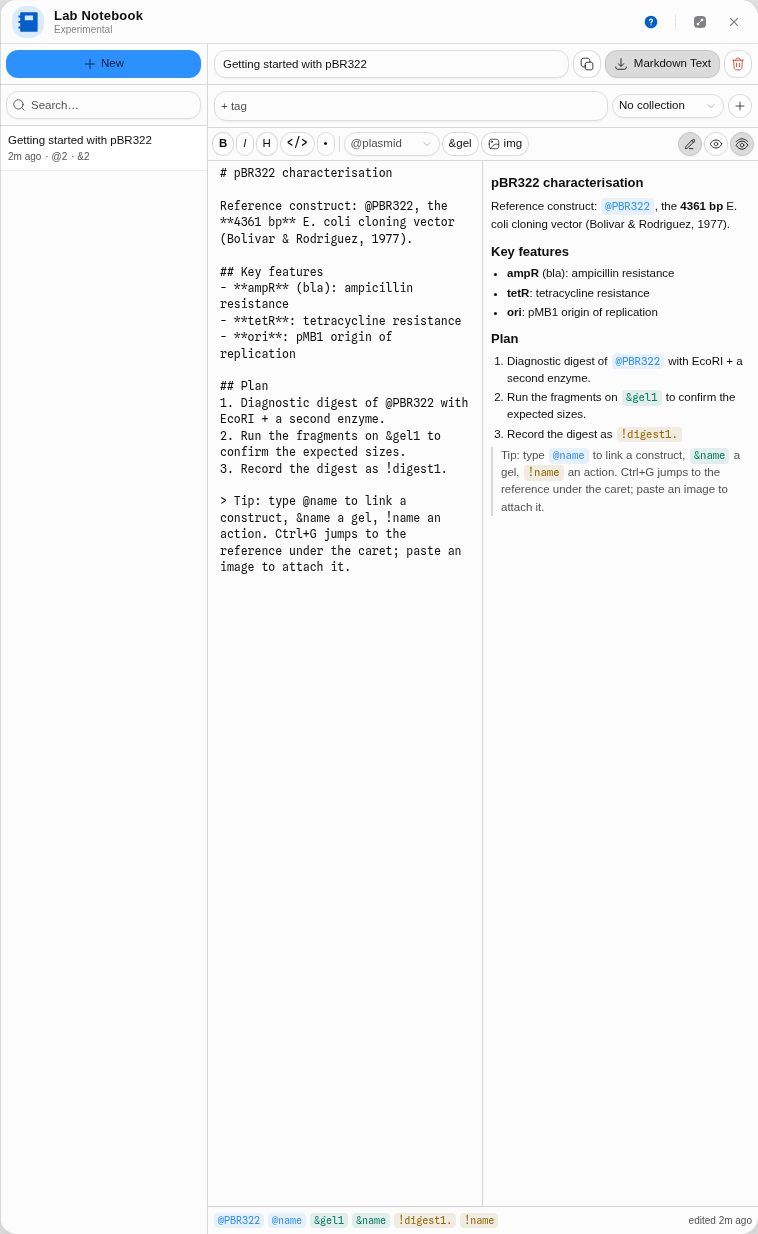
Open the Lab notebook starter. Its entry is a real characterisation plan for pBR322 and it contains one of each reference kind.
1. Read the entry in preview. The three references are chips: @PBR322 names the construct,
&gel1 a gel, !digest1 the digest step. The editor is a split view, so the Markdown you type and
the rendering sit side by side.
2. Click &gel1 before you have run anything. The Gel Bench opens and the panel says the project
has no saved gels yet, so nothing matches. That is the honest answer, and it tells you what to do
next.
3. Make the gel it is talking about. In the Gel Bench, Load open plasmid as a lane, name it
gel1, and save.
4. Click &gel1 again. The bench loads that gel: the lane you saved, its ladder, its settings.
The note now refers to something.
Controls
- Entries list — with free-text search over titles, bodies and tags, a tag filter, and collections.
- Title, tags, collection — per entry. A collection groups entries the way a project folder would.
- Collection — which collection a new entry is filed in, or none.
- Markdown ⇄ preview ⇄ split — the body editor. Formatting buttons for bold, italic, headings, code and lists, and insert buttons for each reference kind.
- Insert image — or paste one from the clipboard. Images are stored with the project, not linked to a file on your disk that will move.
- Ctrl+G — jump to the reference under the caret, without leaving the keyboard.
- Cite — find a paper by DOI, PubMed id or PMC id, or search PubMed by words, and write its citation at the caret.
- Citation style — under the preview's References, switches every citation in the entry between APA, Vancouver and Harvard, in the preview and in the export.
- Export — the entry as Markdown, with citations formatted and the reference list appended.
Cross-references
Three sigils, one convention:
| you write | it means | clicking it |
|---|---|---|
@name | a construct | opens that project |
&name | a gel | loads that saved gel into the Gel Bench |
!name | a construction step | opens History & Provenance on that step |
All three resolve the same way, so there is one rule to learn: an exact id first, then the name with
capitals and punctuation ignored. &Digest 3, &digest3 and &DIGEST-3 all find the gel you named
Digest 3.
An !action may name either the product a step made (!pUC19_gibson) or the kind of step it
was (!gibsonAssembly). The product wins, because it is the specific one; naming a kind gives you the
most recent step of that kind, which is what a note written today is about.
A reference that ends a sentence keeps its full stop — !digest1. — because the notation is
SpliceCraft's and that is what it does there, so a note written in either place means the same thing
in both. It resolves correctly regardless; the stop is ignored when matching.
Algorithms you can choose
None. There is one resolution rule and it is deliberately not configurable: a notebook where two people's references resolve differently is a notebook whose links cannot be trusted. The one place a choice would be tempting — fuzzy matching on names — is exactly where it would be wrong, because a chip is a promise that the thing on the other end is the thing you meant.
The science
There is no science in the notebook itself. What it is built to protect is the provenance chain.
An experimental record is only useful later if it says which material it was about, and a name typed
into a document decays: the plasmid gets renamed, the file moves, and a reader in two years cannot
tell which pET28a-derivative was meant. A reference that resolves against the real project is a
name that can still be followed.
That is also why the resolution rule is exact id first, then a forgiving name match. The id is
stable and the name is what a person actually types; taking the id first means a renamed construct
keeps its old references working, and the forgiving second pass means &Digest 3 and &digest3
are the same gel.
Compared with other tools
The comparison that matters is with a dedicated electronic lab notebook, and the honest summary is that a dedicated ELN does the compliance half — audit trails, witnessing, retention, signatures — and this does not. What this has instead is proximity: it is in the same window as the constructs, and its references point at them rather than naming them in prose. If your requirement is a regulated record, use a compliant ELN. If it is remembering what you did and why, next to the thing you did it to, this is closer to hand.
Limitations
- Entries belong to one project. There is no cross-project notebook view, so an experiment spanning two projects has to be written in one of them.
- References resolve within the current project. A
&gelnaming a gel saved in another project will not find it. - No timeline view. Entries sort by most recently edited; there is no chronological lab-book view of a project’s whole history yet.
- Markdown export is one entry at a time. The whole notebook (every entry, its collections, images and cited papers) exports and imports as one file, which reads back into this notebook rather than into another editor.
- A DOI containing
;or,(some older DOIs do) cannot be cited, because those characters separate the papers in one citation.
Export
An entry exports as a Markdown file. References are written in their sigil form, so the exported text reads naturally elsewhere and still round-trips if it comes back. Citations are the exception: they are written out in the chosen style with a References section, because a reader elsewhere has no way to resolve a DOI key.
API
The reference grammar is the notebook's own, and it is shared with the rest of the workbench rather than reimplemented per surface — which is what lets a reference written in an entry resolve the same way everywhere else. Beyond that there is nothing to call: entries are content, not computation.
Automation
There is no workflow node that writes notebook entries, and that is a decision rather than a gap: an
entry generated by a pipeline is not a record of what a person did, which is the only thing a
notebook is for. Pipelines record themselves — History & Provenance is
where that lives, and the ! reference is the join between the two.
Provenance
The reference notation follows SpliceCraft's grammar, so an entry written against either tool means the same thing in both — including the detail that a reference ending a sentence keeps its full stop.
Screenshots
The frame in the worked example above is this surface's capture: the split editor with all three reference kinds as chips. No second frame is carried here, because the panel's other states — an unresolved reference, the Gel Bench it opens — are the destination's surfaces rather than this one.
Related
In this group: Workflow Builder · History · Export · Export Image
Feeds it: anything you do at the bench. The Gel Bench and History & Provenance are the two tools a reference can point at.