
History & Provenance
Marked experimental: the surface can change.
Recover how a construct was actually made — every step, every reagent, in the order they happened — from the file itself.
| Reached by | Tools → History & Provenance |
| Formats | SnapGene .dna · QUEEN GenBank · SBOL 2/3 · OpenCloning strategy · builds made in this browser |
| Sample project | History & provenance |
What it does
A plasmid file is usually a dead end: it tells you the sequence you have and nothing about how it came to exist. Which vector was cut, with what, and joined to which amplicon? Which primer pair produced that fragment? Was this the construct that came out of the third attempt or the first?
Some files carry that record, and this panel reads it. It answers one question — how was this molecule made, and can I reproduce it? — from five real sources, and it always names which one it is reading, because a provenance claim whose origin is unstated is not a provenance claim.
| Where the record comes from | What it carries |
|---|---|
| A build you made here | The operation, its inputs, the product, size and topology, the enzymes, the oligo sequences, and the project each input came from |
A SnapGene .dna file | The reaction graph embedded in the binary: reaction types, nested inputs, fragment sizes, enzymes |
| A QUEEN-authored GenBank | The complete construction script — every operation with its arguments, its process identifier, and the author's own description of the method |
| An OpenCloning strategy | The interchange document, read back into the reactions it describes |
| An SBOL 2 or SBOL 3 document | Every activity that made a molecule, the molecules it consumed, the role each one played, and — when the author recorded them — who ran it and when |
The QUEEN one is the deepest, and the one most people have never seen: a QUEEN GenBank is a self-contained provenance document. The software writes one qualifier per recorded operation into the record itself, so the file you are handed is also the script that built it.
When you'd use this
Used in: Clone an insert into a vector, and prove it worked
- A colleague sends you a plasmid and you need the method before you can repeat, extend or publish it. Open it, read the Protocol tab, order the oligos it lists.
- You are writing the methods section and need the steps in the order they happened, with the enzymes and the primer sequences, rather than reconstructed from memory six months later.
- You are auditing a construct — a result depends on it and you want to know what it was built from, and what those were built from.
- You built something here across PCR, Gibson or Golden Gate and want the lineage of the thing you ended up with, including which project each part came from.
What this computes
Nothing here is inferred. The panel reads a construction history that is already in the file, or one this workbench recorded as you worked, and reports what it says — it writes nothing it does not know, so a step whose intermediate size was never recorded gets no size, and a reaction with no recorded enzyme gets no enzyme field, rather than a zero or an empty list that would read as a measurement.
Per construct
- The source of the history, named — QUEEN history, SnapGene history, SBOL record, OpenCloning strategy, or this workbench's own log — as a badge, because the five carry different detail and you should be able to tell them apart
- Four counters: recorded steps, distinct starting inputs, lineage depth (how many builds deep the construct is, so built on builds is visible rather than implied), and the product's size with its topology
- Topology carried through the operation that produced it: an amplicon is linear whether or not its template was circular, and an optimised sequence keeps the topology of what it was optimised from — both recorded rather than assumed
Per build
- The references the build cites: the published method per step, and the implementation a step run in this workbench reproduces, each with the step numbers it supports, in the Methods export
- The process-flow graph, left to right from starting molecules through each recorded operation to the product, every node carrying its full name
- The build as named processes — the same record read as what was DONE rather than as what came from what: every recorded operation grouped under the process name its author gave it (PCR, Gibson Assembly), in the order they ran, each one naming what it consumed, what it produced and the arguments it was called with. Where the software that wrote the file cannot itself draw a particular build, the panel says so and names the reason instead of showing an empty picture
- Where a step's bases ended up, for a record that says so: a crop's window projected from the molecule it was measured on onto the construct you have open, drawn on the circular, linear and sequence views at once. A window that spans the origin of a circular join is drawn as the two pieces it really is, and a staggered cut is read as the top/bottom strand pair it records
- The step list and the lineage, and a protocol view that lists each step with its reagents — a PCR step names its primers and their sequences underneath
- A comparison view between a construct and what it was built from
The reading, written from the record rather than about it
Above every tab the panel states what it found, in one sentence built from this decode — how many operations were recorded, over how many rounds, from how many starting materials, what the build cut with if it cut, and which of the five records the answer came out of. Nothing in it is a fixed sentence: a single-round build says nothing about rounds, a build that used no enzyme names none, and a record with no starting material says from no recorded input rather than claiming one.
Under it sit only the cautions this history earned, each naming what it is about. There are ten, and they mean two different things, which is why they are coloured differently:
| Caution | When it appears |
|---|---|
| The decoder stopped following a step | The file records an operation the reader does not model. The history shown is real and shorter than the file's |
| A reaction produced fewer products than the naive enumeration | A step filtered a product the reaction could not have made. Not a loss |
| This is not the document you have open | The file in front of you records no build, so the panel answered about another file in the project, and names both |
| Intermediate sizes are not recorded | A QUEEN history stores processes rather than molecules, so only the finished construct has a known length |
| This log covers what the editor did | A build recorded here is the workbench's own record. A step taken at the bench is not in it, and its absence is not evidence |
| Part of this chain came from a parent file | Steps inherited from an imported parent reach the exported file but cannot be drawn on this tree |
| This construct was built on other builds | The longest path from a starting material to the finished plasmid is more than one operation, so the build has a route rather than a single step. It says how long that path is, and says it is a fact about the route rather than a verdict on the plasmid |
| Sizes and topology are not recorded | An SBOL construction record names activities and the molecules they consumed. It carries no sequence length and no topology, so neither is shown |
| Input roles are shown as the document wrote them | An SBOL activity can tag each consumed molecule with a role from an ontology. The term is shown exactly as written and never translated |
| This is an SBOL 3 document, and the reader is ungraded on SBOL 3 | The reference implementation this reader is checked against covers SBOL 2 and refuses SBOL 3, so no independent reading has confirmed this one |
The amber ones mean the record you are reading is incomplete, is about something else, or has not been independently checked. The neutral ones mean this is how this kind of record works — a QUEEN history without intermediate sizes, or an SBOL record without a topology, is the format behaving correctly, and colouring it as a problem would be a warning with no cause.
Why a role is never translated. It would be easy to render an input tagged
SO:0001631 as "upstream", and it would be wrong: that term is upstream_gene_variant, a
variant-consequence term, and the published SBOL examples use it to mean the upstream piece of a
join. The panel therefore shows the term the author wrote and leaves the reading to you, because a
role means whatever the document's author meant by it.
Nothing here grades the build. There is no deep histories are risky band on a depth, because where such a band would sit depends on the polymerase, the insert and what was sequenced afterwards. Depth is stated with what it counts and you decide what it means.
Behind a fold, the chain the answer came down: this history ← decoder ← read from ← graded against. The last link names the authority the reader was validated against, and it is deliberately absent for a build recorded here: that record has no oracle behind it, and a fourth link claiming one would be provenance-shaped and empty.
What it exports: the history as a portable GenBank another tool can read. One limit is stated at the moment you export rather than discovered later: a construct carrying no annotation other than its own history loses that history when reopened, because the convention the format follows discards the history record along with an otherwise-empty feature list. Annotate anything at all — one feature is enough — and it survives.
Where it lives
Tools → History & Provenance, in the right rail; the command palette (⌘K) finds it by name. It is read-only and it follows the active document: whichever file is in the front tab is the one whose history you are looking at. Switch tabs and the panel switches with you.
The graph also opens as its own canvas tab. A lineage is a picture with a shape rather than a reading order, and a real build outgrows a side panel quickly: the four-round example below draws 1,372 px of graph, which a 454 px rail turns into a threefold sideways scroll. On the stage it pans, zooms and fits, and the whole shape is visible at once. The tab and the panel draw the same lineage — pick a molecule on either and it is selected on both, with the step list filtering to the operations that touch it.
If the document you have open records no build, the panel falls back to the project. Most files carry no history — that is the normal state of a GenBank — so a project opened on one would otherwise show nothing at all while a construct sitting beside it has a full build record. When that happens the panel says so first: it names the file you opened, names the file the history is actually from, and leaves you the choice of opening that file or reading what you have as the project's history rather than this document's. The numbers, the graph and the protocol are all about the file it names, never about the one you opened.
Nothing you do here changes the sequence, and nothing is drawn on the map — see Limitations for why that is deliberate rather than missing.
Inputs and outputs
It accepts whatever is open: a SnapGene .dna, a GenBank written by QUEEN, an SBOL 2/3
document, an OpenCloning strategy, or a project you built here. It reads them in that order of specificity — the active document first, resolved
completely; only if that file carries no history does it fall back to another file in the project,
and that fallback is ordered by name so two people opening the same project see the same thing.
It produces a lineage graph, a step list, an indented lineage tree, a numbered protocol, and seven exports (Markdown · CSV · JSON · GenBank carrying its own history · SBOL 2 · OpenCloning · a rebuild script).
What it refuses, and says so: a project with no history at all gets a stated empty state naming every source rather than a blank panel; a file whose history exists but cannot be resolved still lists every step it could read and reports the rest as warnings rather than dropping them silently. A plain FASTA has no history to read and is not an error — it is a record that never carried one.
Demo
No screencast exists. The frames in the tutorial below are stills of the real panel on the starter project's own files; nothing here is a mock-up.
Tutorial — read a real build, end to end
Open the History & provenance starter from the lobby (Start a project → Samples → History & Provenance). It carries six real build histories: three SnapGene source graphs and three QUEEN GenBanks, including a 76-step Golden Gate assembly.
1. Open the construct and read the badge
Click pCMV-Target-AID.gbk in the file list. The panel header names the file, the badge names the
source — here QUEEN history — and four counters summarise the build.
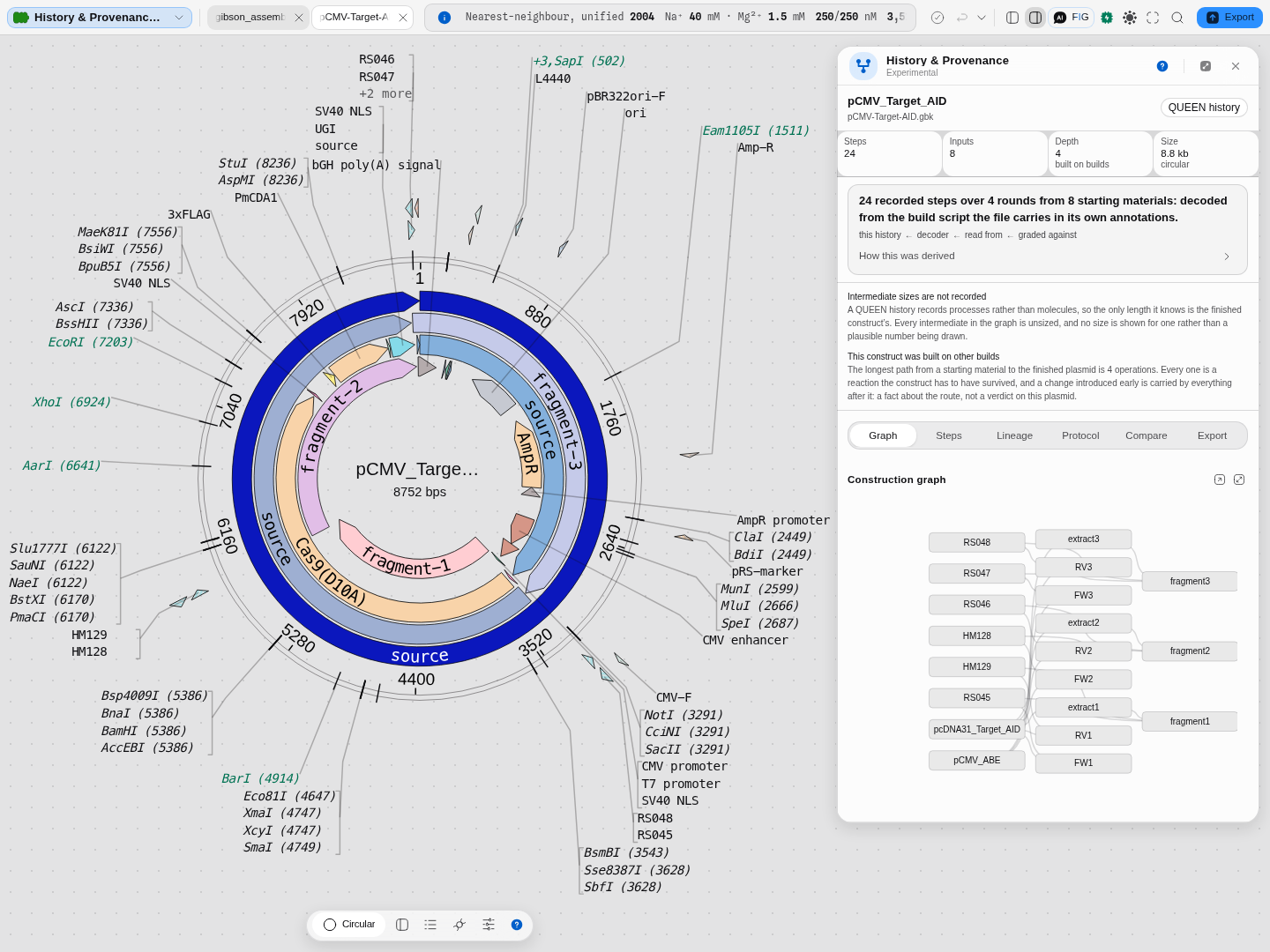
pCMV-Target-AID.gbk: 24 recorded operations from 8 starting molecules, depth 4, an
8.8 kb circular product. The graph reads left to right — primers and templates on the left, through
the extraction and PCR steps and the three fragments, to the final construct. A build this deep is
wider than the panel, so the graph scrolls sideways: the frame holds the inputs, the three
extractions and the three fragments, and the assembled product is one scroll to the right. Every
node carries its full name rather than a truncated one, which is the point of reading a lineage at
all: pcDNA31_Target_AID is a different claim from pcDNA31_Target_A….
The same reading on a SnapGene-sourced file. The starter's other three histories come from
SnapGene rather than QUEEN, and they are shallower by nature — SnapGene records the constructs a
build consumed, where QUEEN records the operations that produced it. Click gibson_assembly.dna and
the badge changes to SnapGene history:
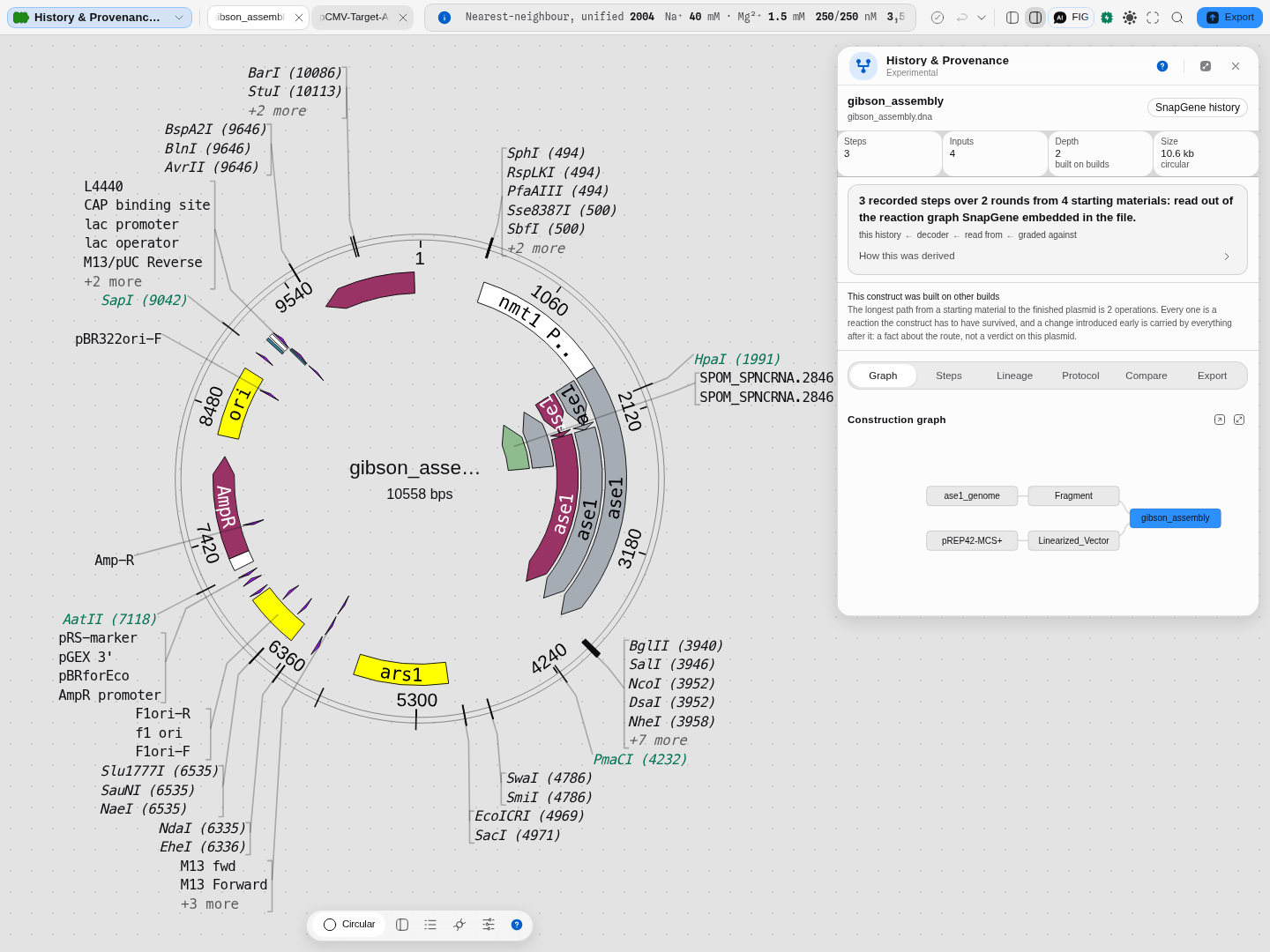
gibson_assembly.dna: 3 steps from 4 inputs, depth 2, 10.6 kb circular. Read it the
same way — the two starting molecules on the left each become an intermediate (a fragment, a
linearised vector), and both feed the assembled product. A depth of 2 is not a poorer record than
depth 4; it is a two-stage build, and the graph says so.
Each counter says what it counts, on hover, because "steps" means something different per source:
| Counter | What it actually means |
|---|---|
| Steps | Recorded operations after de-duplication. A reagent reused across steps is counted once |
| Inputs | Molecules the history starts from — nothing recorded produced them |
| Depth | The longest chain from an input to the final construct. Depth > 1 is marked built on builds |
| Size | The final construct, and whether it is circular. A QUEEN history records processes rather than the size of each intermediate, so this is the one length that is known |
If the construct was cut, the enzymes appear as chips under the header — a Type-IIS assembly's enzyme is the first thing a cloning scientist looks for.
2. Follow the graph, and use it to filter
The graph is a real process-flow DAG, not a decoration. Click any node and the Steps list
narrows to the operations that touch it — the step that produced it and the steps that consumed it.
On this file, selecting extract1 narrows 24 steps to 2. A chip above the tab strip names the
selected node in full, which also solves the long-name problem: the graph truncates a label only if
it must, and the chip always shows it whole.
A deep history draws wider than the panel. Scroll the graph sideways — it grows to fit the longest name rather than squeezing every box until the labels clip. Widen or detach the panel if you would rather see it all at once.
3. Read a step at full granularity
Open any step in the Steps tab. It expands to everything its source actually knows:
- the author's description of what the step was for;
- what it consumes and what it produces, by resolved name;
- the software's own
infofield for that operation (positions, topology, start/end); - the parsed arguments, in the order they were recorded;
- the process id, and any earlier ids it was derived from;
- the raw command, exactly as recorded;
- the abstract — the same command with every molecule variable replaced by a placeholder.
The last two are the pair worth understanding. The raw command is this run; the abstract is the procedure independent of what it was run on. Two constructs built by the same protocol on different molecules share an abstract and differ in their raw commands — which is why it is also half of what the process id is computed from.
3b. Read a build that is too big to read
The starter's other QUEEN files are three, fifteen and twenty-four steps. golden_gate_construct.gbk
is 76, assembled from 25 starting molecules with a single Type IIS enzyme, and it is the one
worth opening because it shows both what a construction record is for and where reading one gets
hard.
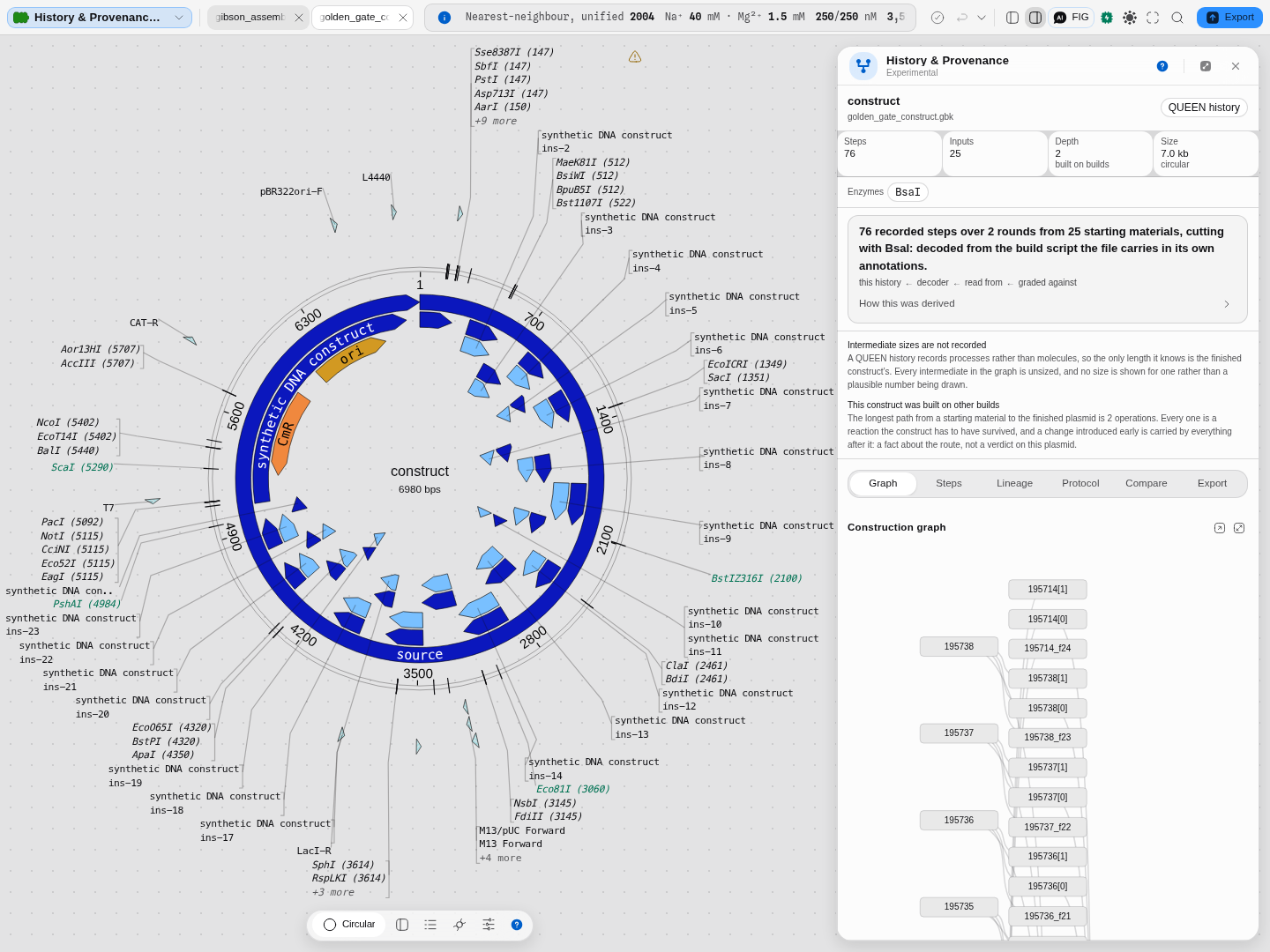
golden_gate_construct.gbk: 76 recorded operations from 25 starting materials, depth 2,
7.0 kb circular, and the enzyme chip reads BsaI. The reading above the tabs is generated from this
decode, so it names the enzyme here and does not on a build that cut with nothing. Depth 2 on 76 steps
is the shape of a one-pot assembly: everything is prepared in parallel and joined once, which is what
Golden Gate is for and what a step count alone would hide.
The graph is honest about being dense. In the side panel those 76 operations are a single tall
column, and the node names are the identifiers QUEEN recorded (195714[1], 195738_f23) rather than
anything a person chose — because on this file nobody named the intermediates. Open it as a canvas
tab to pan and zoom the whole shape; what neither view does is summarise a level, so a build this
wide is still read one product at a time.
Which is what the filter is for. In the Steps tab, type the enzyme:
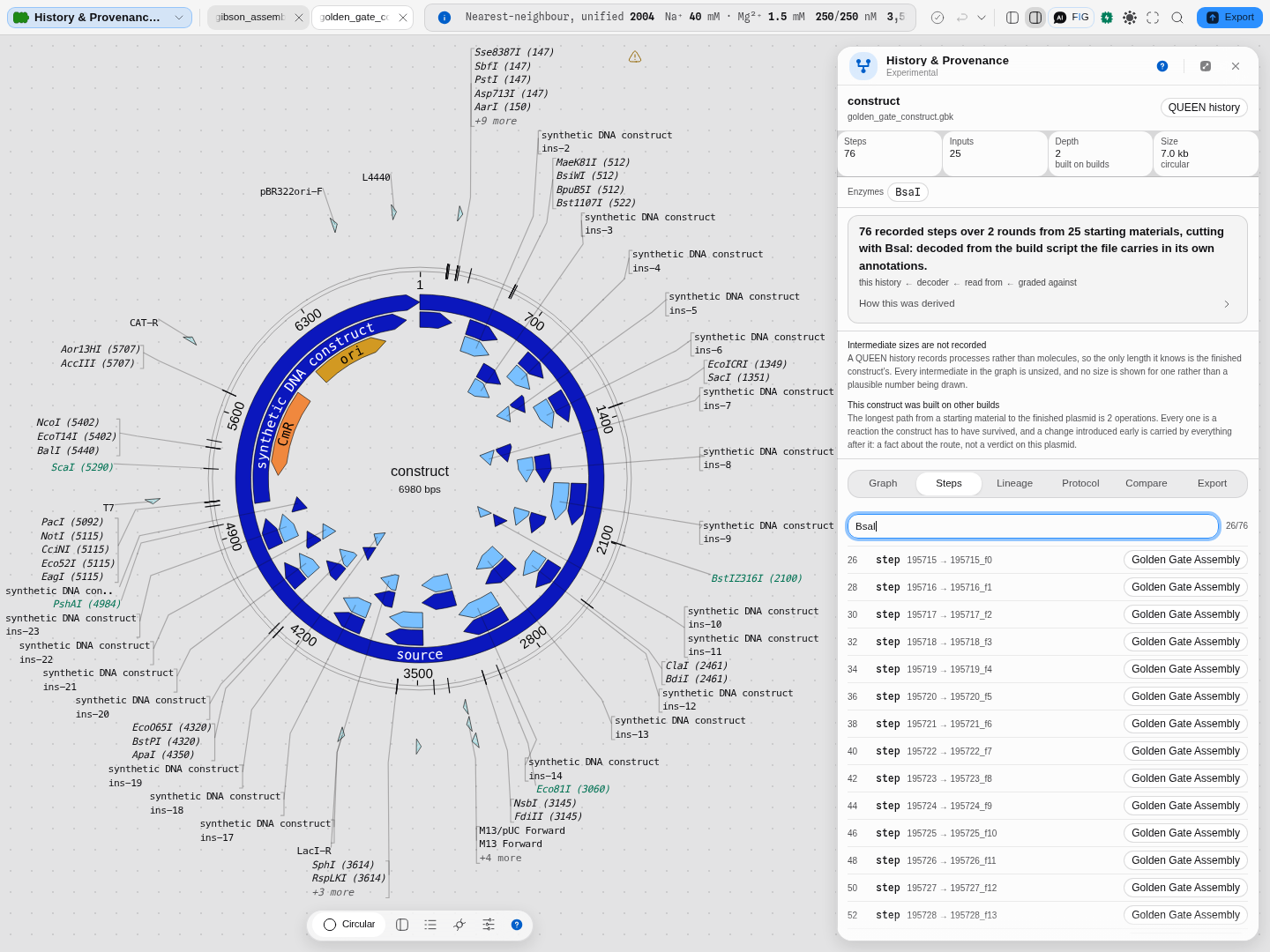
BsaI narrows 76 steps to 26, and the count beside the box reads 26/76 — the fraction, never
a bare number, because 26 means nothing without what it is out of. Those 26 are 25 cuts and one join:
the other 50 operations load a part or modify its ends and name no enzyme at all. Each narrowed row
carries the author's own process name, Golden Gate Assembly, which is how a recorded history
answers "what was this step part of" without anyone annotating it afterwards.
Try cropdna on this file and you get 0/76 with No step matches that filter — the correct answer,
because a crop is a PCR-shaped operation and this build has none. An empty list with no denominator
would have looked like a broken panel.
The graph selection and the text filter compose: pick a molecule, then type within it. Both reach the assistant and a workflow with the same names, so the question you can ask on screen is the question a pipeline can ask.
4. Ask whether two constructs were built the same way
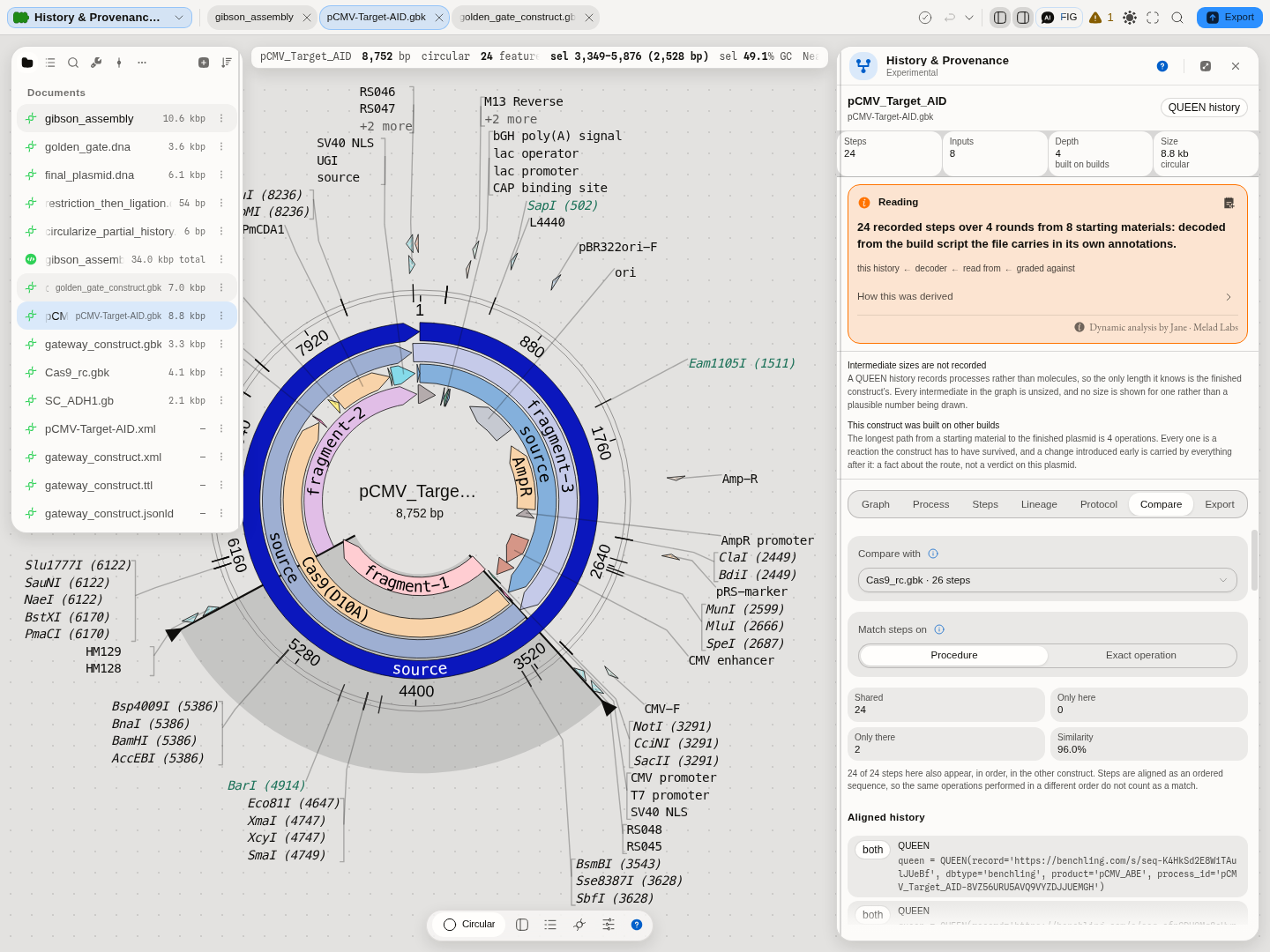
The Compare tab answers the question the abstract exists for. Pick another QUEEN-authored construct in the project and the two construction scripts are aligned in order, step against step, and you get four numbers plus the aligned history itself: how many steps both builds share, how many are unique to each, and a similarity percentage.
Choose what "the same step" means, because it is two different questions:
- Procedure matches on the abstract — the operation with its molecules abstracted away. The same method applied to different DNA still matches. This is the one you want when asking did we follow the same protocol?
- Exact operation matches on the process id, which is identical only when the very same operation ran on the very same molecules. This is the one you want when asking is this literally the same build, or a re-recording of it?
The alignment is a sequence alignment, not a set comparison: two builds using the same operations in a different order are different builds, and the tab says so rather than reporting them identical.
Run it on the starter project. With pCMV-Target-AID.gbk open, compare it with Cas9_rc.gbk — the
same construction with one further recorded operation, the product reverse-complemented — and you
get 24 shared, 0 only here, 2 only there, 96.0%: every step of the parent appears, in order,
inside the derivative. Compare it with either of the other two constructs and you get 0%, which
is the correct answer for two unrelated builds and the reason a similarity number is worth reading
at all.
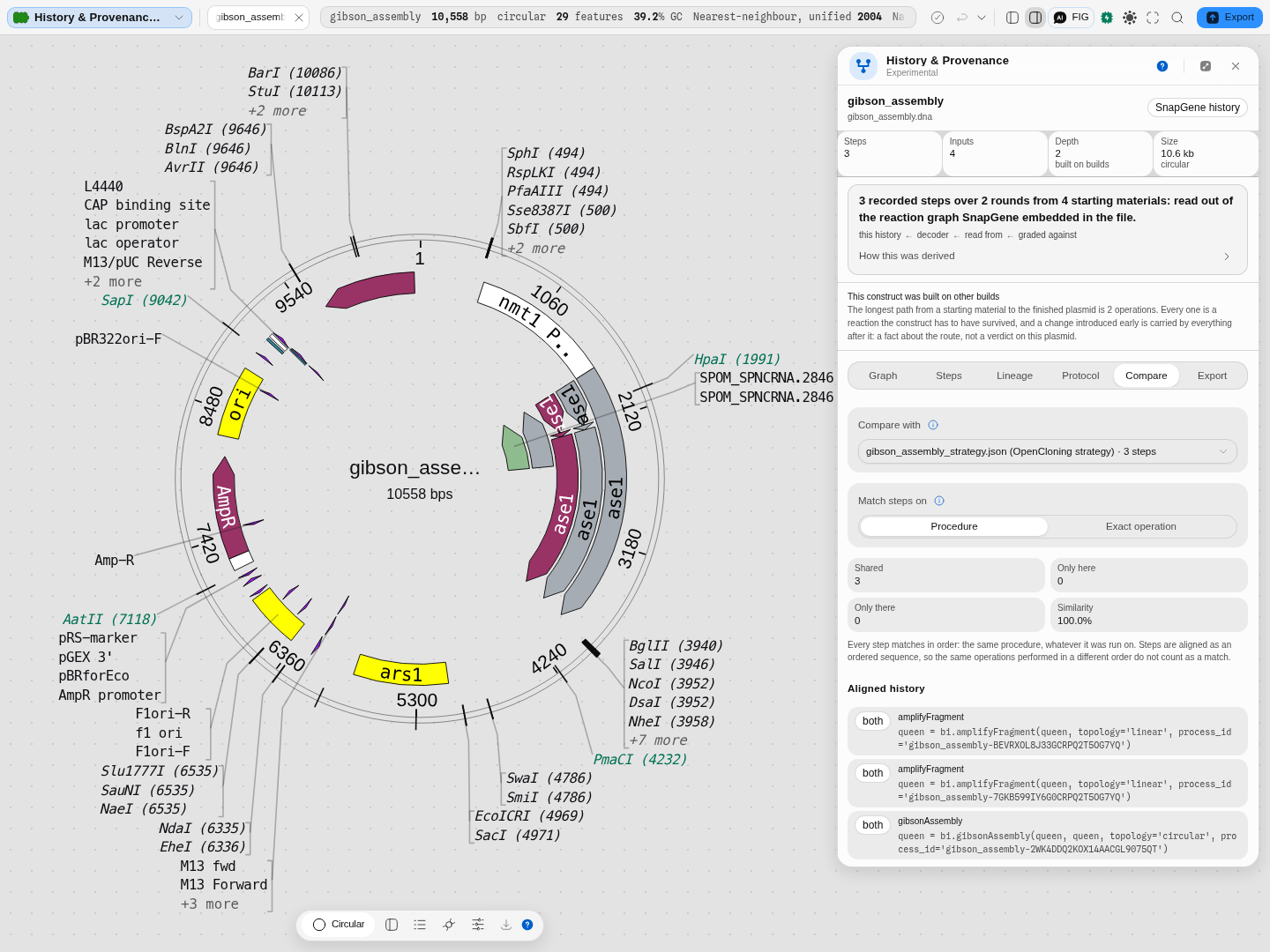
It compares across formats, which is the case that matters in practice. A build you received as
a vendor binary and the same build someone sent you as an open strategy document are the same
science in two containers, and the tab now aligns them: every recorded reaction is written out as a
step whose identity is derived from the reaction type and the parameters it ran with, so two files
describing the same procedure produce the same key whatever they arrived in. On the starter, open
gibson_assembly.dna and compare it with gibson_assembly_strategy.json — the same Gibson of two
PCR products, one as a SnapGene file and one as an OpenCloning strategy — and you get 3 shared, 0
only here, 0 only there, 100.0%. Compare it with golden_gate.dna and you get 0.0%, because
that really is a different build.
The identity is derived, never assigned: it is a hash of the recorded operation with its inputs and its arguments, which is the same rule QUEEN uses for its own process ids. That is what lets the comparison mean something — two steps match because they describe the same reaction, not because something labelled them the same. The one construct with nothing to align is one with no recorded build at all, and the tab says so rather than showing an empty result.
5. Get the method out
The Protocol tab is the bench view: the author's own method descriptions first, de-duplicated (a description that belongs to a process is recorded on every step of it, and printing it per step reads as several different methods), then the numbered steps. Where a build carries oligos, the real primer sequences appear as step reagents — a protocol you cannot order from is not a protocol.
The notes you write on a recorded step in the Protocol sheet, and the steps you remove from it, travel with the protocol: Copy, Text, Markdown and PDF put each note under its step and leave a removed step out, with a closing line naming it, because the recorded history itself is never changed. The tab says so whenever the protocol it will write differs from the steps it shows.
When a QUEEN file was written with the higher-level experiment API, its own experiment protocol
sits above the low-level operations: on gateway_construct.gbk, two steps — a PCR and a BP
Gateway reaction — above the 15 operations they expand into.
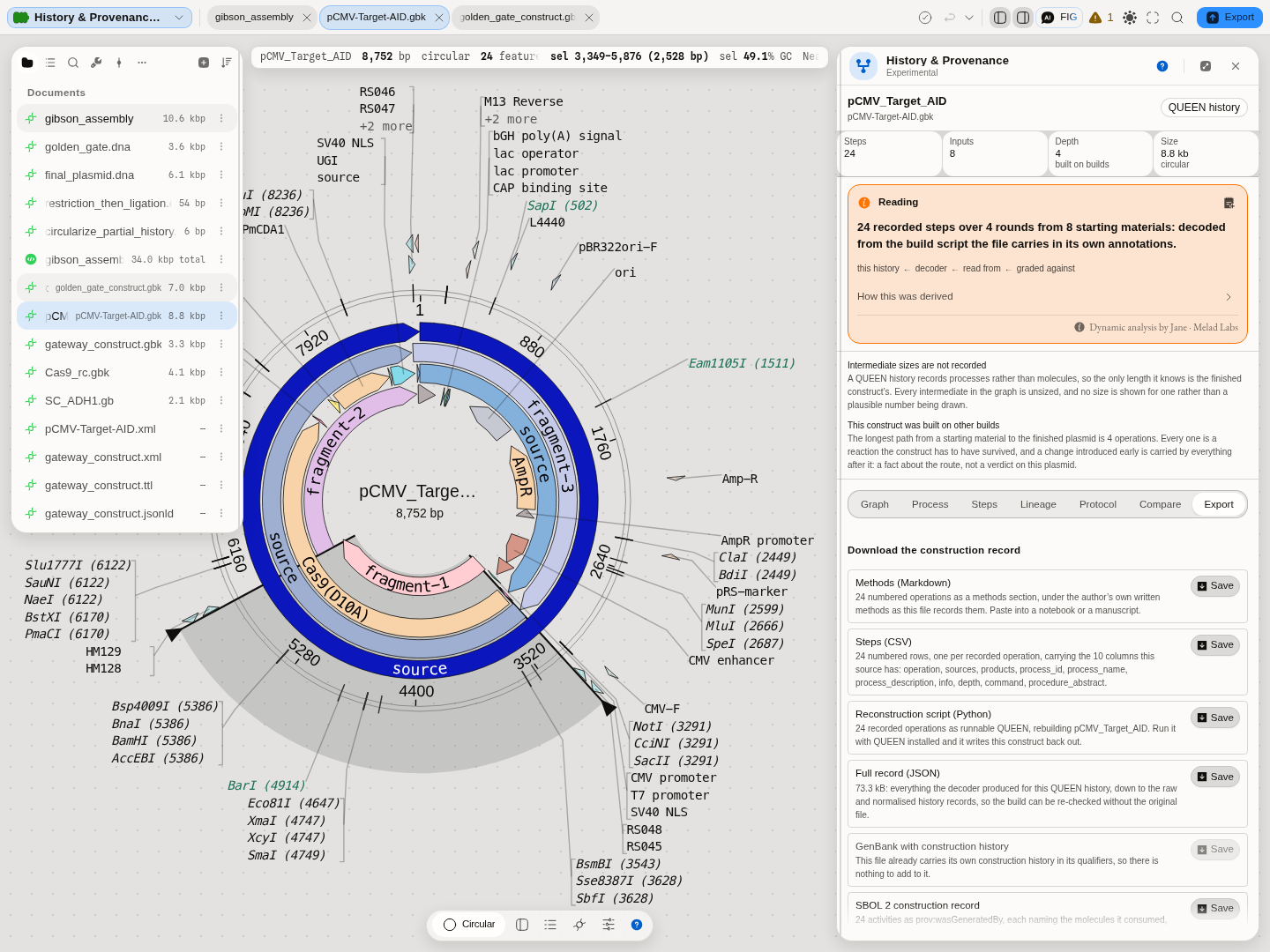
The Export tab writes seven things. Every one but the rebuild script leaves in a format nobody has to own, which is what makes this the way OUT of any one program as much as the way in:
| Export | Use it for |
|---|---|
| Methods (Markdown) | Paste into a paper, a notebook entry or a lab wiki. Ends with References: the published method behind each step, and the implementation a step run here reproduces, each with the step numbers it supports |
| Steps (CSV) | A spreadsheet of every step, its arguments, its process id and its abstract |
| Full record (JSON) | The raw and normalised records, so the build can be re-checked without the original file |
| GenBank with construction history | The molecule itself, carrying how it was made, in a format every tool reads |
| SBOL 2 construction record | The build as W3C PROV-O activities, in synthetic biology's own standard. Validates against libSBOLj, the SBOL reference implementation. Offered for every source except an SBOL file, which already is one. A Syntax control beside the row picks which of RDF's six encodings it leaves in |
| OpenCloning document (JSON) | Hand the whole strategy to someone who does not use this tool |
| Reconstruction script (Python) | Run it with QUEEN installed and it rebuilds the construct. Offered for a QUEEN-authored file only, because no other record is quinable |
Six ways of writing one SBOL document down. SBOL records a build in RDF, and RDF is a graph of statements rather than a file format — RDF/XML, Turtle, N-Triples, N-Quads, TriG and JSON-LD are six standard encodings of the same graph. The Syntax control beside the SBOL row picks one. RDF/XML is the default because it is how SBOL documents are normally published and what the reference implementation validates; choose Turtle to read the record yourself or load it into a triple store, JSON-LD to hand it to a JavaScript pipeline, N-Triples when a tool wants one statement per line. The encoding changes nothing about the build: the same activities, the same molecules consumed, the same roles. Records arriving in any of the six are read here too, so a collaborator's Turtle file opens exactly as an RDF/XML one does.
The script is the strongest form the record takes, and it is worth being precise about why: a methods paragraph describes a build, a JSON record lists it, and a script performs it. Two lines it cannot carry — an install path and an output path — are named in the panel rather than guessed at, because writing a plausible path into someone's script would be inventing a value.
OpenCloning is an open format for a cloning strategy: every sequence travels inside the document as a GenBank record, and every step travels as a reaction with its real parameters — the enzymes of a digest, the reaction type of a Gateway BP, the recombinase's own half-sites, the primers of a PCR, each pointing at the sequences it consumed. A colleague can open it at opencloning.org, and pydna reads it directly, so a history that arrived inside a vendor's binary file can leave in a format anyone can read. What we write is checked against pydna's own writer, reaction family by reaction family.
It reads them as well as writes them. Open an OpenCloning .json the way you would open a
GenBank — drag it in, or pick it from a project — and every molecule in the strategy appears, each
one labelled with the step that made it, with the history laid out in the panel as if the build had
happened here. That is the round trip a collaboration actually needs: send the document, get it back
with the extra steps in it. The History & Provenance sample project ships one to try.
The OpenCloning export is offered for a construction history read out of a file. A history this workbench recorded as you worked, and a QUEEN build script, describe the operations rather than carrying the molecules, so there is nothing to put in the document's sequence records — the button says so rather than handing you a file with the sequences missing.
The history travels inside the molecule
The other four exports are documents about a construct. GenBank with construction history is the construct: the plasmid you built, as an ordinary GenBank that every tool on the bench can open, with the build recorded on it as annotation qualifiers. Deposit it, email it, put it in a repository, and how it was made goes with it — no companion file to lose, and this panel reads it straight back when someone opens it here.
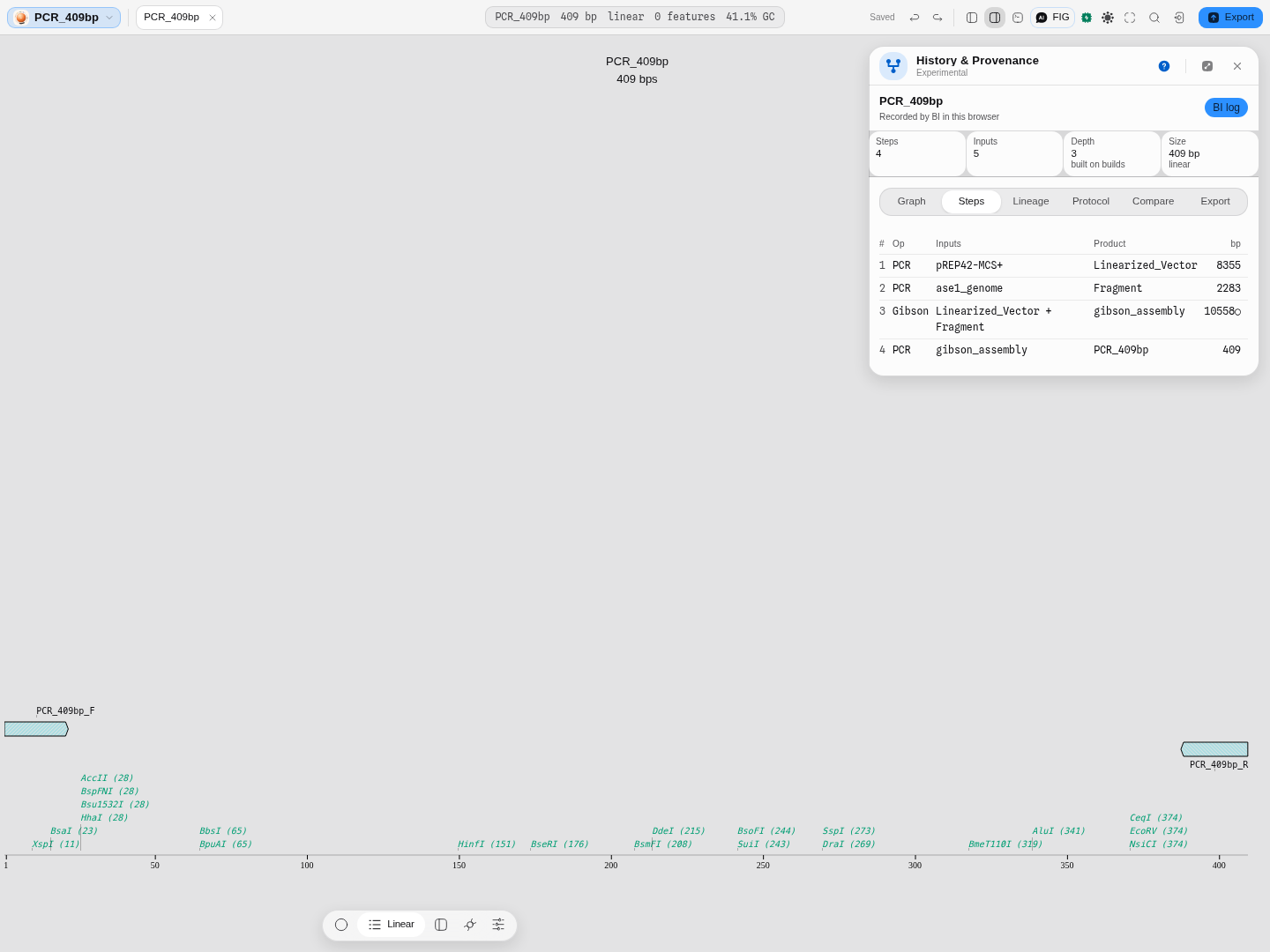
It carries the whole chain, not the last step. If you amplified off a plasmid that arrived as a vendor file with its own reaction graph, the construct you made is one operation and everything before it lives in that parent. The export walks back through the files your build consumed and writes their steps too, oldest first, so the record you hand over is the build a reader can follow all the way to the starting material. The panel states the split before you commit: 4 steps: 1 recorded here and 3 inherited from gibson_assembly.dna.
Two things it deliberately does not do, because a construction record that overstates itself is worse than none:
- It does not claim the file re-runs. A QUEEN script regenerates the molecule it describes; this is a record of what was done. Every operation it writes is marked as such, so nobody mistakes the file for an executable build.
- It writes nothing it does not know. A step whose intermediate size was never recorded gets no size, and a reaction with no recorded enzyme gets no enzyme field — not a zero and not an empty list, both of which read as measurements.
One limitation is worth knowing before you rely on it, and the panel warns about it at the moment you export: a construct carrying no annotation other than its own history loses that history when it is reopened. The convention the format follows discards the history record along with an otherwise-empty feature list. Annotate anything at all — one feature is enough — and it survives.
Worked example — a build with no history becomes one with
The panel is not only a reader. Anything you build in this workbench records its own construction edge as it goes, so a molecule you made here arrives with a history a colleague can read.
Open the PCR, multiplex & fusion starter — it arrives loaded with pBR322 and primers designed against its own tet and bla genes.
- Amplify. In PCR Simulation, the primer pair
tet_F/tet_Ris already in place. Simulate PCR → a 1,191 bp product. Open as new project → a new project. - Read what it recorded. Open History & Provenance in that project.
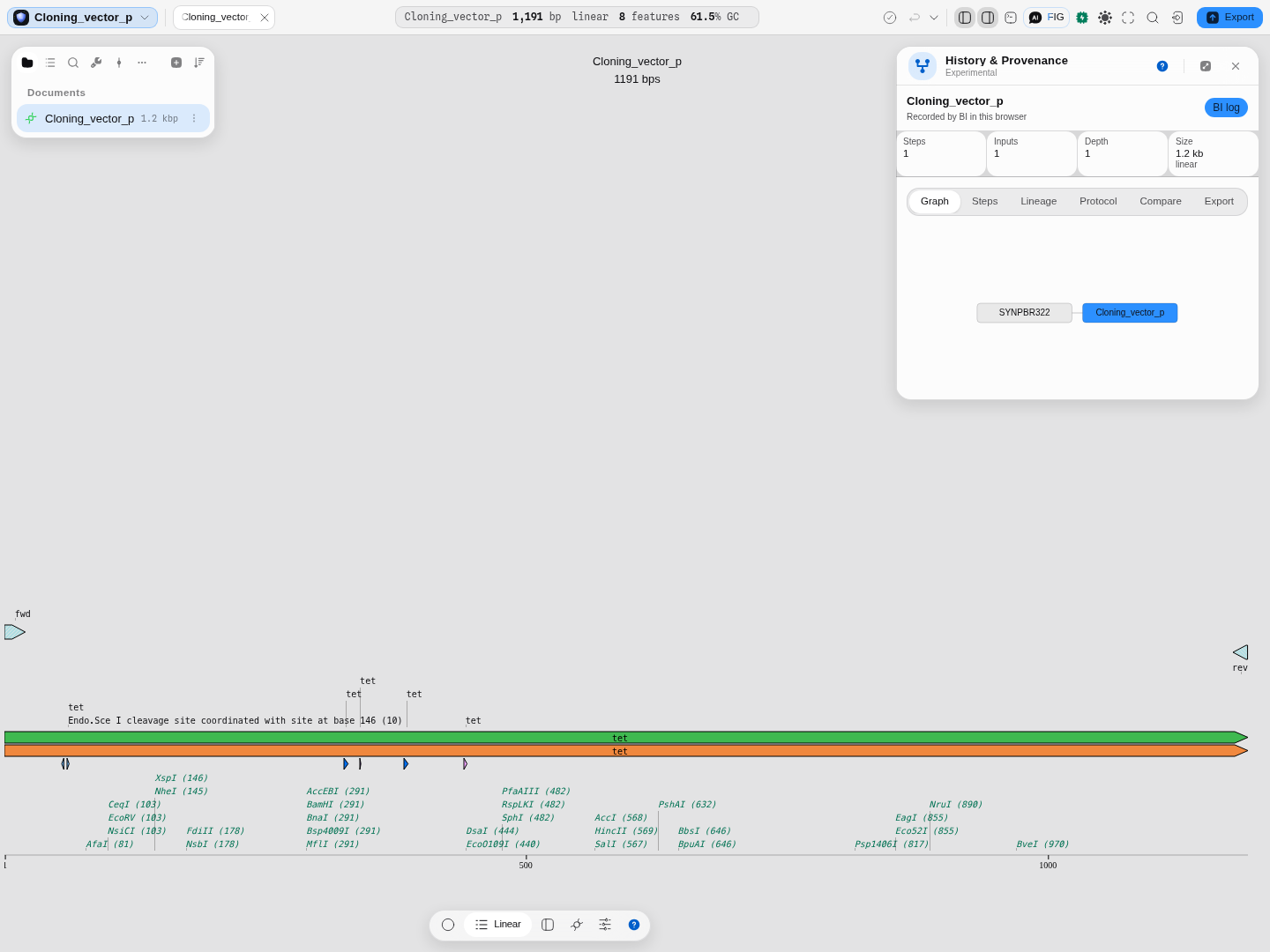
One step, one input, 1.2 kb linear — and the real edge SYNPBR322 → Cloning_vector_p. The
amplicon is linear whether or not its template was circular, which is exactly the sort of fact a
lineage has to get right to be worth reading.
The Protocol tab for the same product lists the step as PCR SYNPBR322 → Cloning_vector_p with
tet_F and tet_R and their sequences underneath, as reagents.
- Fuse two amplicons. The same starter stages two real fragments for overlap-extension PCR: a 1,211 nt tet fragment from pBR322 carrying a 20 nt tail matching the donor gene's start, and the 795 nt neo fragment from pEGFP-N1. They come from two different plasmids, which is what overlap-extension PCR is for, and both come out of the same PCR engine as step 1, so they are real amplicons rather than typed sequences. Run Fusion PCR → one 1,986 bp product (1,211 + 795 less the 20 nt of shared homology) → Open as new project.
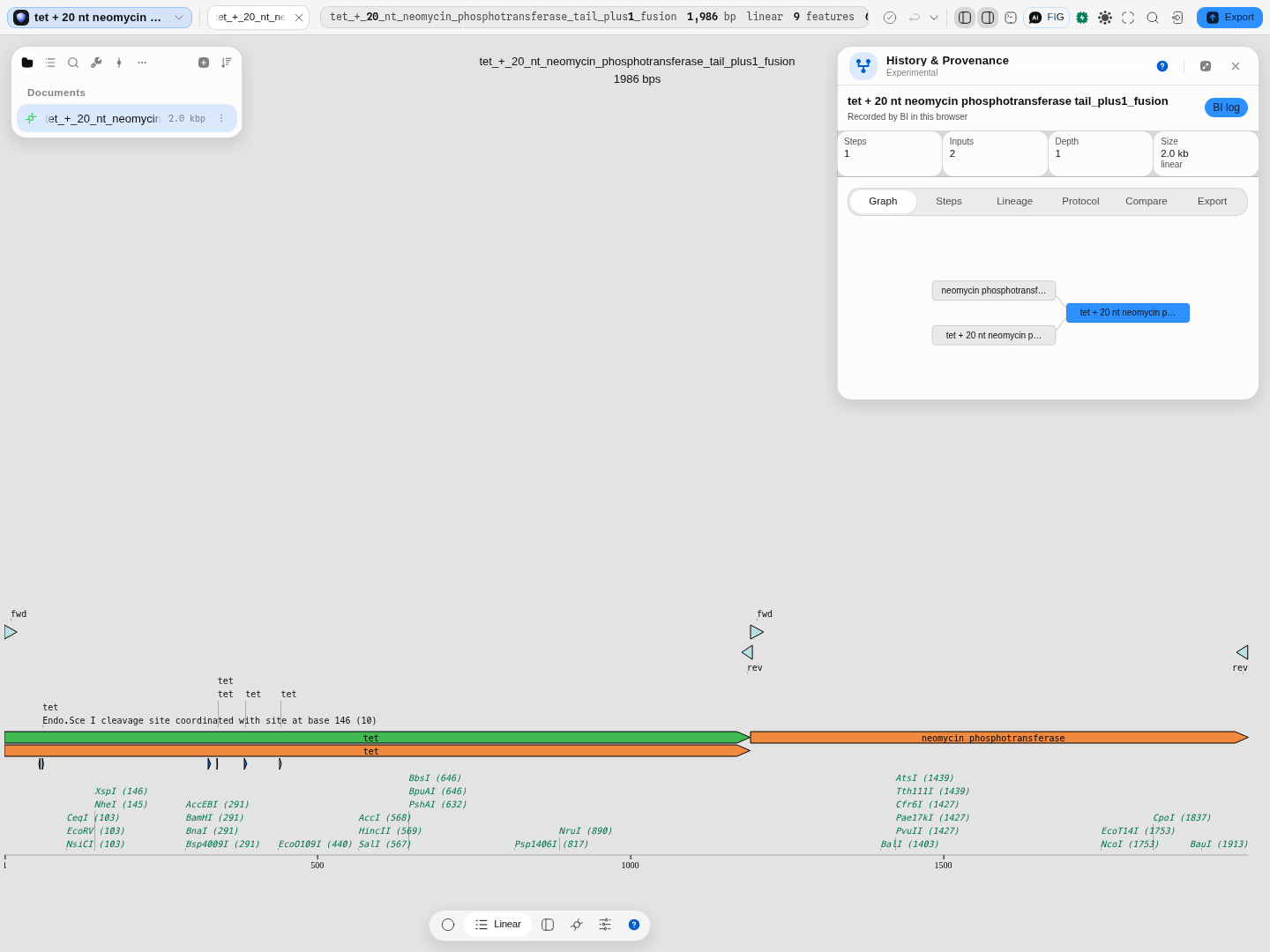
Both parts are lineage parents, so the graph joins them — and each can itself have been built by an earlier step, which is what lets a construct built on constructs nest. The map underneath is the other half of the same claim: the two parents are still visible as the two halves of the product, green and orange, meeting at the junction the homology defined.
- Optimize a CDS. In Codon Optimizer, target
CDS: tet, keep the bundled E. coli K-12 table, and Optimize → 260 edits, CAI 0.604 → 1.00, protein preserved. Open optimized → the product's history:
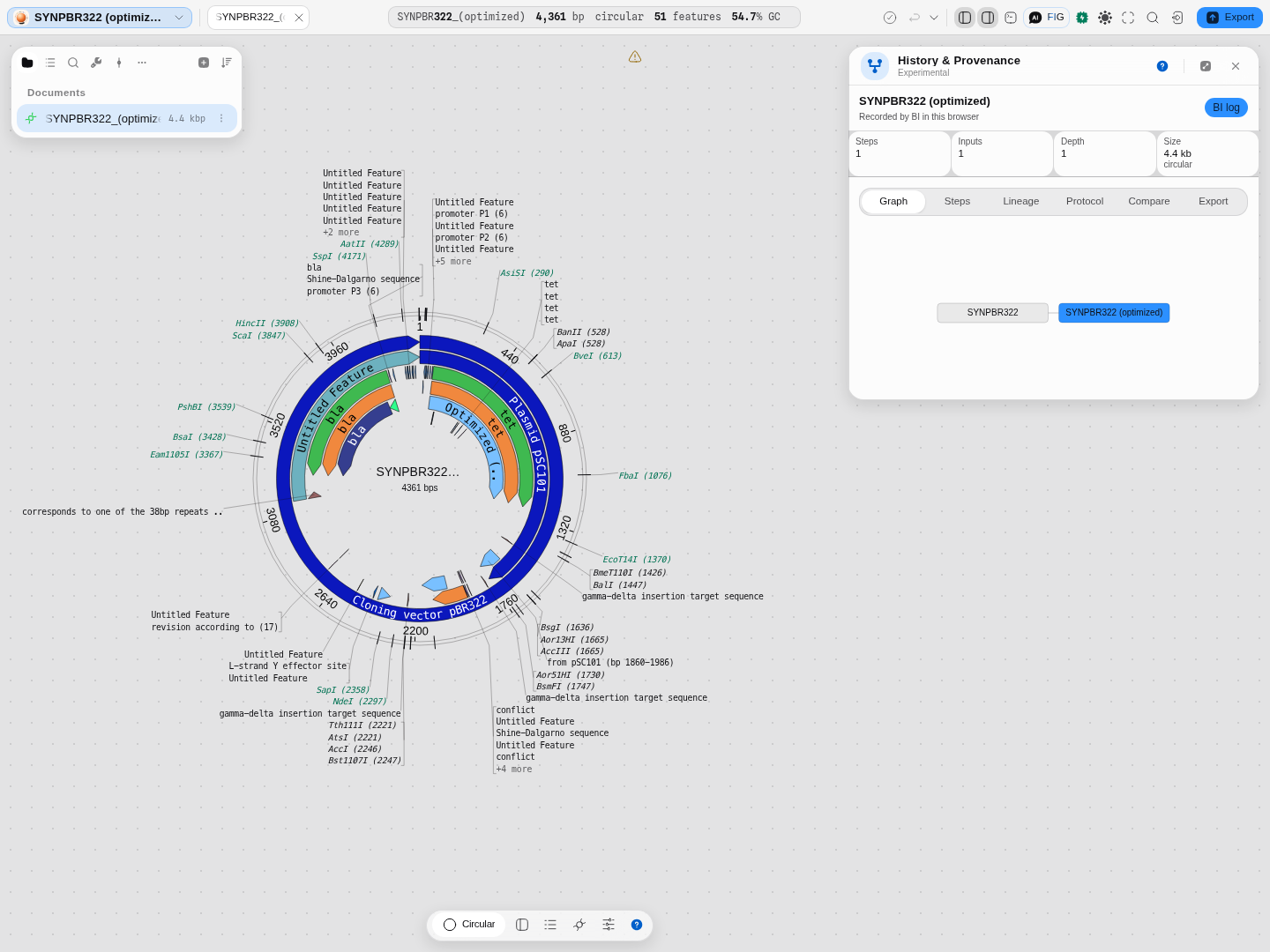
Note the circular: an optimized sequence keeps the topology of what it was optimized from, where an amplicon is always linear. Both facts are recorded rather than assumed.
Controls
The panel is a reader, so its controls are about finding rather than changing:
| Control | What it does |
|---|---|
| Graph node click | Filters the Steps list to the operations touching that molecule; the chip names it in full. Click again, or Clear, to drop the filter |
| Step filter | Free text over operation, product, process id and description. Composes with the node selection rather than replacing it. The count reads matched/total |
| Expand a step | The full detail above. The panel scrolls the detail into view, so a step at the bottom of a 76-step history does not open below the fold |
| Tabs | Graph · Steps · Lineage · Protocol · Compare · Export |
| Clear this project's recorded history | Drops the build log this project accumulated. Offered only for builds recorded here, because it is the only source that lives in the browser rather than in the file — a .dna or QUEEN GenBank decodes again the moment you reopen it |
| Detach | Floats the panel, which is the comfortable way to read a wide graph |
Algorithms you can choose
There is nothing to choose, and that is the correct shape here. Every other panel that offers a choice does so because published methods genuinely disagree — eight melting-temperature models give a 21 °C spread on one 20-mer, and which one you pick is scientific information. A construction history is not like that: the file states what happened, and there is exactly one faithful way to read each format. A "reading" that differed from the writer's own would be a bug, not an option.
What you can change is which record you are reading: switch the active tab, or select a node to scope the step list to one molecule.
The science
QUEEN build histories. QUEEN records each operation as a qualifier on the record's source
feature, holding the command, an information field, and a process identifier. Reading one back is a
chain of four steps: decode the qualifiers, then normalise them the way QUEEN's own quine
operation does (de-duplicate, sort, resolve process ids), then build the process rows and the
variable→product name dictionary, then work out which processes consume and produce which products.
The panel's graph is that last result drawn.
Two details matter to anyone comparing our output with QUEEN's own:
- Decoding is a pure function of the file. QUEEN keeps its history counter in a process-wide registry and offsets imported steps by it, so constructing the same file three times in one Python session yields different first indices each time. Decoding here resets that state per file, so the same GenBank always decodes identically.
- The process id is content-derived, from the command and its abstract form — which is why two runs of genuinely the same procedure carry the same id, and why the abstract is worth reading.
SnapGene histories are decoded from the .source reaction graph inside the binary file:
reaction types, nested inputs and fragment sizes, walked into the same lineage shape.
How it is checked. The QUEEN reader is validated against real QUEEN, run over the QUEEN project's own demo files: 30 of the 31 history-bearing GenBanks in that tree decode byte-identically, up to a 76-step, 12-part Golden Gate build. The one that does not is named: its history refers to a molecule variable that nothing in that same history defines, so QUEEN's own reader raises an error on it too. The process-identifier hash is checked against the RFC 1321 test vectors and against real QUEEN commands.
SBOL, and how a standards body models a build
SBOL is the synthetic-biology community's open exchange format, and it does not invent a vocabulary
for construction history: it reuses PROV-O, the W3C provenance ontology. A molecule that was made
rather than found carries wasGeneratedBy, pointing at an activity; that activity lists the
molecules it used, the role each one played, and optionally the agent that ran it and the time
it finished. A Gibson assembly is an activity that used three DNA molecules; the product points back
at it.
That layer is separable from the rest of SBOL, which is why an SBOL document opens here for its build record even though its parts and sequences are not read yet. What you get is the same panel as any other source: the activities as steps, the molecules as a graph, a methods section, and the same export list.
Two things it does not carry, and the panel says so rather than filling them in. An SBOL construction record has no field for a sequence length or a topology, so Size is blank instead of showing a plausible number; and it has no field for an enzyme, so no enzyme is listed rather than one being read out of an activity's title.
What checks it. The reader is graded against libSBOLj 2.4.0, the SBOL reference implementation, which reads the same documents through the standard's own object model and resolves the product side of every activity independently. They agree on every activity, every molecule consumed, every role, every agent and every plan. libSBOLj covers SBOL 2 and refuses SBOL 3, so an SBOL 3 document is decoded the same way and carries a caution saying no independent reading has confirmed it.
It writes them too. Any build the panel can read — one you made here, a SnapGene graph, a QUEEN script, an OpenCloning strategy — leaves as an SBOL 2 document from the Export tab, which is the format a collaborator on another toolchain can open.
Limitations
- A recorded coordinate belongs to another molecule, and is shown as such. A crop records start and end, and those positions are on the molecule that step cut, not on the construct you have open: once a cut, join or flip has happened the two no longer share a coordinate frame, and a mark computed from the wrong one lands somewhere plausible and wrong. Every row therefore names the molecule its numbers belong to. Where the record also says where those bases ended up — a QUEEN-authored file records that on every piece that survived — Show on the map draws the real span, and where it does not, the row says which of the two reasons applies: the bases were cropped away later in the build, or that molecule reached this construct only through an intermediate.
- A QUEEN history does not carry the length of its intermediates. Only the final construct's length is known, which is why the intermediate steps show what they do and not a size.
- Oligos are reagents, not parents. A primer has no construction history of its own, so it is recorded on the step rather than as a node in the lineage — nesting it would add a leaf that can never be walked back.
- Builds recorded here are local to this browser, like everything else in this workbench. A file that carries its own history travels; a build log does not until you export it — GenBank with construction history is how you make it travel.
- A QUEEN parent is inherited but not drawn. When the file your build consumed was a QUEEN record, its steps are written into the export but do not appear in the lineage graph, because a QUEEN history records processes and not the size of each intermediate: drawing it would put a measurement beside every inherited step that nobody made.
- Very wide histories are dense in the rail. The bundled 76-step build puts its products in one tall column, which the side panel can only scroll. Open the graph as a canvas tab and it pans, zooms and fits, which is the answer to seeing one; what a canvas does not do is summarise a level, so a build that wide is still read one product at a time — use the step filter for that (§ Read a build that is too big to read).
- An SBOL document is read for its build, not for its parts. Sequences, annotations and the component hierarchy of an SBOL 2/3 file are not read yet; the construction record is. A file whose only content is its provenance therefore opens with a build history and no sequence to display, and says so.
- RDF/JSON is the one RDF syntax not read. An SBOL document can be published as RDF/XML, Turtle, N-Triples, N-Quads, TriG or JSON-LD, and all six are read as the one graph they encode. RDF/JSON is a 2013 note superseded by JSON-LD, with no maintained implementation to check a reading against, so it is refused by name rather than guessed at.
- An SBOL 3 reading is unverified. The reference implementation available for grading covers SBOL 2, so a v3 document is decoded but carries the caution that nothing independent has checked it.
- A history names the molecules its author named. Where a build script recorded no product names,
the graph draws the identifiers the software generated (
195714[1]), because inventing readable names for them would be inventing data. A build whose author usedproduct=throughout reads as words; one that did not, does not, and the difference is the author's, not the reader's.
Compared with other tools
SnapGene records a reaction graph in its own file format and shows it as a history tree; that record
is what this panel reads when you open a .dna file. QUEEN, an academic tool, goes further than any
commercial viewer we know of by writing the entire construction script into a standard GenBank so
the record is self-describing — and that is the format this panel gets the most out of. Detailed,
dated, first-party comparisons live on the comparison pages — for this one,
Compared with SnapGene — and nothing is claimed here that is not sourced there.
Reading a record is only half of it. Whatever wrote the history you opened, it leaves here as a GenBank whose own annotations state the build, as an SBOL 2 document, as an OpenCloning document, or as a script that performs it. A construction record normally stops at the edge of the program that made it; this is the panel that takes it across.
Export
Seven exports, named with what each is for in the table under Get the method out — a methods section, a step spreadsheet, the full record, the molecule carrying its own history, the build as an SBOL 2 construction record, the whole strategy as an OpenCloning document, and a script that rebuilds the construct. Each is offered only where it is real: a source that cannot produce one says which source it would need, rather than writing an empty file. The graph is a panel view rather than an exported image; to put a construct's map in a document use Map image, and for the project as a whole Export.
API
The decode is a pure function of the file text: hand it a QUEEN GenBank and it returns the records, the normalised step list, the lineage nodes and edges, the process notes and any warnings — the same object every tab on this page is drawn from. It is usable without the editor, and it is reachable from the workbench's own Python and R consoles, where your project's files are already mounted. The entry points and their signatures live in the API section.
Automation
The copilot can run this, and so can a workflow. Ask for the history of the open construct and it
calls get_construction_history: the same decode this page describes, returning the recorded steps,
how many rounds deep the build goes, which of the five records it came from, the numbered protocol,
and the same one-sentence summary the panel headlines. Ask whether two constructs were built the same
way and it calls compare_constructions, aligning their procedures step by step on either the
procedure or the exact recorded operation — the same choice the Compare tab offers, defaulting
the same way.
Its parameters are the panel's, one for one. get_construction_history takes document — a file
id or name, defaulting to the focused one exactly as the panel does — plus the panel's own two ways
of narrowing a long history: molecule, which keeps the steps that produced or consumed one
molecule, the graph-node click; and query, free text over the operation, the recorded command, its
info field, the process id and name, and every molecule the step names. They compose, exactly as they
do on screen — pick a molecule, then type within it. limit bounds how many steps come back and
exists only because a turn has a budget and a scrolling panel does not; it counts oldest first,
which is why the two filters matter rather than being a convenience: on a 76-step build, a question
about the finished construct answered through limit alone would come back with the beginning of the
build and none of the end. compare_constructions takes the same document for this side, against
for the construct to compare with, and key, which is the Compare tab's own choice between the
procedure (abstract, the default) and the exact recorded operation (processId).
And it can write the record out, not only read it. export_construction_record produces the
same seven documents the Export tab offers, from the same writers: a methods section, a step
spreadsheet, the full decoded record, the molecule carrying its own build as GenBank qualifiers, the
whole strategy as an OpenCloning document, the build as an SBOL 2 construction record, and the
runnable script that rebuilds a QUEEN construct.
It takes document — the focused one when omitted, as everywhere on this page — and format, which
names which of the seven to write and defaults to the methods section, the one document every kind of
record can produce. Three of the seven need something a particular record carries: a construct whose
history is already written into its own qualifiers has nothing to add to them, an OpenCloning
document needs the input sequences that only a file-parsed history embeds, and only a build script
can be turned back into runnable code. Asked for one of those where it cannot be written, the tool
says which record it is reading and why that document is not available — and every answer carries
the list of formats that are, so a pipeline can choose instead of failing. Where a written GenBank
would not read its own history back — a construct with no other annotation loses it, because the
reader takes the history feature out and then sees an empty file — the answer says so beside the
document rather than after it.
The SBOL record can leave in any RDF syntax, and that choice is not a choice about the science.
SBOL records a build in RDF, and RDF is an abstract graph of statements that has six standard ways of
being written down: RDF/XML, Turtle, N-Triples, N-Quads, TriG and JSON-LD. sbol_syntax picks which,
defaulting to rdfxml — the encoding SBOL documents are normally published in, and the one the SBOL
reference implementation validates. Every other value re-serialises that same document, so the
statements, the activities, the molecules each consumed and the roles they played are identical; only
the bytes differ. Pick Turtle to read the record yourself or load it into a triple store, JSON-LD to
hand it to a JavaScript pipeline, N-Triples when a tool wants one statement per line. Because it
describes how an SBOL document is written down and nothing else, asking for it alongside any other
format is refused by name rather than ignored — a Markdown file returned under a request for Turtle
would be a silent wrong answer. The reply echoes the syntax actually written, and leaves it empty
for the formats that do not have one.
The same six syntaxes are read as well as written: a construction record that arrives as Turtle or JSON-LD opens exactly as the RDF/XML one does, and reports the same steps, because a re-serialisation moves the bytes and not the build.
An SBOL record can be compared, and what it aligns on is not the same thing as for a build script. SBOL records each step as a PROV-O activity, and an activity carries two identities: the title its author gave it, and a URI. Those map onto the same two choices every other source offers — the procedure (the title, which travels between documents) and the exact recorded operation (the URI, which SBOL defines per document, so it matches only when two files name literally the same activity). Nothing is invented for SBOL and nothing is translated.
One caveat worth stating plainly, because it decides how much a match means: a title is a dependable key when the document's author generated it, and free text when they typed it by hand. For records a tool wrote — including the ones this app writes — the titles are generated, and aligning on them reproduces the comparison of the underlying build exactly: two SBOL records of the same construction, one of them carrying two extra steps, come back at 24 shared, 0 only here, 2 only there, 96.0%, the same numbers the original build scripts give. Two unrelated builds come back at 0%. For a record whose steps were described by hand, a match says the two documents describe their steps the same way, which is a weaker claim; the Steps tab shows what the document actually wrote, so you can see which kind you have.
It refuses a filter it cannot honour, rather than quietly returning nothing. Only a build script
records a per-step command, a process id and an info field, so molecule and query have nothing to
match against a workbench log, a SnapGene reaction graph or an OpenCloning strategy — asked for one
there, the tool says which kind of record it is reading and what to drop. A molecule name that is not
in the history comes back with the list of the names that are, because there is no graph to click in a
pipeline and a name that matches nothing would otherwise read as this build has no such step.
It reports the filter as a fraction, never as a count. matched is what the filters kept and
total is the whole build — the same matched/total the panel prints above its step list, and the
reason both are reported is that 12 means nothing without the number it is out of.
Ask for a build history and an edit log, and you get different answers, deliberately. The build
history is what MADE the molecule; get_document_history is what CHANGED it afterwards — the
editor's own edit log. They are separate tools because they are separate questions, and they are one
letter apart in a list: a plasmid can have a long build history and no edits, or the reverse.
It refuses rather than guessing. A document with no recorded build comes back saying so — an answer, not a failure, because most files carry no history and a pipeline should not die on one. A comparison against a construct that records nothing, or a name no file in the project has, comes back naming what the project does offer.
Provenance
This panel is the provenance surface, so the question turns around: what does using the workbench leave behind? Every product-creating tool listed under Related records its own construction edge as it builds — the operation, its inputs, the product's size and topology, the enzymes, the oligo sequences and the project each input came from. That log is what the jane* log badge reads.
To cite the method in a paper, export Methods (Markdown) and check it against your bench record: it is the author's own descriptions plus the numbered steps, not a paraphrase. Its References list cites the method each step performed (Gibson assembly: Gibson et al. 2009; Golden Gate: Engler et al. 2008; PCR: Saiki et al. 1988), by DOI so your reference manager formats it. For a step made in this workbench it also cites the published implementation the simulation reproduces, and for a step read out of a SnapGene or QUEEN file it does not, because that program, not this one, simulated it. A step type with no reference is left uncited rather than given a guess. For a build made here, the Full record (JSON) carries both the raw and the normalised records, so a reviewer can re-check the construction without your original file. When the history came from a QUEEN GenBank, cite QUEEN as the source of the record.
Screenshots
Every frame on this page is the panel on real files, run: a QUEEN build graph, the three lineages recorded by amplification, fusion and codon optimization, a vendor construction history offered as a portable GenBank, a construct built here on an imported file showing the three steps it inherited, and two builds compared across formats. The Graph, Steps, Lineage and Protocol tabs on the same corpus are shot alongside them.
Related
Feeds it: PCR Simulation · Fusion PCR · Primer Designer · Gibson Assembly · Golden Gate · Codon Optimizer — each records its own construction edge as it builds.
Follows it: Notebook, to keep the method beside the result; Sanger verification, to confirm the construct you built matches the one the history says you built.
Alternative to: reconstructing a build from a lab notebook by hand.