
Assembly Plan
Marked experimental: the surface can change.
Plan several assemblies at once and let them depend on each other: each level's constructs become parts for the next, so a promoter fused to a reporter at level 1 is the input a level-2 step assembles with a terminator.
| Reached by | Tools → Cloning |
| Sample projects | Assembly plan (multi-level) · Assembly plan (all chemistries) |
What it does
A plan is a list of constructs. Each construct names the parts it is built from and the chemistry it is built with — and a part may be another construct in the same plan. From that alone the tool works out the order the bench work has to happen in, simulates every step on the real sequences, and hands you the finished molecules.
The ordering is the point. You do not tell it that C2 comes after C1; you say C2 is built
from C1 and a terminator, and the level falls out of the dependency graph. A construct's level
is its longest distance from a physical part, so a step reachable by both a short and a long route
sits at the long one and can never be scheduled before something it consumes exists.
Two things drop out of the same graph that are tedious to keep by hand:
- The parts you actually need. The graph's leaves are the molecules nobody in the plan builds, which is exactly the list you have to have in a freezer before you start. It is derived from the plan, so it cannot disagree with it.
- What a failure costs. If a step fails, every step downstream of it is reported as not attempted rather than simulated, because its input was never made.
When you'd use this
You are building something in more than one round, and the rounds depend on each other. That is the ordinary shape of hierarchical assembly — MoClo and GoldenBraid level 0 → level 1 → level 2, BioBrick standard assembly, or any design where transcription units are built first and then combined into a multi-gene construct.
It is also the right tool for a batch: several independent constructs from a shared pool of parts. They come out as one run with one parts list, rather than as n trips through a single assembly panel.
The route through the workbench:
- Get your parts into a project. Files you have open are offered as parts automatically. Parts you need to amplify come from Primer Designer → PCR Simulation.
- Write the plan — here, a row per construct, or imported from a spreadsheet you already keep.
- Simulate, and read the level breakdown and the parts list.
- Take each construct onward. Every finished construct opens as its own sequence, so a diagnostic Restriction Digest and gel or a Sanger check follows from it directly.
Reach for something else when you are building one construct in one reaction: a single Gibson goes to Gibson Assembly, a single one-pot Type IIS build to Golden Gate, and a syntax-checked MoClo part set to Grammar Assembly. This tool is for when there is an order.
What this computes
The order the bench work has to happen in, and the molecules each step produces — from nothing but a list of constructs and what each is built from.
- Every construct's level, defined as its longest distance from a physical part. Longest, not shortest: a step reachable by both a short and a long route sits at the long one, so it can never be scheduled before something it consumes exists
- The dependency graph itself, which is what the levels fall out of. You never say C2 comes after C1 — you say C2 is built from C1 and a terminator
- Every step simulated on the real sequences, in its own chemistry, giving the finished molecules rather than a plan on paper
- The parts inventory: which physical parts the whole plan consumes and how many times each is used — tedious to keep by hand and derived from the same graph
- A refusal with the reason when a plan cannot be ordered at all: a cycle, or a construct naming a part that does not exist
Where it lives
Tools → Cloning → Assembly Plan opens it in the right rail, and it is in the command palette.
It reads the editor rather than asking you to re-enter it:
- The parts list is seeded from the open project's sequences, with each part's real length and topology, so a project of ten plasmids arrives ready to plan against.
- Every finished construct offers Show map, Open in editor and Open as project, so a level-2 product becomes an ordinary sequence you can annotate, digest or verify.
What a part is called
A part is addressed by its file name, not by the LOCUS written inside the record. This is
worth knowing because the two can disagree, and the shipped sample proves it: the part in
BBa_K611094_bar.gb carries the locus name BBa_K611094_br. Trusting the locus would fail the
plan with "unknown part BBa_K611094_bar" — a correct complaint about a name you never chose.
A file holding many records is the exception: there, each record is addressed by its own id, because a single file name cannot name five different fragments.
Inputs and outputs
Parts come from the open project's sequences — GenBank and FASTA both — with their features carried through the simulation onto the products.
The plan is written in the panel, or imported from a spreadsheet: CSV, XLSX and XLS. The spreadsheet is read in the same shape the reference implementation uses, so a plan you already keep for the bench can be used as it is.
What it refuses, and what it says. Validation is re-derived on every edit, so it always describes the plan in front of you:
- An unknown part name — a row naming something that is neither a part in the project nor another construct in the plan is flagged on that row.
- A step that depends on itself, directly or through a cycle. A cycle has no valid order, and the message names the steps involved rather than reporting an empty result.
- Duplicate construct names, which would make "built from
C1" ambiguous. - A step whose chemistry needs an enzyme and has none chosen.
Outputs: the outcome tally, the parts list, the dependency graph, and per level each construct with its sequence, length, topology and features.
Demo
Not recorded yet. A screencast of a real run belongs here and does not exist. The worked example below is a real run on a shipped sample project, reproducible step for step in the meantime.
Worked example
The Assembly plan (multi-level) sample project: four real iGEM BioBrick parts and a three-level plan, which is the reference implementation's own hierarchical-BioBrick test case.
| Part | Length | What it is |
|---|---|---|
BBa_J23119_prom | 2,190 bp | A constitutive promoter, in its backbone |
BBa_E0040_GFP | 2,900 bp | GFP |
BBa_J61048_term | 2,300 bp | A terminator |
BBa_K611094_bar | 2,200 bp | A coding part |
The plan is three constructs, each BioBrick standard assembly:
| Step | Built from |
|---|---|
C1_prom_gfp | BBa_J23119_prom + BBa_E0040_GFP |
C2_prom_gfp_trm | C1_prom_gfp + BBa_J61048_term |
C3_br_pr_gfp_tm | BBa_K611094_bar + C2_prom_gfp_trm |
Press Simulate plan:
Built: 3      Failed: 0      Cancelled: 0

Parts you need (4)
  BBa_J23119_prom · BBa_E0040_GFP · BBa_J61048_term · BBa_K611094_bar

Level 1   C1_prom_gfp        2,918 bp   circular   15 features
Level 2   C2_prom_gfp_trm    3,039 bp   circular   18 features
Level 3   C3_br_pr_gfp_tm    3,072 bp   circular   22 features
Nothing in the plan says which construct is level 2. C2 consumes C1, so it is scheduled after
it; C3 consumes C2, so it is third. Delete the middle row and the remaining two become level 1
and level 2 by themselves.
The feature counts rise down the levels — 15 → 18 → 22 — because each product carries its parents' annotations, so the level-3 construct still knows where its promoter and its GFP are. That is what makes a finished construct usable rather than an anonymous string of bases.
Controls
Parts
Each part shows its name, length and topology, read from the project. Parts are added from the open project and removed individually or all at once. A part that no step consumes is simply never used; it is the graph's leaves that matter, not the length of the list.
Plan
One row per construct, reorderable and deletable, each with:
| Control | What it changes |
|---|---|
| Name | What the construct is called, and therefore how later steps refer to it |
| Chemistry | Which assembly the step simulates — see below. Six choices |
| Enzyme | The Type IIS enzyme, shown only for chemistries that use one, so the control cannot disagree with what runs |
| Expected constructs | How many products this step should give. A step that yields a different number is reported rather than silently accepted — the usual reason is parts that can assemble in more than one order |
| Connector collection | Shown only for chemistries that use connectors. When a construct will not close, the minimal set of bridging connectors is chosen from this collection; blank means none. Parts join a collection in the Parts tab |
| Parts | The step's inputs, picked from chips listing every legal name: the project's parts and the other steps, so a dependency is chosen rather than typed |
Plus, for the plan as a whole: plan name, Add construct, Import CSV / XLSX / XLS, and CSV export.
Result
The tally (Built · Failed · Cancelled), the parts you need list, the build-order graph with each node coloured by outcome, and then each level with its constructs. Every construct carries its length, topology and feature count, and the three hand-offs: Show map, Open in editor, Open as project.
A failed step states the error the chemistry raised. A cancelled step states which step actually failed and the chain that carried the failure to it — not merely the neighbour it was waiting on, which on a deep plan is rarely the one you need to fix.
Algorithms you can choose
Chemistry is chosen per step, and a plan may mix them — a Type IIS level can feed a Gibson level. Six are offered, and they are genuinely different joining chemistries rather than variants of one:
| Chemistry | How the ends join | Uses an enzyme |
|---|---|---|
| Golden Gate (Type IIS) | One-pot digest and ligate; parts join by their four-base fusion overhangs | Yes |
| Gibson / homologous | Overlapping ends joined by chew-back, annealing and extension | — |
| BioBrick standard | The classic two-part iGEM assembly: EcoRI + SpeI on the insert, EcoRI + XbaI on the backbone | — |
| BASIC (linker-based) | Parts joined through annealed oligo adapters (iP/iS linkers) | — |
| Ligase cycling reaction | Single-stranded bridging oligos template the joins between adjacent parts | — |
| Oligo pair annealing | Anneals two oligos into one sticky-ended adapter — the step that makes BASIC linkers | — |
The last one is worth a sentence because it looks out of place beside the others: it does not join parts, it makes one. Being a step in the plan means a BASIC build can start from the oligos you will actually order rather than from linkers you had to prepare somewhere else first.
Bring your own: the planner is callable directly — see API.
The science
The planner derives a directed graph whose edges run part → assembly, then groups the assemblies by depth. Depth is the longest path from a leaf, which is the property that makes the schedule safe: a step is never placed at a level where one of its inputs has not been built yet, even when that input is also reachable by a shorter route.
Simulation runs level by level. Each level's products are added to the working repository under their construct names, which is what allows the next level to consume them by name — the same mechanism as putting a tube from yesterday's ligation into today's reaction.
Each step's chemistry is simulated in full on the real sequences: overhangs, cut positions, terminal homology and feature transfer are all computed by the engine that the corresponding single-assembly tool uses, so a Golden Gate step inside a plan and a run in Golden Gate Assembly are the same simulation.
Provenance of correctness. The planner is a port of DnaCauldron's assembly-plan simulation, and it is checked against the real library: the derived graph, every construct sequence, the per-step errors and warnings, the outcome tally and the cancellation list are all asserted byte for byte against real DnaCauldron 2.0.12 running its own hierarchical-BioBrick case — which is where the 2,918 / 3,039 / 3,072 bp in the worked example come from. The app-facing wrapper carries its own separate check, because scheduling and simulating a whole plan is a different claim from assembling one construct, and the single-assembly checks do not cover it.
Limitations
- One failure convention differs from the reference implementation, deliberately. DnaCauldron cancels only a failed step's immediate dependents, so on a three-level plan a failure at the bottom leaves the top level to run and die looking for a construct that was never made. Here the cancellation is carried all the way down and each cancelled step names the root cause. The original behaviour is preserved in the engine's own checks so the difference stays visible rather than becoming an accident.
- Combinatorial explosion is capped by you, not by the tool. A step whose parts can assemble in several orders reports every construct it finds; Expected constructs is how you say what you meant, and a mismatch is reported rather than quietly resolved.
- No plate or liquid-handler export. The plan tells you the order and the parts; turning that into a picking list for a robot is not built.
- Parts come from the open project, not from a parts registry. There is no direct import from iGEM or Addgene.
Compared with other tools
Every row is a claim from a first-party vendor source, with the date it was read (2026-08-08). Nothing here describes another product from memory.
| jane* | SnapGene | Geneious Prime | |
|---|---|---|---|
| Where it runs | Browser, offline after load; nothing uploaded | Installed desktop app | Desktop, with optional cloud sync |
| Assembly chemistries simulated | Type IIS, Gibson, BioBrick, BASIC, LCR, oligo annealing | Restriction, Gateway, Gibson, NEBuilder HiFi, In-Fusion, TA & GC, TOPO, Golden Gate | Golden Gate, Gateway, Gibson, Restriction, Parts |
| Cost of the simulation half | Free | Paid — the free Viewer mode excludes cloning simulation | Not published as a single figure |
Not compared: multi-level planning itself. None of the three vendor sources read in that sweep makes a claim about hierarchical, dependency-ordered assembly planning either way, so this page does not assert that they lack it. What our sources do support is the chemistry row above.
What they do that we do not: SnapGene simulates several chemistries absent here entirely — TOPO, TA/GC, In-Fusion and NEBuilder HiFi — and Geneious covers de novo genome assembly and read mapping, which are out of scope for this workbench.
Export
- CSV of the plan, in the same spreadsheet shape the import reads, so a plan written here can go back to the bench sheet it came from.
- Each construct, individually: opened as its own project, opened as an editor tab, or shown on the map. From there the ordinary export paths apply.
API
import { runAssemblyPlan, ASSEMBLY_METHODS } from '@ports/assemblyplan';

const report = runAssemblyPlan({
  parts: [{ name: 'BBa_J23119_prom', sequence, circular: true, features }],
  assemblies: [
    { name: 'C1_prom_gfp', method: 'biobrick', parts: ['BBa_J23119_prom', 'BBa_E0040_GFP'] },
    { name: 'C2_prom_gfp_trm', method: 'biobrick', parts: ['C1_prom_gfp', 'BBa_J61048_term'] },
  ],
});

report.stats;        // { valid, errored, cancelled }
report.levels;       // assemblies grouped by dependency depth
report.allParts;     // the leaf parts a bench user must have
report.assemblies;   // per step: status, construct, errors, cancelledBy, cancelledVia
ASSEMBLY_METHODS is the chemistry list itself — id, label, whether it takes an enzyme, and the
spreadsheet class it corresponds to — so a caller offering its own chooser reads it from here rather
than restating it.
Feature coordinates are 0-based and inclusive, matching the editor.
Automation
- Workflow DAG: the node is
assembly_plan_simulate. It runs a whole plan as one step, so a pipeline can build a construct set and pass the products on. - The copilot can call the same tool by the same name, through the approval gate.
Provenance
Opening a construct as a project records what went into it. On a multi-level plan that record is the useful one: a level-3 construct's inputs include a level-2 construct, which has inputs of its own, so the lineage is the plan itself rather than a flat list of the original parts.
The CSV export carries the plan; it does not carry the simulated sequences, which travel with the constructs.
Screenshots
Real runs on the shipped sample project, not mock-ups.
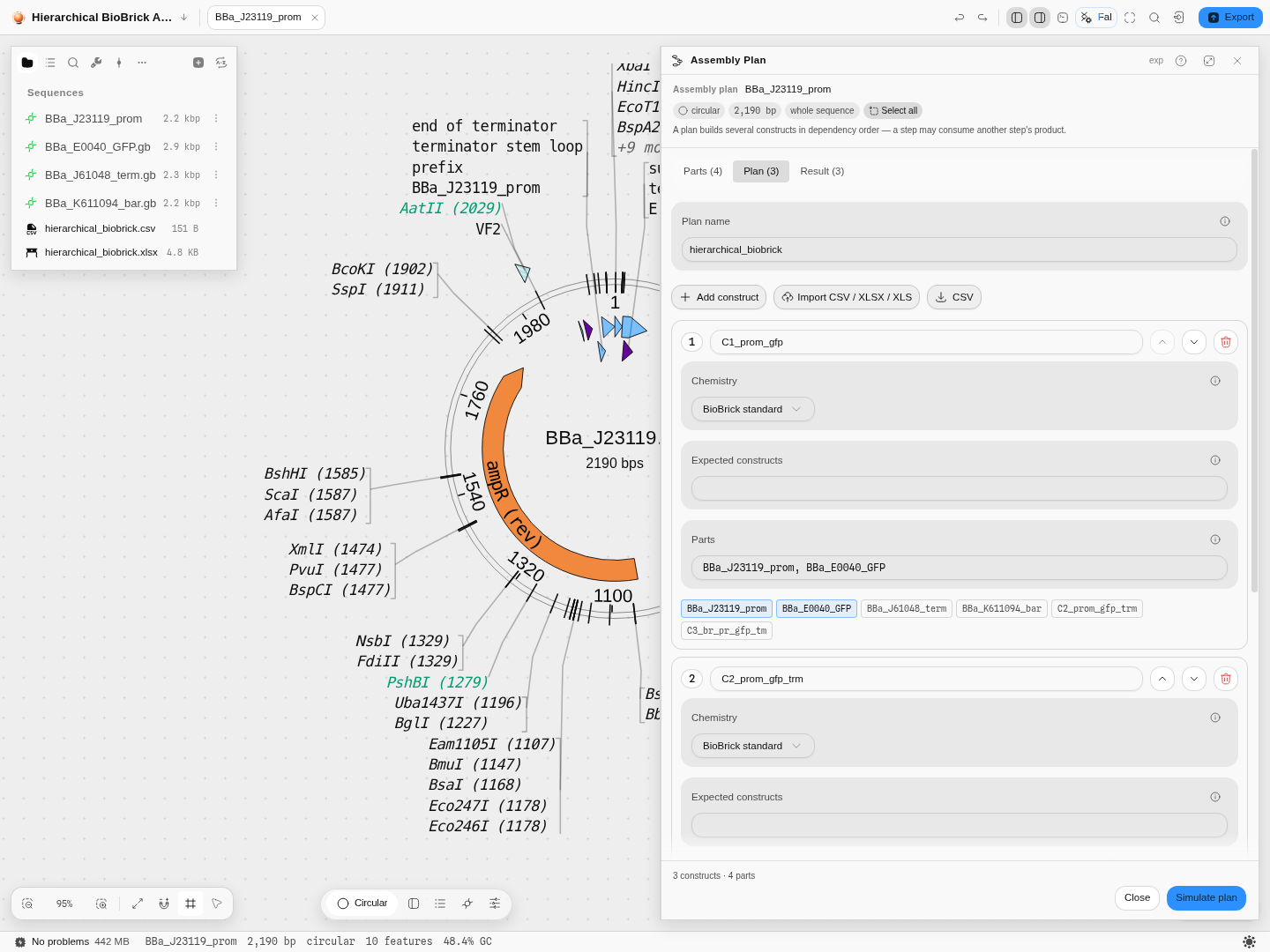 The plan tab on the multi-level sample. Each row names its construct, its chemistry and its parts,
and the part chips include the other constructs —
The plan tab on the multi-level sample. Each row names its construct, its chemistry and its parts,
and the part chips include the other constructs — C2_prom_gfp_trm and C3_br_pr_gfp_tm are
offered to row 1 exactly as the four physical parts are, which is how a dependency is declared.
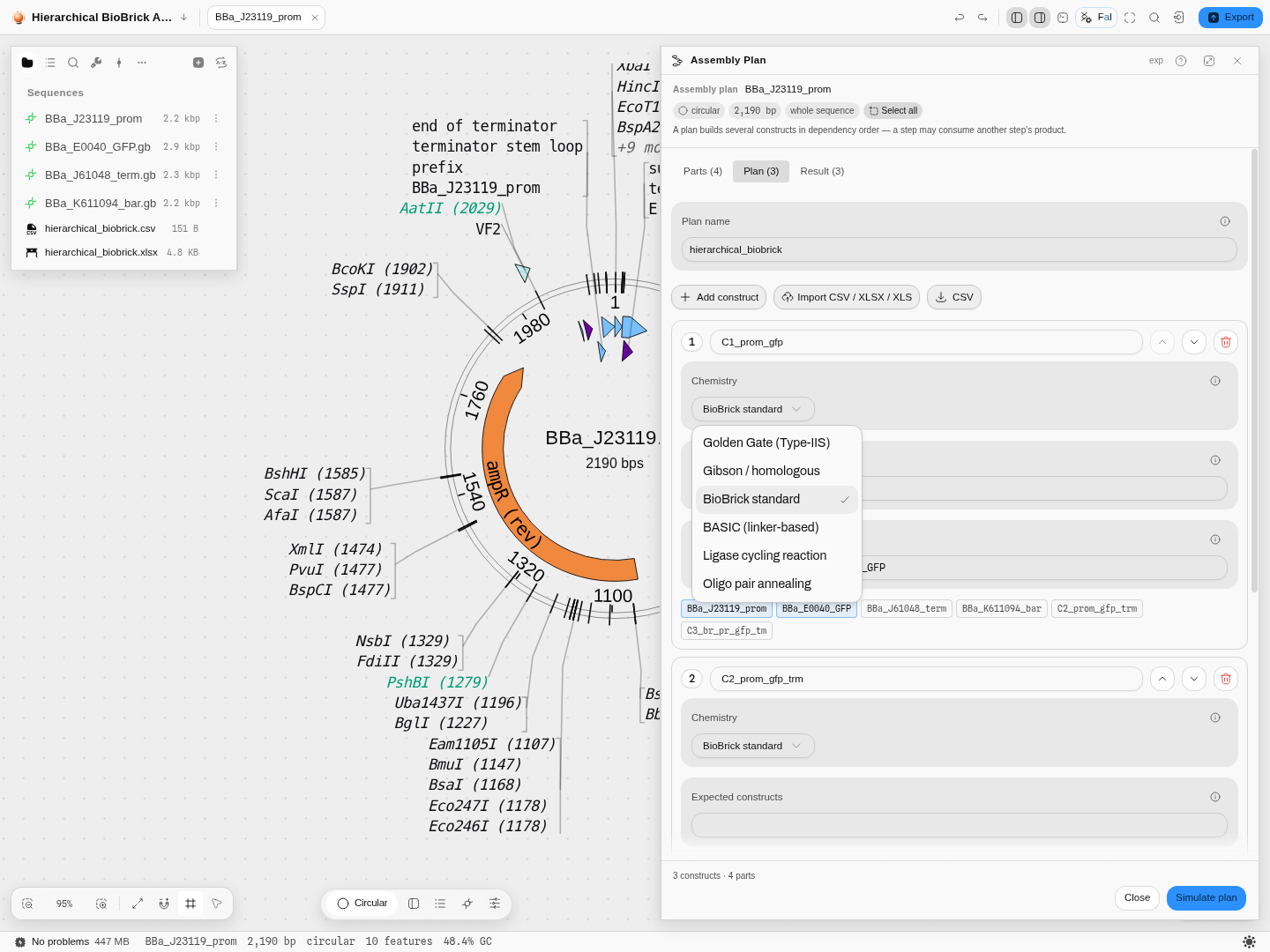 Chemistry is a per-step choice, so one plan can mix them: a Type IIS level can feed a Gibson level.
Oligo pair annealing is the odd one — it makes an adapter rather than joining parts.
Chemistry is a per-step choice, so one plan can mix them: a Type IIS level can feed a Gibson level.
Oligo pair annealing is the odd one — it makes an adapter rather than joining parts.
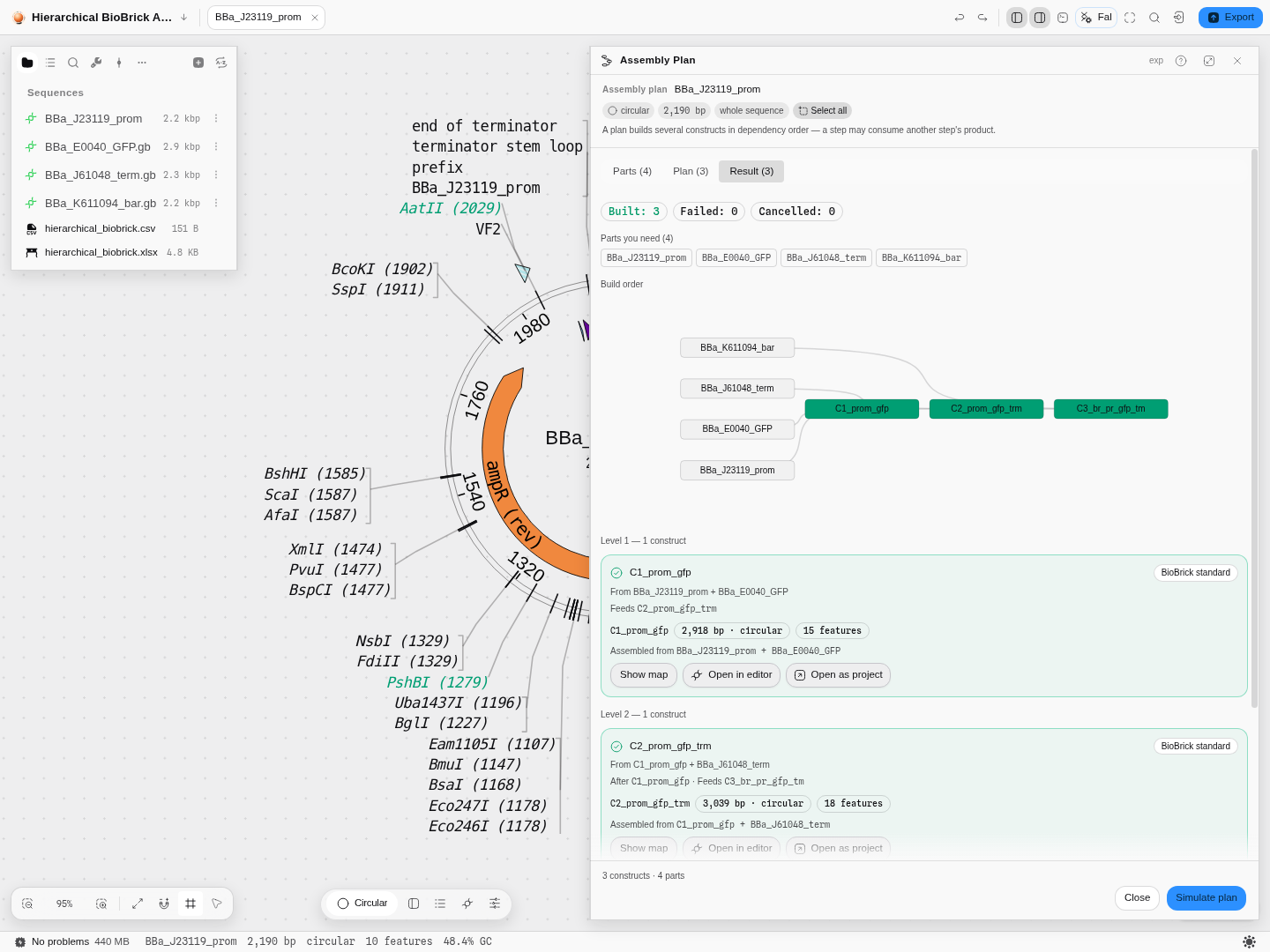 After Simulate plan: the tally, the four leaf parts you must physically have, the build-order
graph with the three constructs picked out from the parts that feed them, and each level's product
with its real length, topology and feature count — 2,918 bp / 15 features at level 1, rising to
3,072 bp / 22 features at level 3 as each product carries its parents' annotations forward.
After Simulate plan: the tally, the four leaf parts you must physically have, the build-order
graph with the three constructs picked out from the parts that feed them, and each level's product
with its real length, topology and feature count — 2,918 bp / 15 features at level 1, rising to
3,072 bp / 22 features at level 3 as each product carries its parents' annotations forward.
Related
Feeds it: PCR Simulation and Primer Designer, for parts you have to make first.
Follows it: Restriction Digest and the gel bench, to design the diagnostic check for each construct; Sequencing Verification, to confirm the built molecule against the predicted one.
Alternatives to it: Gibson Assembly, Golden Gate Assembly and Grammar Assembly, each for a single assembly in a single chemistry.
In this group: Restriction Digest · Ligation · Gibson Assembly · Golden Gate Assembly · Grammar Assembly · Recombination Cloning · Site-Directed Mutagenesis · Site-saturation mutagenesis · Multi-site mutagenesis