
Plasmid Editor
Open a plasmid and work on it in the view that suits the task: the circular map for the whole construct, the linear map for a region, the sequence view for individual bases.
| Reached by | Opening any project — every sequence in it becomes a tab. Also Tools → Plasmid Editor and the command palette |
| Formats | GenBank FASTA FASTQ EMBL GFF3 GTF BED SnapGene .dna JSON |
| Sample project | Virtual Gel Bench · Feature files · and every other starter — this is where they all open |
What it does
This is not a tool beside the editor; it is the document. Every other tool in the workbench reads the sequence that is open here, writes its results back onto it, and takes its selection as input. When a page elsewhere in these docs says "the open plasmid", it means this.
A plasmid is one record with three drawings of it, switched from the bar under the canvas without reloading anything:
| View | What it is for |
|---|---|
| Circular | The whole construct as a closed loop — feature arcs, cut-site leaders, the origin at the top |
| Linear | The same layers on a straight rail: for anything that is not a closed molecule, and for reading two regions that sit far apart on a circle |
| Sequence | The actual bases, both strands, wrapped, with annotation lanes and the translation under them |
They are three drawings of one record. A feature you add in the sequence view is on the circular map immediately — not because anything synchronises, but because there is nothing to synchronise. What each view draws, layer by layer, is the sequence map canvas.
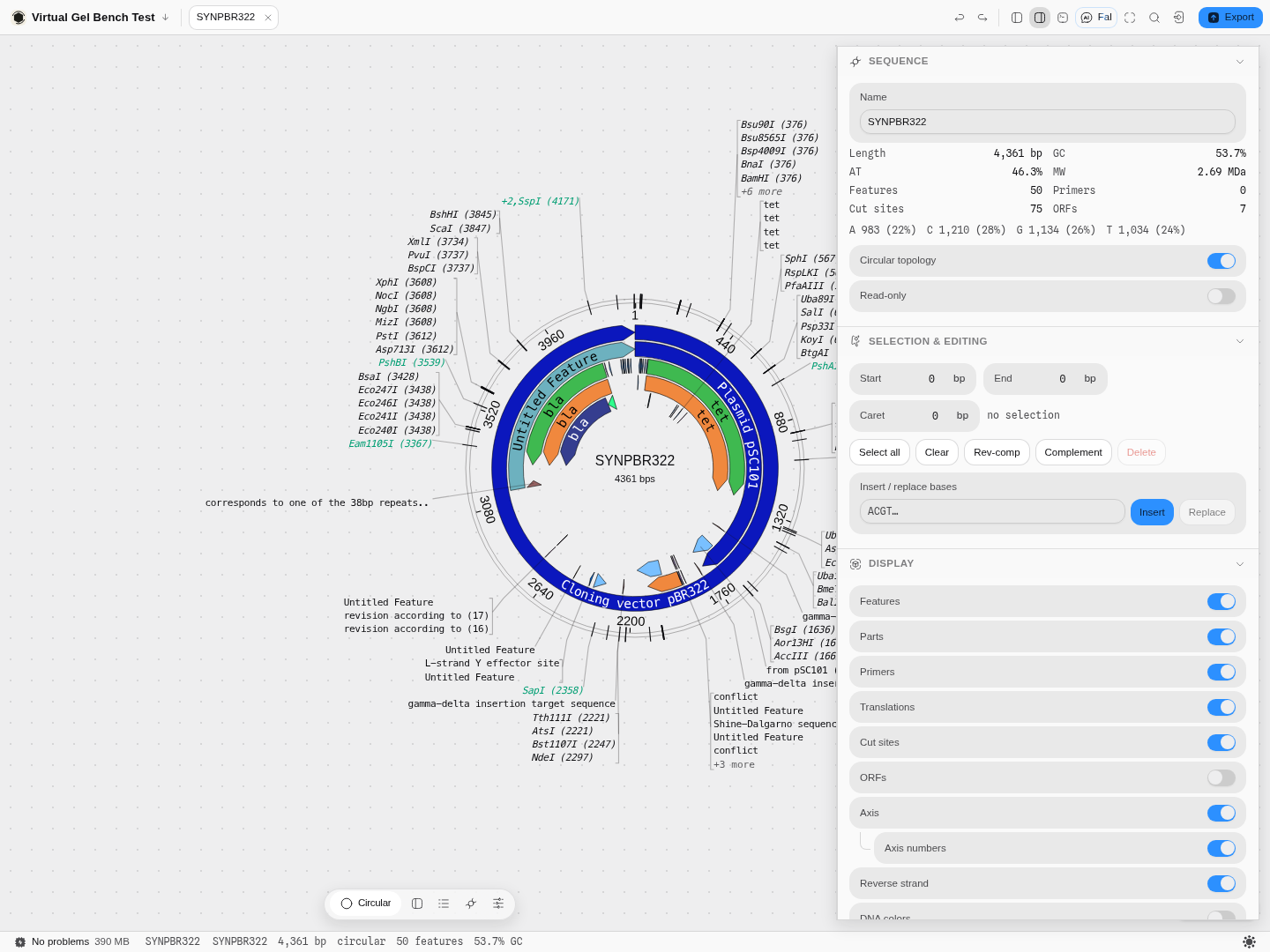 SYNPBR322 open on the circular view. The inspector on the right is reading the same record the map
is drawing: 4,361 bp, 53.7% GC, 50 features, 75 cut sites, 7 ORFs, and the base composition
underneath — A 983 (22%) · C 1,210 (28%) · G 1,134 (26%) · T 1,034 (24%). Nothing there was typed in.
SYNPBR322 open on the circular view. The inspector on the right is reading the same record the map
is drawing: 4,361 bp, 53.7% GC, 50 features, 75 cut sites, 7 ORFs, and the base composition
underneath — A 983 (22%) · C 1,210 (28%) · G 1,134 (26%) · T 1,034 (24%). Nothing there was typed in.
When you'd use this
Whenever you have a construct in front of you. The three views answer three different questions, and choosing the wrong one is the most common reason a plasmid is hard to read:
- "What is this construct?" → circular. Feature arcs and the cut-site ring answer what is in it and where can I cut it at a glance, and neither is legible base by base.
- "Where exactly does this feature start?" → sequence. Arcs cannot show you a frame, a start codon or a one-base slip; the base rows can.
- "Is this even a plasmid?" → linear. A PCR product, a genomic fragment, a synthesised gene and a sequencing read are all linear molecules, and drawing them as rings asserts a junction between the last base and the first that does not exist.
That last point is a correctness issue, not a preference — see Topology below.
Reach for something else when: you want to cut the plasmid and see the fragments — that is Restriction Digest and the gel bench; you want to join fragments — Gibson, Golden Gate or Ligation; you are checking a finished clone against a Sanger read — Sequencing Verification.
What this computes
This is the document, not a tool beside it — so what it computes is the record's own facts, and every other tool reads them rather than deriving its own.
- Length, topology and GC%, the feature count, the primer count, the cut-site count under the active enzyme collection, and the ORF count — the same numbers the status bar and the inspector read, from one declaration, so two surfaces cannot disagree about one record
- Base composition — A, C, G, T with their percentages — and molecular weight
- Three drawings of one record, switched without reloading: Circular (the closed loop, with feature arcs, cut-site leaders and the origin at the top), Linear (the same layers on a rail, for anything not closed and for reading two distant regions together), and Sequence (the bases, both strands, wrapped, with annotation lanes and the translation beneath)
- The live selection as a start, an end and a caret, in the coordinate convention every panel takes as input
- Circularity as part of every answer, not a display flag: a feature or a cut site spanning the origin is real, and is counted
Where it lives
Opening a project opens each of its sequences as its own tab, and each tab carries its own view state — so a circular vector and a linear insert can sit side by side, each drawn as what it is.
The bar under the canvas switches Circular · Linear · Sequence, and carries the controls that belong to the view that is leading — a split against the sequence view for the two maps, the jumps for the sequence view. Controls a view does not have are absent rather than greyed out.
The status line under everything states the record's own facts — name, length, topology, feature count, GC — so the thing you are about to act on is named before you act on it.
Inputs and outputs
It accepts every sequence-bearing format the app reads: GenBank, FASTA, EMBL, SnapGene .dna,
GFF3, GTF, BED, JSON and the rest. Features, parts, primers and notes come in with the record and
are drawn as their own layers.
It refuses, with the reason on screen: a FASTQ opens in the read-quality viewer instead, because drawing only the bases of a read set hides the per-base quality that decides whether the bases mean anything. A project id that does not exist gives a named "No such project" page rather than an empty editor.
It produces the edited record — exportable to the same formats, as an image, or straight into any other tool without an export step.
Controls
Every readout on the record, and every layer, is exposed rather than assumed:
Sequence — name, and the two properties that change how the molecule is treated: circular topology and read-only. Alongside them the derived facts: length, GC, AT, molecular weight, feature / primer / cut-site / ORF counts, and the per-base composition with percentages.
Selection and editing — start, end and caret as editable base positions (type a number, the canvas goes there), select all, clear, rev-comp, complement, delete, and an insert / replace box that takes bases directly.
Display — independent toggles for features, parts, primers, translations, cut sites, ORFs, the axis and its numbers, the reverse strand, and DNA colouring. Each one is a layer of the same record, so turning ORFs on adds a reading of the sequence rather than a different document.
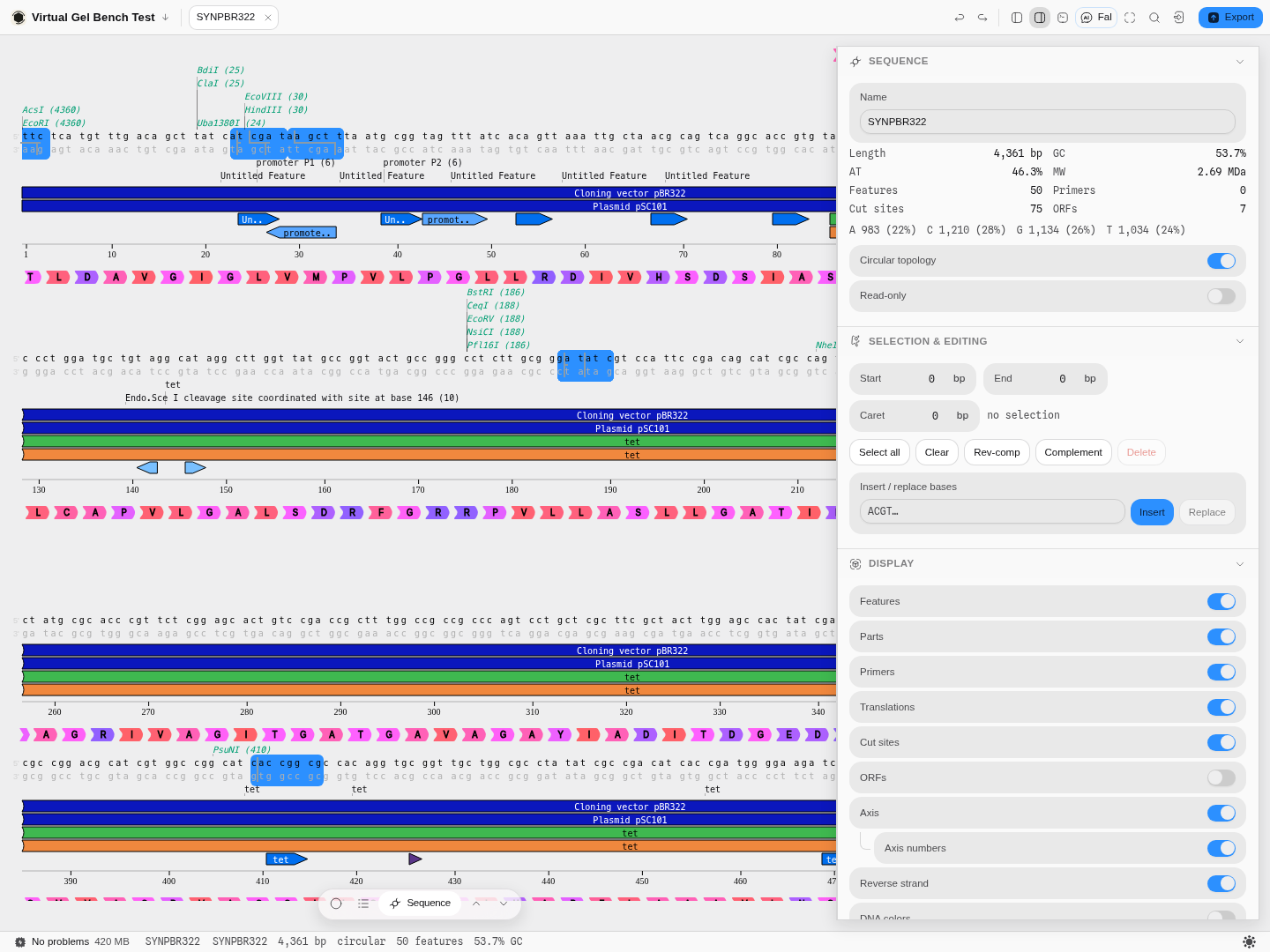 The same plasmid on the sequence view with every layer on. Both strands are shown with the reverse
strand under the forward one, cut sites are labelled above the bases they cut (
The same plasmid on the sequence view with every layer on. Both strands are shown with the reverse
strand under the forward one, cut sites are labelled above the bases they cut (ClaI (25),
HindIII (30), EcoRV (188)), feature lanes run under each row, and the amino-acid track beneath
translates the coding strand. The selection highlight is the same selection the inspector's Start /
End boxes hold.
The science
Topology is a property of the molecule, not a view
A circular record asserts that the last base is joined to the first. That claim changes real answers: a feature can span the origin, a restriction fragment can wrap around it, and a digest of a circular molecule with n cut sites gives n fragments where a linear one gives n + 1.
So the view a document opens on is derived from the document, not from a default. A linear record opens linear. Changing the circular topology switch changes the molecule, not the picture, and every downstream tool — digest, PCR, assembly — reads it from the record.
Coordinates
Positions are shown 1-based and inclusive, which is what a GenBank file and a lab notebook both use. The caret sits between bases; a selection covers bases. That distinction is why the inspector shows a caret position and a start/end pair separately rather than pretending they are the same number.
Where the numbers come from
- Cut sites are found with recognition sites and cut offsets checked against REBASE.
- Translations use the NCBI genetic-code tables, and every declaration of that code in the workbench is checked against the NCBI authority and against each other.
- GC and base composition are counted, not estimated.
- The molecular weight is the mass of a linear single strand with free (5′-OH) ends — the
residue masses plus one water for the two termini — and it matches Biopython's
molecular_weightexactly, from a single base to 20 kb. A strand that still carries a 5′-phosphate, as a restriction fragment does, weighs about 61 g/mol more per strand than this readout says; that is 1% on a 20-mer and 0.005% on a 4.4 kb plasmid.
Limitations
- The circular map's colour key overlaps a dense map. On a plasmid with features in every quadrant there is no empty corner to place it in; use the canvas bar's colour key for reading, and the on-map legend only when you are exporting a figure.
- Very wide records need the linear view. The circular map's leaders can only relax so far before a crowded region has to hide labels; the linear rail has room the circle does not.
Related
- The sequence map canvas — every layer this editor draws, in detail
- Restriction Digest and the gel bench
- Gibson Assembly · Golden Gate
- Primer Designer · PCR Simulation
- Sequencing Verification
Export Image
Get a publication-ready figure of a plasmid out of the editor — at the physical size and resolution a journal asks for, as vector or raster.
Edit annotation
Add or edit a feature, a part or a primer — the same fields the editor's dialog has, docked in the rail beside the map instead of floating over it.