
Read quality viewer
| Document kind | fastq |
| Drawn from | a file — it can also be previewed in the file manager |
| Formats that open here | FASTQ |
| Refuses to draw below | 240px wide |
What it draws
A run, not a molecule.
A FASTQ file is a stack of reads, each carrying one quality character per base. Opening it as a sequence would draw the bases and throw away the half that decides whether you can trust them, so a FASTQ gets its own canvas: mean quality per cycle across every read in the file, or one quality strip per read, plus the totals a quality check turns on — Q20 and Q30 fractions, GC, N content, read-length spread.
The per-cycle view is the one you look at first. Sequencing chemistry degrades along the read, so quality normally starts high and falls; where it falls, and how fast, is what decides your trimming.
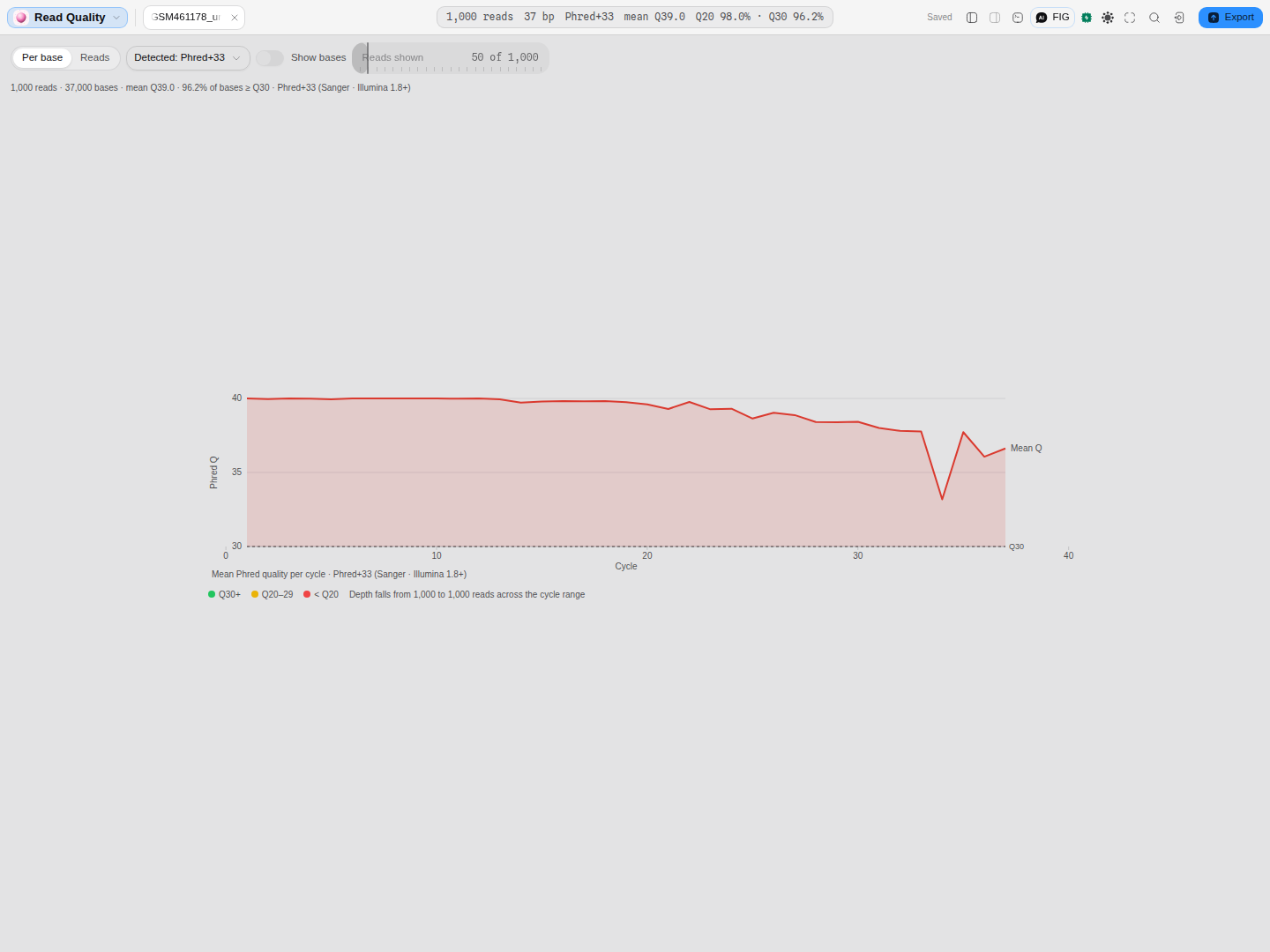 1,000 reads of a public Drosophila RNA-seq run (37 cycles). Hovering a point names the cycle, the
mean quality across all reads at that cycle, and the error probability it implies —
1,000 reads of a public Drosophila RNA-seq run (37 cycles). Hovering a point names the cycle, the
mean quality across all reads at that cycle, and the error probability it implies —
cycle 19: mean Q39.7 over 1,000 reads (0.01% error). The decay from Q40.0 at cycle 1 to Q36.6 at
cycle 37 is the ordinary 3′ decline you trim against.
The Q20 and Q30 lines are drawn only when they fall inside the axis. This run never drops below Q30, so only the Q30 line appears — a threshold below everything in the file tells you nothing that the axis has not already told you, and drawing it would push the scale down and flatten the decay you came to look at. If you open a poorer run, both lines appear.
Like every chart in the workbench, this one can be copied or saved as a figure — hover it and use the control at its top right.
What opens in it
Any .fastq or .fq, compressed or not — a .fastq.gz is decompressed on the way in and arrives
here, not in an archive viewer.
What does not open here, though you might expect it to: a FASTA. It has no quality scores at all, so it draws as a sequence. And a FASTQ never opens as a sequence map, even though it parses as one: 1,000 reads is one instrument run, not 1,000 molecules to annotate.
Nothing is dropped on the way in — every read in the file is scanned for the statistics. What is limited is the per-read list, which shows as many reads as you ask for (see Controls).
What this computes
Every statistic here is computed over every read in the file — nothing is sampled. What is limited is the per-read list you can page through, not the scan behind the numbers.
- Mean quality per cycle, across all reads at each cycle. This is the view you read first: sequencing chemistry degrades along the read, so quality normally starts high and falls, and where it falls and how fast is what decides your trimming.
- The error probability each mean implies, on the hover readout, because a Phred score is a logarithm and the difference between Q30 and Q37 is not what it looks like on a linear axis.
- Per-read quality strips, for looking at individual reads rather than the run.
- Q20 and Q30 fractions, which are fractions of bases, not of reads.
- GC content, N content and the read-length spread over the file.
- The quality encoding, which the file does not state and which changes every number above: Phred+33 and Phred+64 use overlapping character ranges, so the encoding has to be inferred rather than assumed, and getting it wrong shifts every score by 31.
- Which threshold lines are worth drawing. The Q20 and Q30 guides appear only when they fall inside the axis: a threshold below everything in the file tells you nothing the axis has not, and drawing it would push the scale down and flatten the decay you opened the file to see.
Quality is a Phred score, Q = −10 log₁₀(P), with P the probability the base is wrong — Q20 is one error in 100 bases, Q30 one in 1,000, Q40 one in 10,000.
Reading it
Quality is a Phred score: Q = −10 log₁₀(P), where P is the probability that the base is wrong. Q20 is one error in 100 bases, Q30 one in 1,000, Q40 one in 10,000. The Q20/Q30 fractions are fractions of bases, not of reads.
The number depends on an encoding the file does not state — and that is the trap this canvas exists for. FASTQ stores each score as one ASCII character, but the offset used to write it varies by instrument era (Cock et al. 2010, Nucleic Acids Research 38(6)–1771):
| Convention | Offset | Written by |
|---|---|---|
| Phred+33 (Sanger) | 33 | Everything since Illumina 1.8, and every Sanger-derived tool |
| Phred+64 | 64 | Illumina 1.3–1.7 |
| Solexa+64 | 64, on a different score scale | Pre-Illumina 1.3 Solexa machines |
Read a Phred+64 file as Phred+33 and every score is inflated by 31 — a mediocre run reads as a perfect one. So the viewer infers the encoding, shows you which one it chose, shows the evidence that chose it, and lets you override it.
The inference is a range argument, and it is only ever as strong as the file allows:
- If a file contains a character below Solexa's floor, it cannot be a +64 convention, and the case
is settled. The viewer says so — "Lowest quality character is ASCII 35 (
#), below Solexa's floor of 59 — only an offset of 33 can produce it" — and the impossible conventions are offered but greyed out, each stating why. - If every character is ASCII 64 or above, the file fits +64 and +33 (it would just be a very high-quality Sanger file). That is genuinely ambiguous, the viewer says so in amber, and it defaults to Phred+64 because that is the convention for that range.
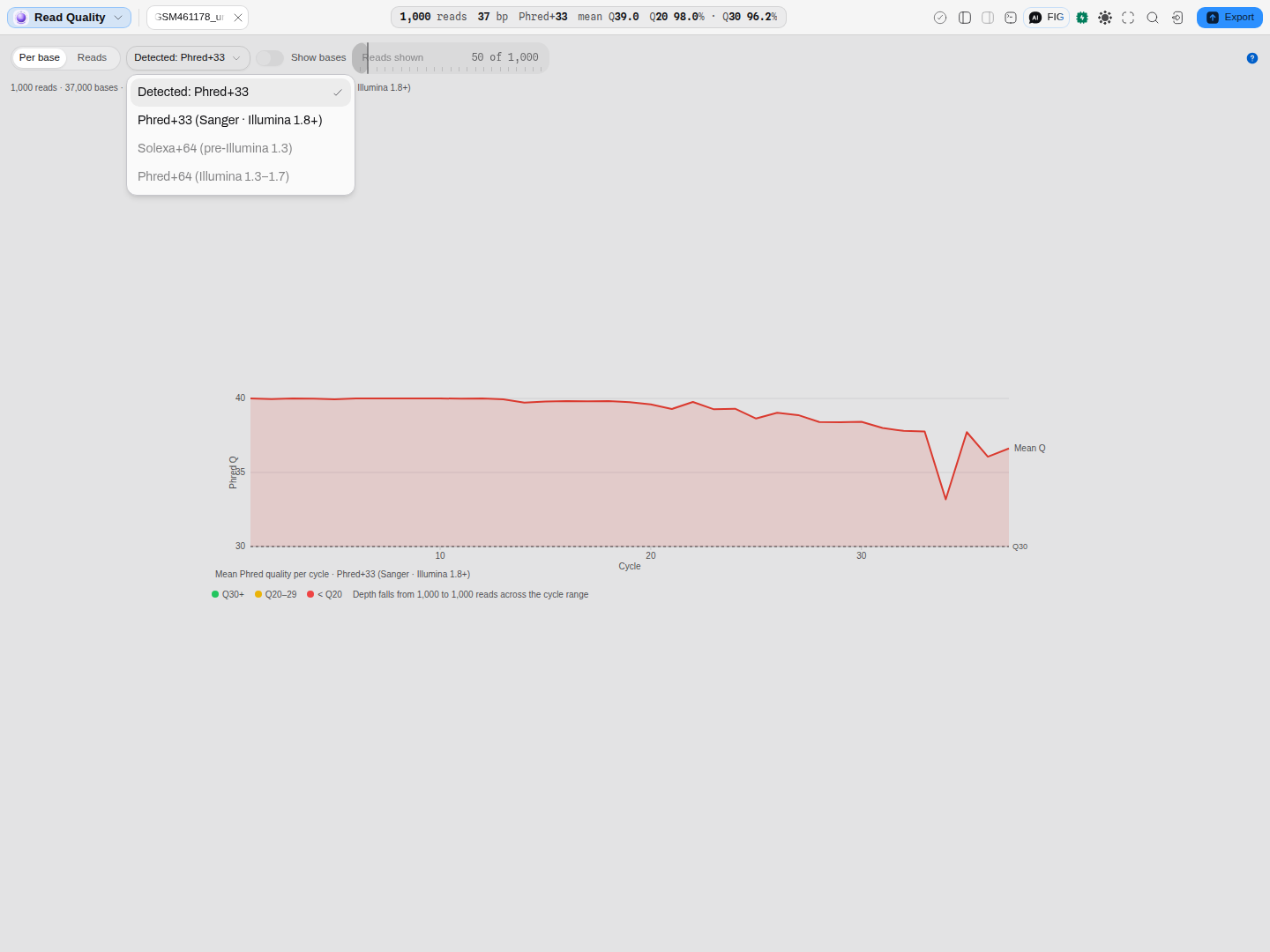 A modern Illumina file. Solexa+64 and Phred+64 are listed but not choosable — the file's own
characters rule them out, and hovering either says which characters and why. They stay visible on
purpose: "impossible for this file" and "not supported" are different facts.
A modern Illumina file. Solexa+64 and Phred+64 are listed but not choosable — the file's own
characters rule them out, and hovering either says which characters and why. They stay visible on
purpose: "impossible for this file" and "not supported" are different facts.
Read length is not assumed. Uniform-length runs report one number; a trimmed or variable run reports the range and how many distinct lengths it contains.
Controls
| Control | What it does to the drawing |
|---|---|
| View: Per base / Reads | Per base draws the mean-quality-per-cycle curve over every read. Reads draws one coloured strip per read, so you can see whether a poor mean is a uniform decline or a few bad reads |
| Encoding | The offset used to turn quality characters into scores. Detected: … follows the inference, with the evidence behind it on hover, and a variant the file's characters rule out is offered disabled, with the reason. Picking a convention explicitly pins it. Every number on the canvas depends on this — the totals, the Q20/Q30 fractions, the per-cycle curve and the per-read colours all move together |
| Show bases | Prints each read's sequence under its quality strip. Available in the Reads view only — in Per base there is no read to print it against, and the control says so |
| Reads shown | How many reads the per-read list draws (10–500). The statistics above are always over the whole file; this changes only how much of the list is rendered |
Every one of these survives into the read-only preview in the file manager — they are how you read the document, not how you change it. There is nothing to change: a FASTQ is evidence, and the viewer never writes to it.
What you can take out of it
Everything the canvas has measured can leave it as a file, under the encoding you are reading with. That qualifier is the whole point: the same reads under Phred+33 and Phred+64 give two different quality tables, 31 points apart, and the file itself says which is right. So every table below names the convention it was computed under, and whether it was inferred or you chose it.
| What you get | What is in it |
|---|---|
| Per-cycle quality | One row per sequencing cycle: the mean Phred score at that cycle, and how many reads reached it. The depth column is what tells you whether a late-cycle decline is real or the average of a handful of long reads |
| Per-read quality | One row per read: its identifier, its length and its mean Phred score. This is the table to sort when you want to know which reads to drop |
| Read lengths | How many reads have each length, shortest first — the distribution behind the minimum and maximum quoted above |
| FASTA | The reads themselves, bases only. FASTA has no field for quality, so every score is dropped, including the convention you are reading under |
The statistics are over the whole file, not the reads currently listed.
Where it appears
- A stage tab, when you open a FASTQ from the Files rail or the file manager.
- The file manager's preview pane, where the same canvas draws read-only beside the file list, with its controls above the box and its statistics as rows beneath it.
- A project card in the lobby, when the FASTQ is the most representative file in the project.
The drawing is the same in all three; only the surrounding chrome changes.
Performance and limits
The file is scanned off the main thread, so the tab stays responsive while a large run is read. The statistics cover every read; only the per-read list is capped, by the Reads shown control.
Two honest limits:
- A file over 64 MB is refused, with the reason, rather than approximated — a FASTQ carries no index to seek into, so there is no cheap way to read a fair sample of a large one. The statistics describe the whole run, and reading only the head would report the first reads off the machine while labelling them as the file's — a number that looks right and is not. Subsample first, and the quality of a random subsample is a fair estimate of the run's.
- Below 240 px wide the canvas refuses to draw rather than drawing a curve with no axis room. Widen the pane or open it as a full tab.
Worked example: the same 25 reads, two conventions
The Read quality starter carries a file whose characters fit all three conventions — 25 real Illumina reads written Phred+64, with quality characters spanning ASCII 70–88.
Open it and the viewer reports the ambiguity rather than hiding it:
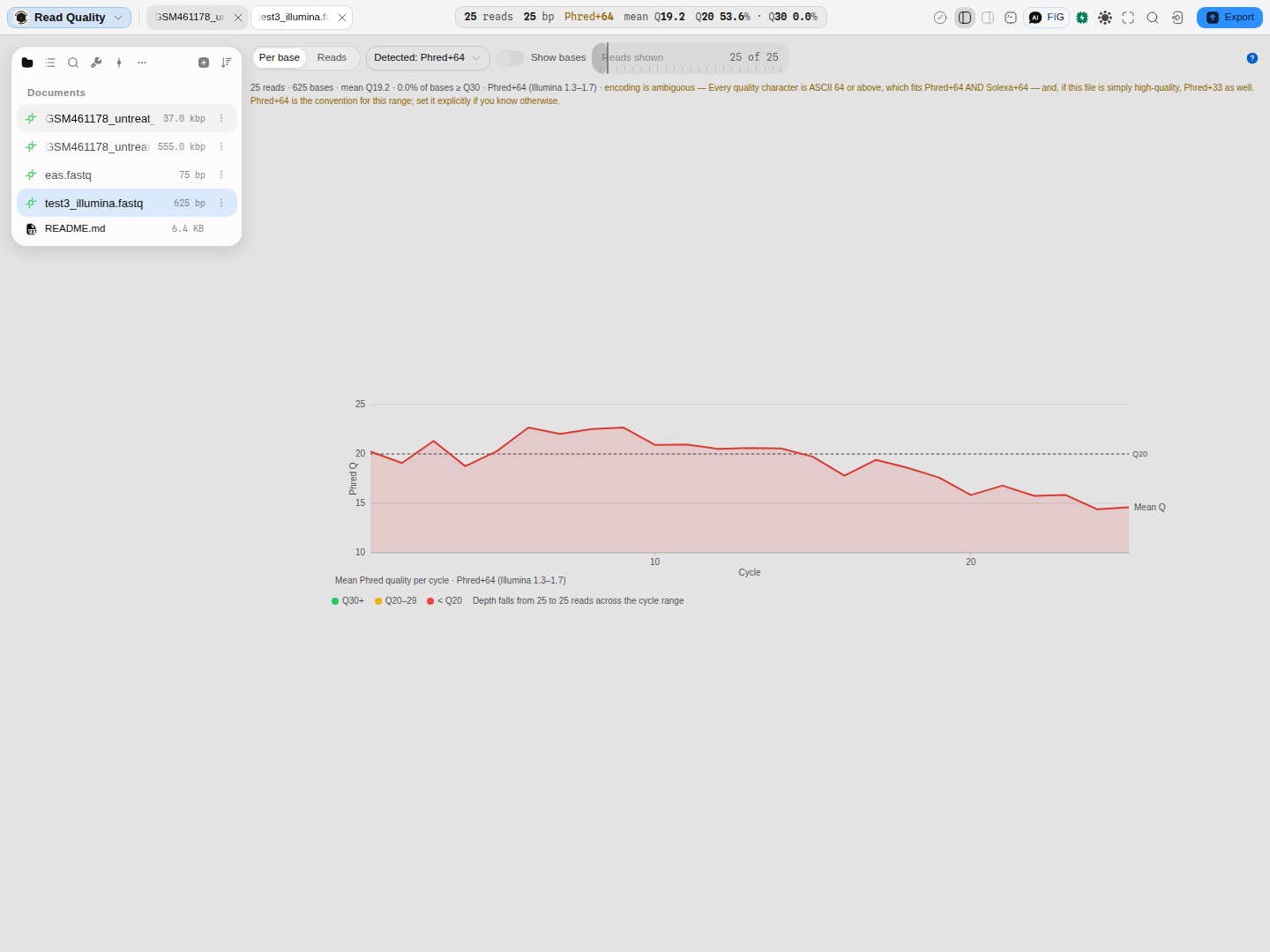 As detected: mean Q19.2, 0.0% of bases ≥ Q30 — a middling run, which is what these reads are.
The amber line is the evidence: every quality character is ASCII 64 or above, which fits Phred+64 and
Solexa+64, and would also fit Phred+33 if the run were simply excellent.
As detected: mean Q19.2, 0.0% of bases ≥ Q30 — a middling run, which is what these reads are.
The amber line is the evidence: every quality character is ASCII 64 or above, which fits Phred+64 and
Solexa+64, and would also fit Phred+33 if the run were simply excellent.
Now switch the encoding to Phred+33:
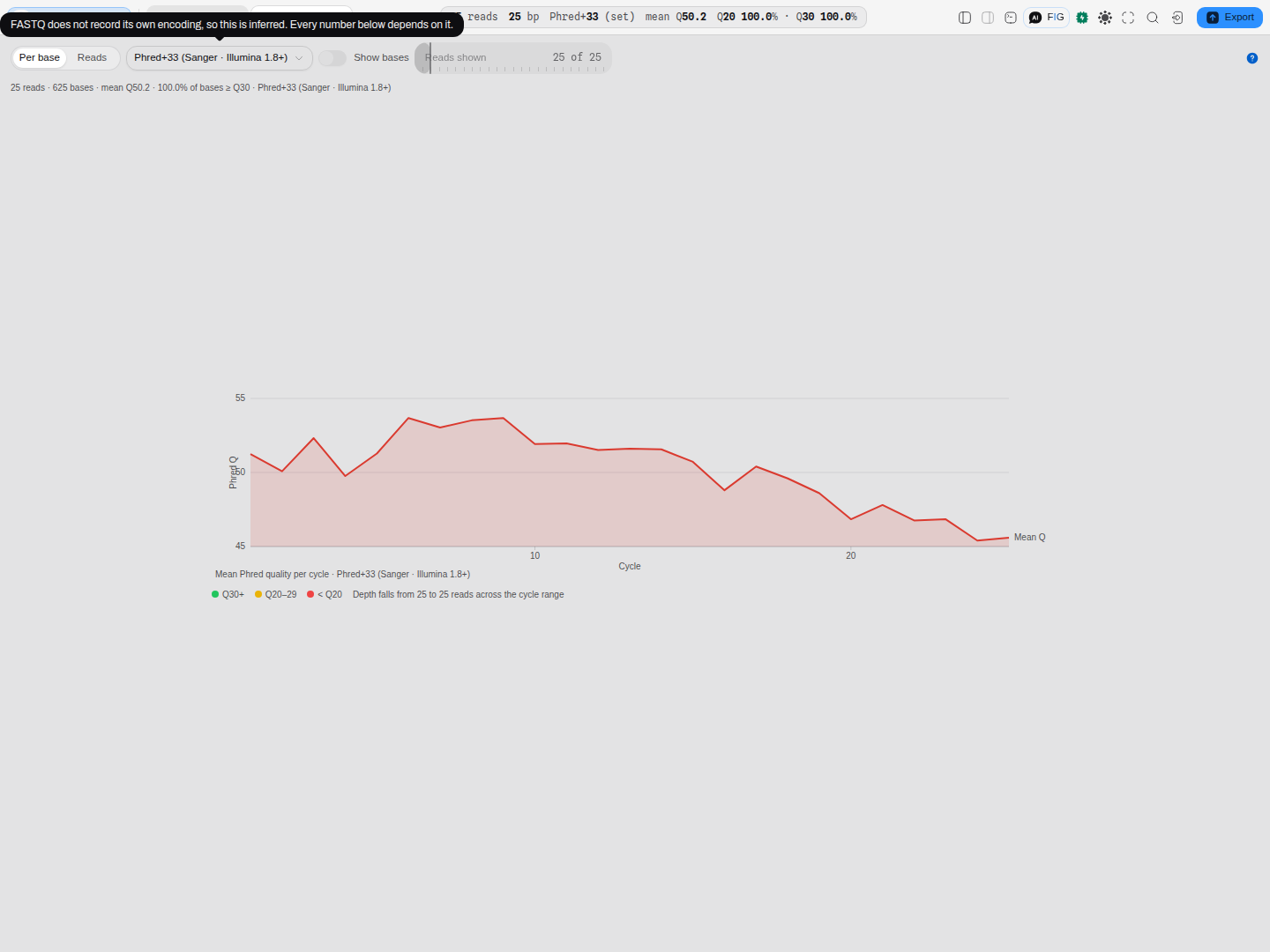 Same 625 bases, same file, one control moved: mean Q50.2, 100% of bases ≥ Q30. Q50 is a score no
sequencer produces — one error in 100,000 bases — and that impossibility is the tell. If a quality
report looks too good, check the encoding before you believe it.
Same 625 bases, same file, one control moved: mean Q50.2, 100% of bases ≥ Q30. Q50 is a score no
sequencer produces — one error in 100,000 bases — and that impossibility is the tell. If a quality
report looks too good, check the encoding before you believe it.
Why it matters downstream: trimming thresholds, per-base filters and aligner quality models all read these scores. A 31-point inflation does not fail loudly; it quietly disables the filtering you thought you had switched on.
Screenshots
The frames on this page are placed where they teach rather than collected at the end: the per-cycle curve under What it draws, the disabled conventions under Reading it, and the same file read two ways under Worked example. All four are the real viewer, driven on the Read quality starter's own files at 1440×1080.
Related
Feeds it: nothing — a FASTQ arrives from your sequencer or a public archive, and you can fetch one straight into a project from the database browser.
Follows it: the pileup viewer once reads are aligned; the alignment viewer if you want to compare a handful of reads directly; Sanger verification for capillary traces, which carry per-base quality of their own and are read on the chromatogram canvas instead.
The quality arithmetic is shared with the importer, so the parser and this view cannot disagree about what a file means, and it is checked against Biopython.
Read next: Check a run's read quality, and settle its encoding — this canvas end to end on the starter, with the numbers above reproduced step by step.