
Edit annotation
Add or edit a feature, a part or a primer — the same fields the editor's dialog has, docked in the rail beside the map instead of floating over it.
| Reached by | Right-click a feature → Edit · double-click an annotation · select a region → Add feature |
What it does
An annotation is a name, a type, a strand and a range on a sequence, plus any notes you attach to it. This panel is where all four are set, for the three kinds the editor draws:
| Kind | What it is |
|---|---|
| Feature | A biological annotation — a CDS, a promoter, a terminator, an origin. Carries a type, which is what colours it on the map |
| Part | A synthetic-biology building block: a span you intend to reuse in an assembly |
| Primer | An oligo, stored by the region it binds rather than by its own sequence |
The fields differ slightly by kind, and the differences are the point: only a feature has a Type, and a primer's Start and End are labelled Bind Start and Bind End because the numbers mean its binding site, not the oligo's own coordinates. Reading them as the primer's own span is the mistake this labelling exists to prevent.
On a primer, the panel also measures the oligo — see The oligo readout below. A primer is the one annotation whose identity is a sequence rather than a span, so the span alone does not tell you whether it will work.
When you'd use this
- You imported a FASTA and it has no features. A FASTA carries bases and nothing else — every annotation on that sequence has to come from somewhere. Either annotate by hand here, or run Auto-Annotate first and correct what it found.
- Auto-annotation got something nearly right. Adjusting a boundary by a few bases is this panel, not a re-run.
- You are marking up a construct you designed so the map reads as a design rather than a string — the promoter, the RBS, the CDS, the terminator.
- You want a region reusable. Save it as a part and it becomes a unit you can pick up in Grammar Assembly.
- You are recording a primer you actually ordered against the template it binds, so the map shows where it lands. For designing new ones, that is the Primer Designer.
What this computes
- The annotation itself, written through the editor's headless controller onto the open sequence, so it appears on every view at once — circular, linear, row — because they all draw one document
- The panel seeded from what you opened it on: an existing feature's name, type, strand and range arrive already filled, rather than as a blank form over a feature that already has values
What it will not do, deliberately: it does not create the sequence, and it does not validate biology. A CDS is written where you ask for one.
Where it lives
It has no Tools-menu entry, on purpose — you reach it from the thing you are editing:
- Right-click a feature on the map or in the sequence → Edit.
- Double-click an annotation.
- Select a region → Add feature / part / primer from the context menu.
Three of the editor's own dialogs (AddOrEditFeatureDialog, AddOrEditPartDialog,
AddOrEditPrimerDialog) are relayed into this one panel rather than opening as floating modals. That
is the whole design: a modal covers the map you are annotating, and the map is the thing you need
to see while you set a range.
Two behaviours follow from being docked rather than modal, and both are deliberate:
- With no unsaved change, selecting another feature dismisses the panel and the rail follows your new target. You do not have to close it.
- With an unsaved change, the panel pins itself, and pressing Escape raises Save / Discard / Cancel rather than silently dropping your edit.
Inputs and outputs
In: an existing annotation, or a selection to create one on. The panel is seeded from whatever you opened it on — a feature's current name, type, strand and range arrive already filled.
Out: the annotation, written through the editor's headless controller onto the open sequence. It appears on every view at once (circular, linear, row) because they all draw the same document.
What it will not do: it does not create the sequence, and it does not validate biology. A CDS whose length is not a multiple of three is accepted — the panel records what you say is there. The tools that care about that (translation, protein analysis, the optimizer) do the checking, at the point where it matters.
Demo
Not recorded yet.
Worked example
Open any starter that carries data/samples/Genbank/PBR322.gb — Primer test, Gibson backbone
prep, Virtual gel bench, Ligation (sticky & blunt), Lab notebook and Workflow
pipeline all open that record first — then right-click the bla CDS → Edit. The record is the
real 4,361 bp SYNPBR322, and the panel opens seeded from it:
Name    bla
Type    CDS
Strand  ⟵ reverse          (the record writes it complement(3293..4153))
Start   3293
End     4153
        Length: 861 bp
861 is 287 codons — divisible by three, as a CDS should be, and the readout under the range is how you check that without doing the arithmetic.
The neighbouring tet CDS at 86..1276 is the useful contrast: forward strand, 1191 bp, 397
codons. Two CDSs on one plasmid pointing opposite ways is the normal case, and getting the strand
wrong on either silently changes the protein the editor translates — which is why Strand is a field
here rather than something inferred.
Now change Type from CDS to misc_feature and save: the annotation keeps its range and name,
and changes colour on the map, because feature type is what drives colour. Change it back and the
colour returns. That is the fastest way to see that type is a real field with consequences and not a
label.
To add one: select any region on the sequence, right-click → Add feature, and the Start and End arrive from the selection rather than needing to be typed.
Which types the picker offers
The picker's standard half is the INSDC feature table — the 52 feature keys the International Nucleotide Sequence Database Collaboration defines for GenBank, ENA and DDBJ records, checked against version 11.4 (April 2026). Those are the keys an exporter can write and another tool will read back unchanged, and they are flagged as standard for that reason.
The picker offers three further groups, kept separate because they are not feature keys:
- The
/regulatory_classand/ncRNA_classcontrolled vocabularies — the values INSDC defines for theregulatoryandncRNAkeys, so a promoter or a guide RNA can be named as what it is. - Retired keys such as
enhancer,promoter,terminatorandRBS, folded intoregulatoryin December 2014 but still written by other editors and still present in files in the wild, so a record already carrying one keeps its type and its colour. - Design labels with no INSDC home at all —
linker,barcode,homology_arm,selectable_marker,kozak_sequenceand the rest — which describe a construct rather than a published record.
A type outside all four groups is still yours to type in: nothing is discarded, it simply is not one the standard names.
Controls
| Control | Kinds | What it does |
|---|---|---|
| Name | all | The label drawn on the map. The only field with no default |
| Type | feature only | The biological type (CDS, promoter, terminator, rep_origin, misc_feature…). Drives the colour on every view, and is what an exporter writes into a GenBank feature key |
| Strand | all | Forward, reverse, or none. On a CDS this decides which strand is translated, so it changes the protein, not just the arrow |
| Start / End | all | The range, 1-based and inclusive as shown. Labelled Bind Start / Bind End on a primer, because the numbers describe its binding site |
| Length readout | all | Live, under the range. Reads Binding site length on a primer |
| Notes | all | Free key / value pairs, added and removed one row at a time. These are what GenBank /qualifiers round-trip through |
| Save / Cancel | all | Save writes and closes; Cancel discards and releases the editor's held dialog state |
On a circular sequence a feature may end before it starts. That is not an error — it is an origin-spanning annotation, and the editor stores it that way rather than splitting it in two.
The oligo readout
On a primer only, an Oligo block sits under the fields and reports what the primer actually is — the sequence you would order, and the six numbers that decide whether it amplifies.
5'-GTGATGACGGTGAAAACCTC-3'

Tm 59.5 °C          GC 50 %              Length 20 nt
3' stability 3.9    Hairpin 0            Self-dimer −2.8
  kcal/mol, max 9     kcal/mol            kcal/mol
  no structure        Tm −29.3 °C
The bases are derived from the binding site and the strand, not stored separately. On the forward strand they are the span as written; on the reverse strand they are its reverse complement, because a minus-strand primer anneals to the bottom strand — so what the panel shows is the oligo you would send to a synthesis company, not the top-strand text under the arrow. Move Bind Start, flip Strand, and the sequence and every number follow immediately. That is also why the sequence is read-only: it is a consequence of the range, and an editable second copy would disagree with the map the moment either changed.
What each number means at the bench:
| Readout | What it tells you |
|---|---|
| Tm | The temperature at which half the oligo is annealed. This is what sets your annealing step; a forward/reverse pair more than ~2 °C apart amplifies unevenly |
| GC | Percent G+C. Below ~40 % primers bind weakly; above ~60 % they mispriome and are hard to melt apart |
| Length | Bases. Under ~18 nt a primer is not unique in a large template; over ~30 nt costs money without adding specificity |
| 3′ stability | How tightly the last five bases bind, in primer3's convention where higher = more stable and the default limit of 9.0 kcal/mol is a ceiling. An over-stable 3′ end anchors at partly-matched sites and extends from them — the classic cause of a ladder of spurious bands |
| Hairpin | The most stable fold of the oligo on itself. A primer folded onto its own 3′ end cannot prime |
| Self-dimer | The most stable duplex the oligo makes with a copy of itself — the primer-dimer band at the bottom of a gel |
Read the melting temperature, not just the free energy. Under each structure ΔG is the temperature that structure melts at, and that is the quantity the limits are defined on: a hairpin with a scary-looking ΔG that melts at −29 °C does not exist at any temperature you will run. A sub-zero structure Tm is good news, and it is the readout most often mistaken for a bug. A value turns red only when the structure survives past the published limit — hairpin 24 °C, self-dimer 45 °C, 3′ stability 9.0 kcal/mol — and the panel states those limits under the grid so red never needs interpreting.
These are the same numbers the Primer Designer reports, under the same buffer. Change salt, Mg²⁺, dNTPs or primer concentration in the melting-temperature panel and every reading here follows — one oligo has one answer everywhere in the workbench, whether you designed it or typed it in.
What it will not tell you: whether the primer is specific. Cross-dimers with a partner primer, mispriming elsewhere on the template and product size are pair-and-template questions, and they live in the Primer Designer and PCR simulation. An oligo with perfect numbers here can still bind in four places. Oligos longer than 60 nt are past the structure engine's range; the panel says so rather than reporting a clean result it did not measure.
Algorithms you can choose
None for the annotation itself: this panel records what you tell it. The only computed values are the length readout and, on a primer, the oligo readout above — and those have no model to pick here, because they follow the workbench's shared melting-temperature settings rather than carrying their own. Where annotations are derived rather than stated, that is a different tool — Auto-Annotate for matching a feature library, ORF tracks for open reading frames.
The science
Little, for a feature or a part — the oligo readout above is the exception, and its thermodynamics are documented with the Primer Designer. What matters here is a convention, and it is the one place this panel can mislead:
- The range is shown 1-based and inclusive, matching GenBank and what a biologist expects.
- The engine's coordinates are 0-based and inclusive. The conversion happens at this boundary,
which is why a range typed here and a range read from
@ports/*differ by one at the start. - A feature with
end < starton a circular molecule spans the origin, and is deliberately not normalised into two features — splitting it would double it in every count. An origin-spanning primer reads correctly too: its oligo wraps through position 1 rather than coming back empty.
Correctness provenance for the oligo readout. The melting temperature is the nearest-neighbour model published by SantaLucia, with the salt, Mg²⁺, dNTP and additive corrections you set in the melting-temperature panel. The three structure numbers and the 3′-end stability are primer3's own thermodynamic-alignment and end-stability calculations, checked value-for-value against primer3 itself — so a number here matches what primer3web reports for the same oligo in the same buffer.
Limitations
- No validation of biological sensibility. A CDS that is not a multiple of three, a promoter of one base, a range longer than the sequence — the panel takes them. It records assertions; the analytical tools do the checking. Whether it should warn is an open question rather than a settled one.
- No bulk edit. One annotation at a time. Renaming twenty features means twenty passes; the tool for changing many at once is Merge Features, and only for merging.
- Notes are free text, unvalidated. Nothing checks a key against the GenBank qualifier
vocabulary, so a typo in
/productexports as a typo. - No undo inside the form. Cancel discards the whole edit; there is no field-level revert. Once saved, the editor's own undo applies.
- Colour follows type and cannot be set per feature here. That is a deliberate consequence of type driving colour — a per-feature override would create two sources for one fact.
Compared with other tools
SnapGene states that annotating features is available in its free Viewer mode, alongside viewing maps and traces — but sequence editing is in the paid product (retrieved 2026-08-08, source). So the closest comparison is: annotating is free in both; here, so is everything you would then do with the annotation.
Geneious Prime lists annotation and prediction among its molecular-biology features (retrieved 2026-08-08, source).
The difference worth stating is not the field list, which is much the same everywhere — it is that this one is docked rather than modal, so the map stays visible while you set a range on it.
Export
Nothing leaves this panel directly; it writes to the sequence. The annotation then travels with the document into every export that carries features — GenBank, EMBL, GFF3, GTF, BED, SnapGene — each of which declares what it drops. Notes survive as GenBank qualifiers; a format with no qualifier concept loses them, which the Export panel states per target.
API
There is no @ports/* entry point for this: an annotation edit is a document mutation, not a
computation. It goes through the editor's own controller (applyAnnotationEdit), and any headless
caller manipulating features works on the record model in @ports/feature instead.
Automation
Not automatable today, and that is a real gap rather than a decision. There is no workflow DAG node and no copilot tool for creating or editing an annotation, so a pipeline cannot say "annotate this region as a CDS called bla". Everything that produces annotations in bulk (auto-annotate, assembly feature transfer) does so as a side effect of its own tool.
Provenance
An annotation edit is a document mutation, so it lands in the editor's invertible step log: it can be undone, replayed, and inspected in version history alongside every other change. It does not write a cloning-provenance record — that is for operations that produce new constructs.
Screenshots
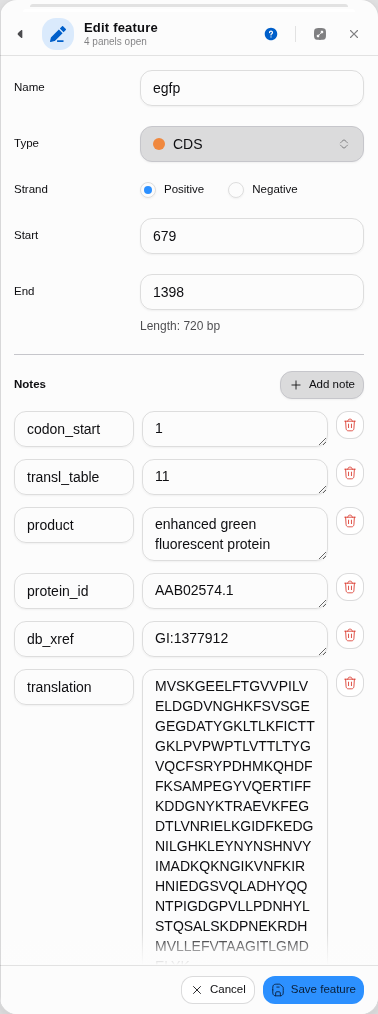 The annotation editor docked in the rail, seeded from a feature.
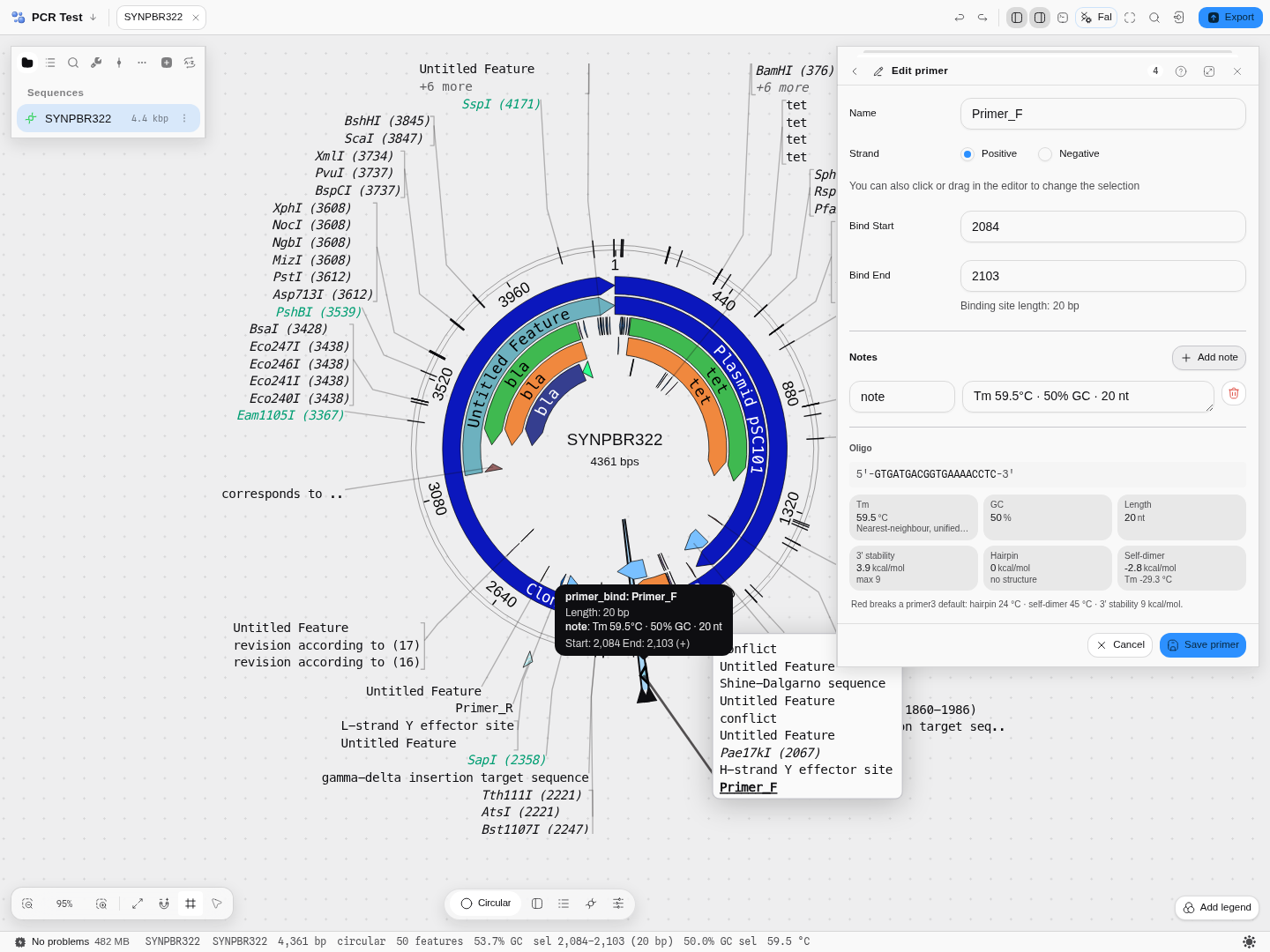 Editing a forward primer on pBR322. Under the binding site, the oligo itself and its six readouts —
the Tm that sets your annealing step, and the three structures that decide whether the reaction is
clean. The self-dimer's ΔG is −2.8 kcal/mol but it melts at −29.3 °C, so it never forms.
Editing a forward primer on pBR322. Under the binding site, the oligo itself and its six readouts —
the Tm that sets your annealing step, and the three structures that decide whether the reaction is
clean. The self-dimer's ΔG is −2.8 kcal/mol but it melts at −29.3 °C, so it never forms.
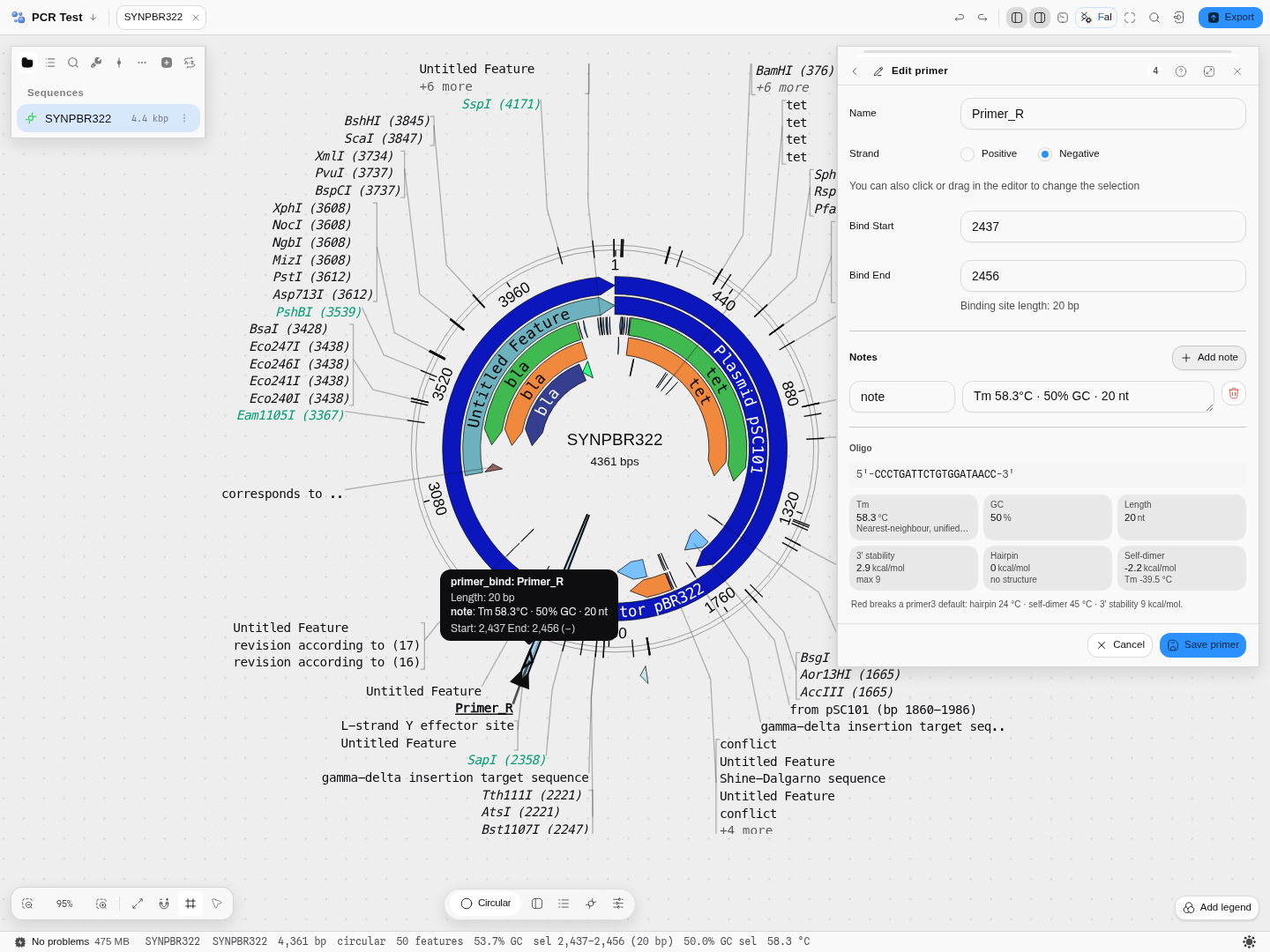 The same panel on a reverse primer. Strand is Negative, so the sequence shown is the reverse
complement of the span drawn on the map — the oligo you would actually order.
The same panel on a reverse primer. Strand is Negative, so the sequence shown is the reverse
complement of the span drawn on the map — the oligo you would actually order.
Related
Feeds it: any selection on the canvas; Auto-Annotate, whose results you correct here; imported files that already carry features.
Follows it: the sequence map, which draws the result; Export, which writes it out; Grammar Assembly, which consumes parts.
Compare with: Merge Features for combining overlapping annotations, and Enzyme for the read-only equivalent on a cut site.
In this group: Enzyme · Insert sequence · Merge features · Manage enzymes · Dot plot · Dot plot grid · Melt curve · Amplification curves · Population genetics · RNA-seq · Site avoidance heat map · Protein coverage · Reference-gene stability · Digital PCR · Codon usage matrix · Pairwise distance distribution · Nearest-neighbor distances · GC content distribution · Base composition per cycle · Pairwise distance grid · Per-cycle channel occupancy · Grammar assembly plan · Gibson assembly plan · Assembly plan build order · Golden Gate assembly plan · Guide track · Primer binding track · Hydropathy profile · Charge vs pH · Amino-acid composition · Hydrophobic moment · Optimization profiles · Digest gel · Virtual gel · Initiation-window fold · Antibody domain map · Electropherogram · Circuit netlist · Circuit transfer functions · Circuit construct · Construction graph · Protocol · Read Quality Profile · Read Alignment · Raw Signal · Verify vs Reference · Chromosomal microarray · Variant calls · Small molecule
Plasmid Editor
Open a plasmid and work on it in the view that suits the task: the circular map for the whole construct, the linear map for a region, the sequence view for individual bases.
Enzyme
Everything about one restriction enzyme against the sequence you have open: its recognition site, its cut offsets, every position it cuts, and all the names it goes by.