
Check a run's read quality, and settle its encoding
The route: open the reads → read the per-cycle curve → decide where to trim → and before you believe any of it, settle which quality encoding the file is written in.
Every number on this page came from running the viewer on the three files the Read quality starter opens. You can reproduce all of them.
Before you start: open the Read quality starter from the lobby. It carries a 1,000-read subset of a public Drosophila RNA-seq run, the worked example from the FASTQ specification itself, and a 25-read Illumina file written in the older quality convention. It opens on the 1,000-read file.
Step 1 — Read the curve before you read the totals
Canvas: the read quality viewer.
The per-cycle view plots the mean quality at each cycle across every read in the file. Sequencing chemistry degrades along the read, so the shape you expect is a high plateau that falls towards the 3′ end — and the shape is more informative than the average, because the average hides where the problem is.
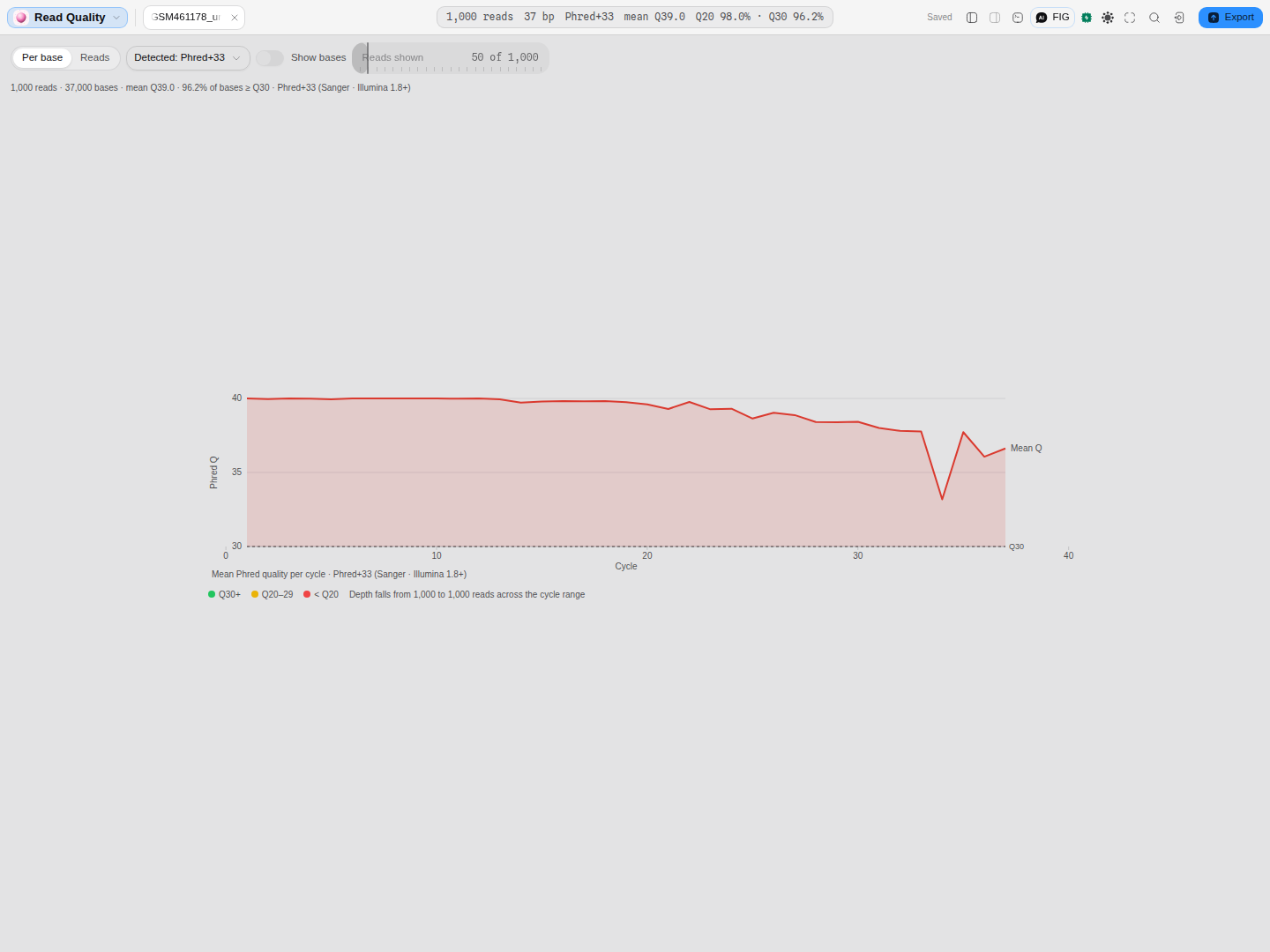 Hover any point for its cycle, its mean and the error rate that implies:
cycle 19: mean Q39.7 over 1,000 reads (0.01% error).
On this run the curve reads Q40.0 at cycle 1 → Q36.6 at cycle 37: a shallow, ordinary decline. Overall, mean Q39.0, 98.0% of bases ≥ Q20, 96.2% ≥ Q30 over 37,000 bases.
How to read it for a trimming decision: find the cycle where the curve crosses the quality you are willing to accept, not the cycle where it starts to slope. A run that falls from Q40 to Q36 has declined visibly and is still comfortably above Q30 — trimming it would cost you real sequence for no gain. A run that reaches Q20 by cycle 30 is a different conversation.
Switch to the Reads view when the mean looks wrong and you want to know whether it is everyone or a few: it draws one quality strip per read, so a uniform decline and a handful of failed clusters look nothing alike.
Step 2 — Ask what the numbers are made of
This is the step people skip, and it is the one that decides whether Step 1 meant anything.
A FASTQ does not record how its quality characters are encoded. One ASCII character per base, and the offset used to write it depends on the machine and the year (Cock et al. 2010): Phred+33 for everything since Illumina 1.8, Phred+64 for Illumina 1.3–1.7, Solexa+64 before that, on a differently-shaped score scale.
Read a Phred+64 file as Phred+33 and every score gains 31 points.
The viewer therefore never silently assumes. It infers, and it shows both the choice and the evidence:
Lowest quality character is ASCII 35 (
#), below Solexa's floor of 59 — only an offset of 33 can produce it.
That sentence is a proof, not a guess. On this file the case is settled, and the conventions the file cannot be are listed but not choosable:
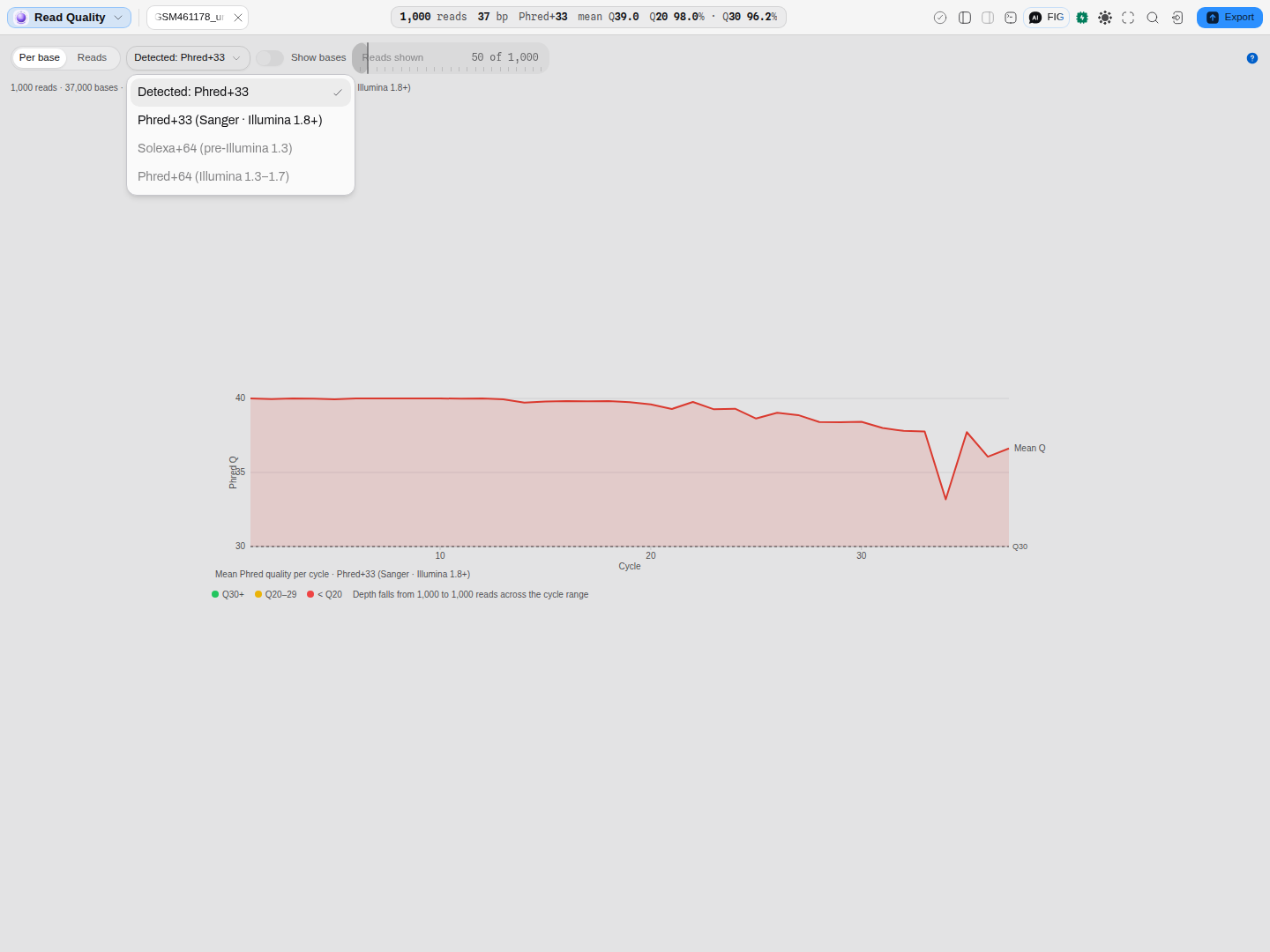 They stay on the list on purpose: "this file cannot be that" and "we do not support that" are
different facts, and hiding the option would blur them. Hover either for the reason.
They stay on the list on purpose: "this file cannot be that" and "we do not support that" are
different facts, and hiding the option would blur them. Hover either for the reason.
Check before moving on: if the encoding line reads Detected: … with settled evidence, Step 1's
numbers are safe. If it says the encoding is ambiguous, keep reading — Step 3 is about you.
Step 3 — Settle an ambiguous file
Open test3_illumina.fastq from the Files rail — 25 real Illumina reads from an older instrument.
Its quality characters span ASCII 70–88, which is in range for all three conventions: too high to rule out +64, and not high enough to be impossible under +33. The viewer says so rather than picking quietly:
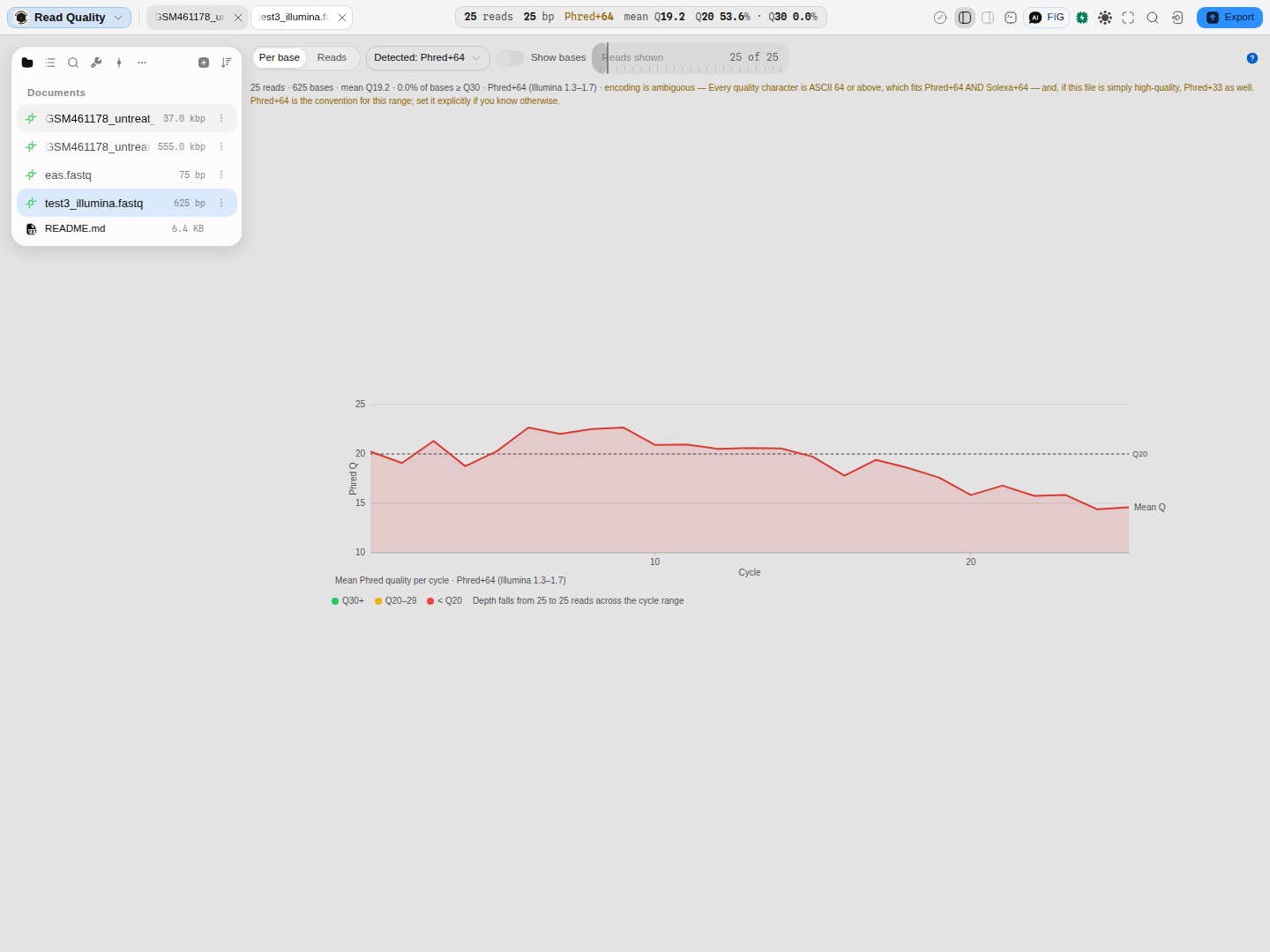 As detected — mean Q19.2, 0.0% of bases ≥ Q30. The amber line states the ambiguity and the
default: every character is ASCII 64 or above, which fits Phred+64 and Solexa+64, and would fit
Phred+33 if the run were simply excellent. Phred+64 is the convention for that range.
As detected — mean Q19.2, 0.0% of bases ≥ Q30. The amber line states the ambiguity and the
default: every character is ASCII 64 or above, which fits Phred+64 and Solexa+64, and would fit
Phred+33 if the run were simply excellent. Phred+64 is the convention for that range.
Now set the encoding to Phred+33 and watch every number move:
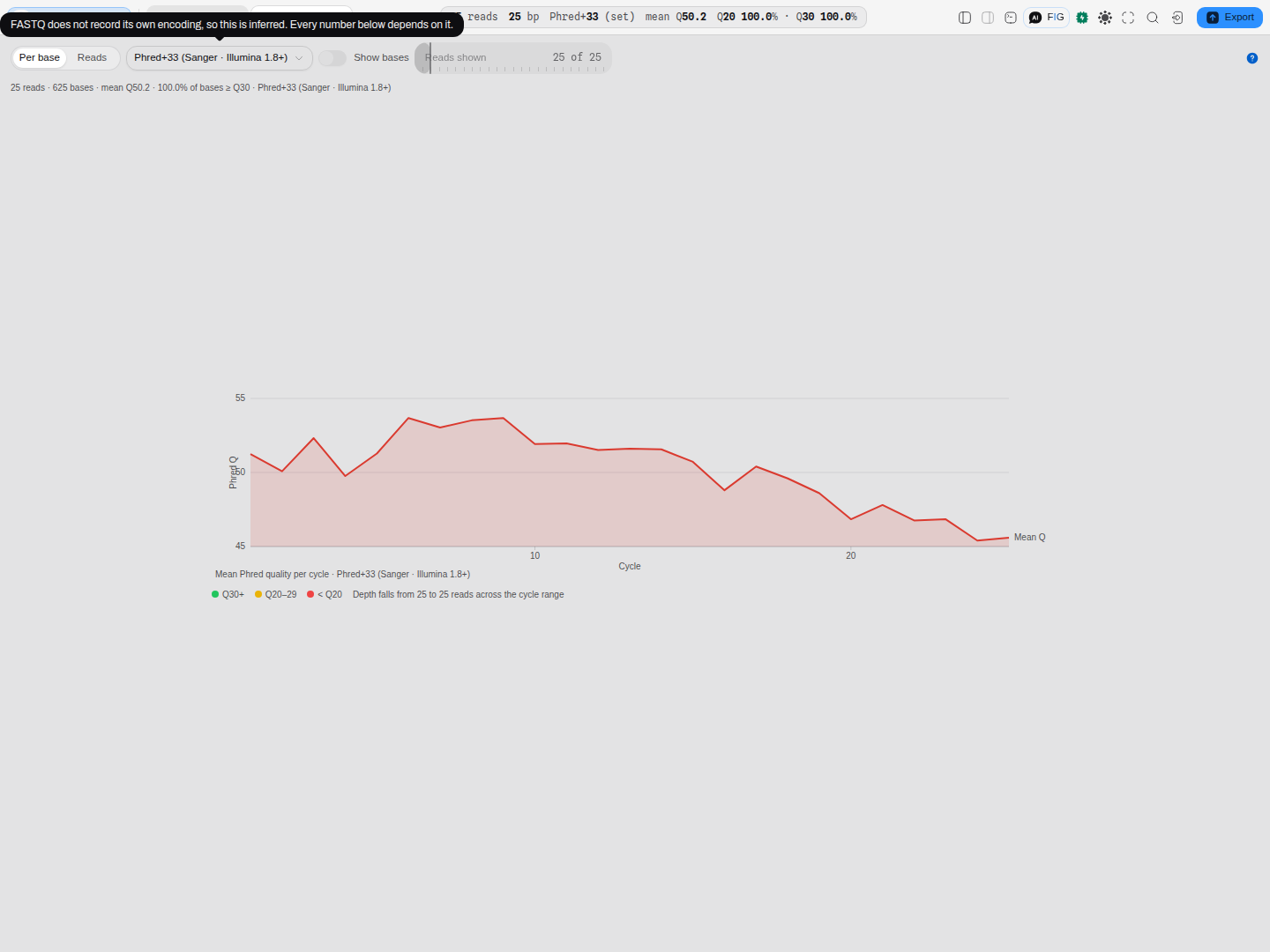 Same file, same 625 bases: mean Q50.2, 100% of bases ≥ Q30.
Which is right, and how you can tell without knowing the machine: Q50 means one wrong base in 100,000, and no sequencer produces that. A run that reads as flawless the moment you choose the modern convention is the signature of a +64 file being read as +33. The honest reading is Q19.2 — these are mediocre reads, and pretending otherwise would carry into every threshold downstream.
Three ways to settle it for real, in order of reliability:
- Ask the file's provenance. An instrument model or a pipeline version in the run metadata settles it outright: Illumina 1.3–1.7 wrote +64, 1.8 and later write +33.
- Look for a character below ASCII 59. One is enough to prove +33, and the viewer does this for you — that is the settled case in Step 2.
- Apply the plausibility check above. Not proof, but a Q50 mean is a stronger signal than most people realise.
When you have decided, pin it explicitly rather than leaving it inferred. The choice is stated on the canvas, so anyone reading over your shoulder can see which convention produced the numbers.
Step 4 — Carry the decision, not just the number
Quality scores are consumed by everything downstream: trimming thresholds, per-base filters, aligner quality models, variant-caller priors. A 31-point inflation does not fail loudly — it quietly disables the filtering you believed you had switched on, and your alignment still succeeds.
So when you hand a run on:
- Record the encoding beside the statistics, not the statistics alone.
- Re-check it after any conversion. A tool that rewrites a FASTQ can rewrite the convention with it, and the new file will not say so either.
- Treat a suspiciously perfect run as unproven until the encoding is settled.
What this workflow does not cover
- Trimming and filtering themselves. This viewer measures; it does not modify reads. It never writes to your FASTQ.
- Adapter content, duplication and over-representation. Those are the other half of a standard quality report and are not computed here.
- Paired-end files as a pair. Each file is read on its own; there is no R1/R2 join.
- Runs larger than 64 MB. The viewer refuses them by name rather than summarising the first few thousand reads and calling that the run — subsample first.
Related
The canvas: read quality viewer — every control, and how the inference works.
After trimming, when reads are aligned: the pileup viewer.
For capillary sequencing rather than a run: the chromatogram canvas, which carries per-base quality of its own and is read completely differently.
Protein → peptides: will mass spectrometry see the region I care about?
The route: read the protein your construct actually encodes → digest it → apply the window your instrument can detect → look at what fell out → change the digest until the region you care about is covered.
All capabilities
Every tool and panel in the workbench, what it does, and where to find it.