
Files and formats
83 formats across 138 extensions, all parsed in your browser, and 29 of them written back out. This page is about what happens to your file when it arrives — what opens as what, what each format keeps, what can be converted into what, and the five cases that will not open at all.
Reading and writing are two different numbers, and a page that gives one of them for both is telling you something untrue about half the list. The live version, which marks every format as read-only or read-and-write and names the surface that writes it, is the file-formats page in the app itself.
Getting a file in
Four routes, all equivalent once the file is open:
| Route | When |
|---|---|
| Drag and drop onto the canvas | The fast one |
File → Open / Import Files… (⌘O) | The obvious one |
| File → Open URL… | A file already on the web |
| File → Fetch from database… | You have an accession, not a file — NCBI Nucleotide and Protein, ENA, UniProtKB, and the databases behind EBI Dbfetch (RefSeq, Ensembl, PDB, AlphaFold, InterPro, IMGT/HLA and the rest). The full guide |
The last one is worth knowing about. A fetched record lands in your project as an ordinary file, in its own format, exactly like one you dragged in — but it also remembers where it came from: the authority, the identifier, the exact URL, and the date it was retrieved. So the file is a dated copy with a citation, not an anonymous blob, and it can be re-fetched from the authority whenever you want to check it against the current record. That distinction matters when you share a project: fetched records travel as their accession rather than as bytes, so the person opening it resolves the record themselves from the authority.
Sources you can reach by accession: NCBI Nucleotide and Protein (GenBank and RefSeq), the EMBL-EBI ENA, UniProtKB, and every database behind EBI Dbfetch — RefSeq, Ensembl and Ensembl Genomes, PDB, AlphaFold, InterPro, IMGT/HLA, IPD-KIR and IPD-MHC, ChEMBL, HGNC, NCBI Taxonomy, MEDLINE and the patent protein sets among them. That list is read from EBI's own registry when you open the tab, so it is whatever EBI currently serves rather than a list we maintain.
Fetching part of a record
You rarely want a whole chromosome. Give the accession a region — a start and an end, and which
strand — and only that window is retrieved: NC_005816 REGION: 5000..7000, or the same thing typed
into the start/end boxes. On the minus strand the window is returned reverse-complemented, written
complement(5000..7000).
Coordinates follow the convention the databases print: 1-based and inclusive, so 5000..7000 is
2,001 bases and includes both ends. Windows are always written low-to-high, whichever strand you
pick — a backwards range is refused before anything is downloaded, rather than failing halfway
through. The file remembers the span and strand it came from and shows them in its properties, so a
sequence you pulled six months ago still says which part of which record it is.
A whole-genome project accession (a WGS, TSA or TLS "master") is a special case: it holds no bases of its own, only a pointer to its component contigs. Fetching one retrieves those contigs and joins them, and the record tells you how many and how large the result will be before you commit.
What opens as what
A file opens as the kind of thing it is, not as text you scroll. Which canvas you land on is decided by the format:
| Group | Formats | Opens as |
|---|---|---|
| Sequences and annotations | BED · EMBL · FASTA · FASTQ · GenBank · Gene Construction Kit · Geneious · GenPept · GFF3 · GTF · JBEI · JSON · SBOL · Serial Cloner · SnapGene · Swiss-Prot/UniProt · XML | An editable construct — circular or linear map, sequence view, feature table |
| Sanger chromatograms | AB1 · SCF · ZTR | A trace you can re-call bases on |
| Alignments | Aligned FASTA · CLUSTAL · GCG MSF · PHYLIP · Stockholm · ACE (phrap / CAP3 assembly) · Vector NTI AlignX (.apr, read-only) | An MSA with per-column conservation |
| Trees | Newick · NeXML · NEXUS · PhyloXML · Guide tree | A tree |
| Read alignments | BAM · SAM | A pileup, read through the index |
| Variant calls | BCF · VCF | A typed variant table |
| Tables | CSV · TSV · Excel | A sortable table |
| Columnar data | Parquet | The same table viewer, read column-wise |
| Papers and protocols | A PDF reader — pages, zoom, rotation | |
| NumPy arrays | .npy · .npz | The tensor viewer — shape, dtype, per-axis slicing |
| Macromolecular structures | PDB (.pdb · .ent) · PDBx/mmCIF (.cif · .mmcif) · NCBI MMDB (.prt, the ASN.1 text form) | The structure viewer — the fold in 3D, its chains and sequences, ligands, solvent and the experiment behind it |
| Small molecules and reactions | MDL Molfile · MDL reaction · SDF · SMILES | The chemistry viewer — the structure drawn, and a reaction laid out arrow-wise |
| Images | AVIF · BMP · GIF · JPEG · PNG · TIFF · WebP | An image, decoded from its own header rather than its extension — a gel photo, a plate scan, a figure |
| Mass spectra | MGF (Mascot Generic Format) | Each MS/MS spectrum drawn with its peaks, and the fragment ions of a peptide you name annotated on it |
| Instrument runs | RDML (.rdml · .rdm) | The plate the run was laid out on, coloured by Cq — or by concentration for a digital run — with the raw amplification and melting curves exactly as the instrument wrote them |
| Notes and documents | AED region list · HMMER profile · Markdown · SVG · Text | Kept viewable, verbatim. An AED or a HMMER profile is not a canvas of its own: it is a list of regions, or a model, that a panel reads when you pick it — the AED against the calls in a chromosomal microarray, the profile against an alignment |
Feature-only files are a deliberate special case. A GFF3 with no sequence, a GTF or a BED has annotations and no bases. Rather than refusing them, they open on an unknown-base backbone spanning the features — so the annotations are still editable, drawable and exportable, and you can attach the sequence later.
What each format keeps
The thing nobody tells you until it has already cost you something:
-
GenBank and EMBL keep everything — features, qualifiers, topology, references.
-
FASTA keeps the bases and the header. That is all. Export a heavily annotated plasmid as FASTA and the annotations are gone. This is FASTA being FASTA, not a limitation of the app, but it is the most common way work is quietly lost.
-
SnapGene
.dnaround-trips, including its own history — and it carries far more than the map suggests. Every qualifier SnapGene wrote is read: the note, the gene symbol, the product name, the protein translation, the codon start and translation table, the database cross-references. Hover a feature and you see them. SnapGene stores that text as formatted markup rather than plain characters, which is why a note can contain an italicised species name (Ashbya gossypii TEF terminator) or a literature citation. Both are shown as what they are — the citation is a link you can follow to the paper.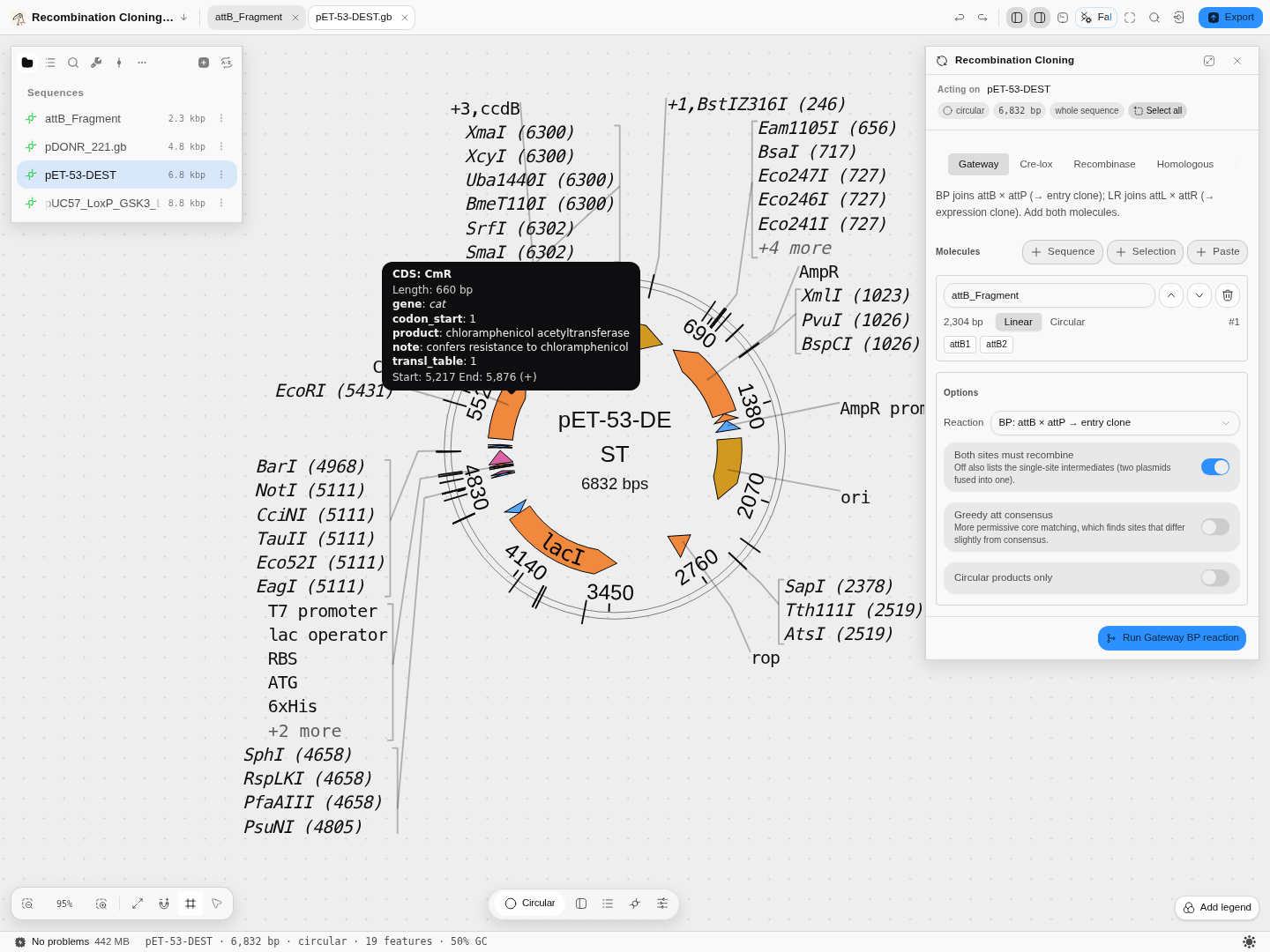
Hovering a feature is the fastest way to see what the file actually says about it. This is the chloramphenicol-resistance CDS of pET-53-DEST: the gene symbol
catis italicised because the file marks it as one, the product name is the full enzyme name, and the note explains what the marker does. All of it comes from the file — nothing here is inferred. -
Serial Cloner
.xdna/.xprtround-trips, and keeps per-feature colours — the field Biopython discards. A.xprtstores coordinates in residues rather than bases. -
Swiss-Prot/UniProt records open as annotated proteins in either form UniProt serves — the flat file and the XML — including the unreviewed TrEMBL records whose feature tables come from automatic annotation rules. An entry that names isoforms also gives you those, rebuilt from its splice variants: the full guide.
-
ACE assemblies keep the thing an alignment file cannot: not just the columns, but how the assembly was made. Each contig carries the reads that built it at the offset and orientation the assembler placed them, and the per-base quality it recorded for the consensus — so a disagreement in a column can be read as depth and quality rather than as a bare mismatch. The consensus and the reads under it open together on the alignment canvas.
Round-tripping is not assumed, it is tested: several starters exist specifically to open a format and write it back out.
Converting one format to another
Two ways, and which one you want depends on whether you are staying.
If you only need the file in another format, the converter does it on its own page: drop the file in, and every format that record can be written as is listed with a download beside it. Nothing is uploaded — the parse and the write both happen in the browser tab — and there is no project to create first.
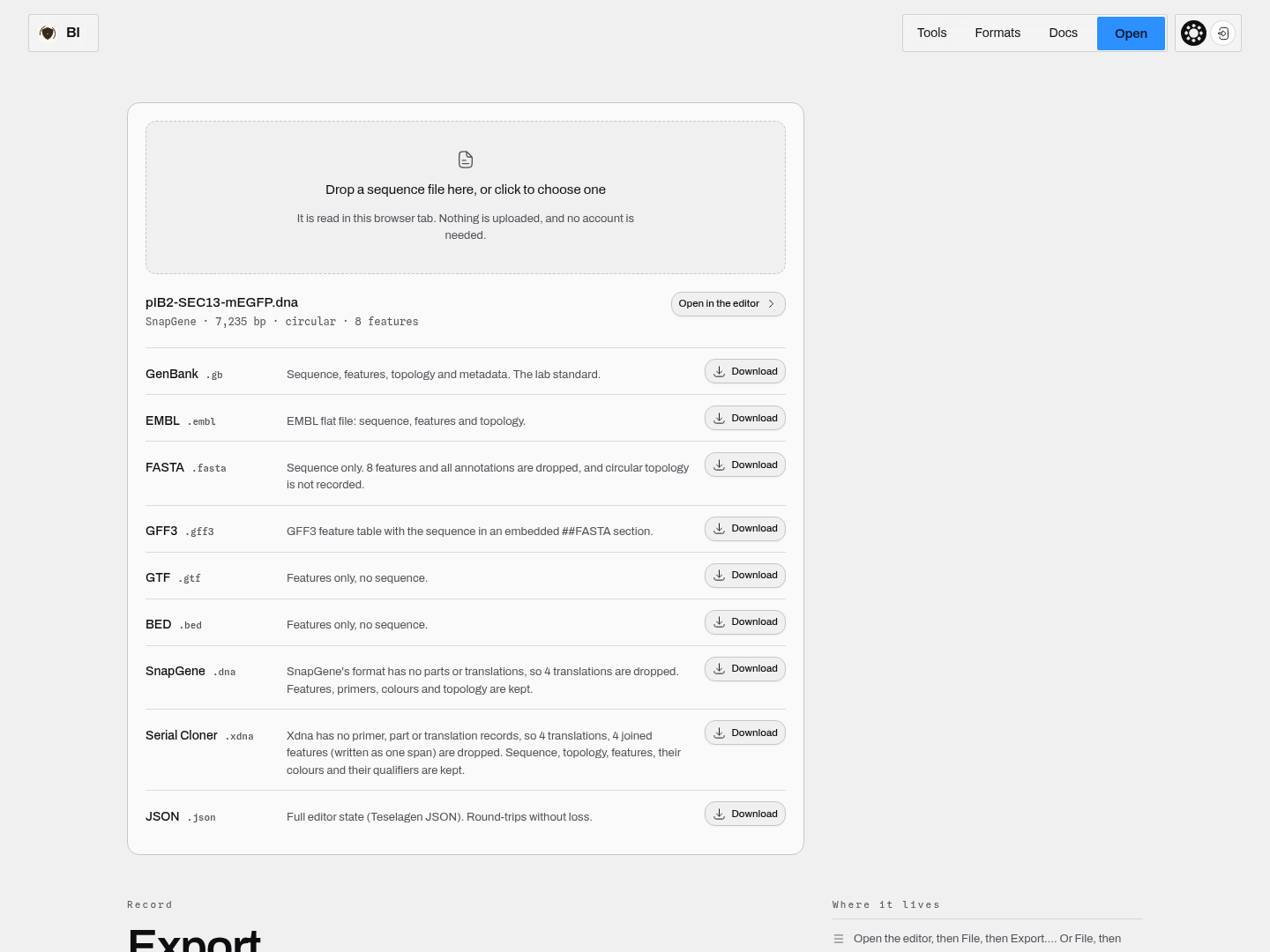
The panel names what it read before you convert anything — 7,235 bp, circular, 8 features — so a file that parsed wrongly is visible before it becomes an export. Each target says what that format costs: FASTA drops the 8 features and the circular topology, GTF and BED carry the features without the sequence, GenBank and the two binary formats keep everything.
If you are going to work on it, open it in the editor instead and use Export ▾. It is the same capability matrix — the same list, the same losses — but the export follows the tab you are on, so a trace exports as a trace and an alignment as an alignment, and anything you edited is in the file you get.
Three things worth knowing before you convert:
- The loss is stated up front, per format. A target that would drop your features says so, and a target the record cannot produce at all is disabled with the reason rather than downloading an empty file. You should never have to open an export to find out what happened to it.
- The conversion is the one the editor performs. The page and the panel run the same writers, so a file converted here is byte-for-byte the file the editor would have written.
- Multi-record files are converted one record at a time, and the page lets you pick which. A multi-FASTA holds many sequences; a GenBank file can too.
Reach for the converter when someone sends you a .dna and your pipeline wants GenBank, when a
collaborator needs a plain FASTA of a construct you annotated, or when an instrument writes GTF and
your viewer reads BED. Reach for the editor when the conversion is the last step of real work rather
than the whole errand.
How we know your file is read the way its own tool reads it
A file format is defined less by its specification than by what the programs of the field actually accept, so "we support GenBank" is not a claim anyone should take on trust. Every format below is checked file by file against the reference implementation the field uses, over every real file of that format we have — not a chosen handful:
| Format | Checked against | Corpus |
|---|---|---|
| GenBank | Biopython | 495 files |
SnapGene .dna/.prot | the SnapGene reader used across the Python bioinformatics ecosystem | 244 files, 1,880 features |
| Swiss-Prot / UniProt flat file | Biopython | 37 files, 2,276 features |
| UniProt XML | Biopython | 13 files, 1,880 features |
| FASTA | Biopython | 396 files, 50,738 records |
| GFF3 / GTF | gffutils | 110 files |
| EMBL | Biopython | 13 files |
| BED | bioframe | 28 files, 1,990 intervals |
What that comparison covers is the part that goes wrong quietly: not just how many features a file has and where they sit, but the text of every qualifier attached to them. A parser can report the right number of features in the right places and still lose every note, product name and translation on them, and nothing on a map would look wrong.
Restriction sites are checked against REBASE, the enzyme authority, rather than against a list of our own.
Where our reading deliberately differs from the reference, it is because the reference is wrong about
that file and we can show it. Three examples, all real: a SnapGene feature that crosses position 1 is
written as a descending range, which the reference sorts into a span covering the entire plasmid —
we read the short wrap it actually is. A cross-reference written as GI:254564564 keeps the database
name that the reference discards. And an older UniProt record that the reference reads completely and
then fails on at the last line is read completely here, without the failure.
A protein record is not DNA, and the workbench knows the difference
Open a UniProt entry, a GenPept file or a Serial Cloner .xprt and you get a protein — not a
sequence of bases that happens to spell amino acids. That distinction is enforced rather than
implied, because a readout with no meaning for the record type is worse than no readout at all.
What you get instead of the nucleotide statistics. GC content, AT content and base composition
are questions about a nucleotide molecule; on a protein they are replaced by the ones that have
answers — length in residues, molecular weight, isoelectric point and the residue composition.
Opening human TNF-α (UniProt P01375) reads 233 aa · MW 25.6 kDa · pI 6.44, against the 25,644 Da
UniProt states for that entry.
What is switched off, and why it says so rather than disappearing. Primer tracks, restriction cut sites and open reading frames are DNA questions. On a protein record each control stays visible and greyed, carrying its reason — "Restriction enzymes cut DNA, not protein" — so you can tell a capability that does not apply from one that is missing. The same is true of reverse-complement and complement, and of the restriction-enzyme search.
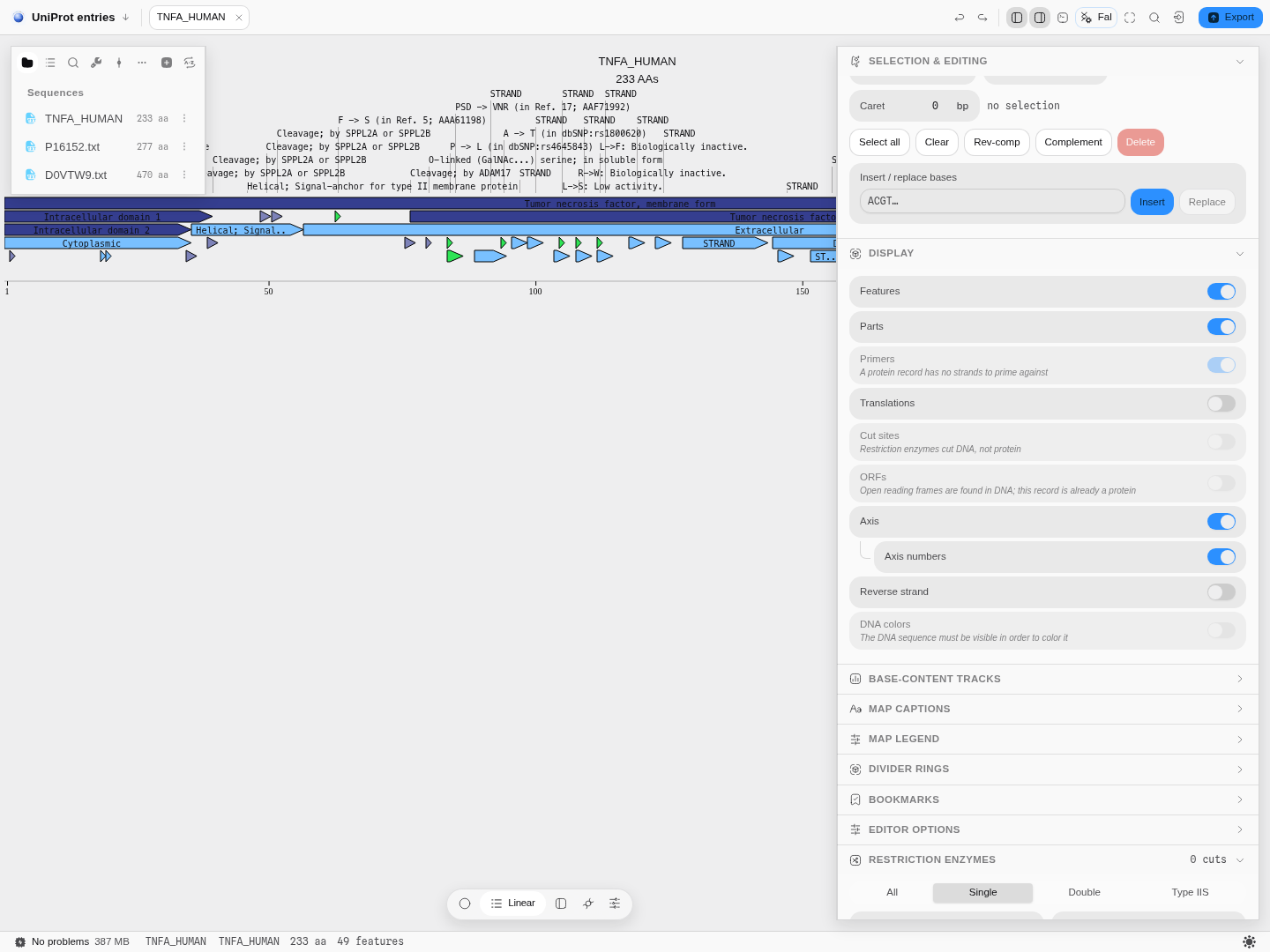
Human TNF-α opened from its UniProt flat file. The three DNA-only tracks are disabled with their reasons in place; everything meaningful for a protein — features, parts, translations, the axis — stays live.
What still works, in the vocabulary of proteins. Search finds residues by their one-letter codes, insert and replace act on residues, and the feature table is the entry's own — signal peptide, propeptide, mature chain, disulfide bonds, glycosylation and modified residues, each keeping its UniProt key.
Ambiguity codes, and the mass that cannot be computed
Real sequence data is not always unambiguous, and the workbench neither hides that nor breaks on it.
In DNA, the IUPAC codes (N, R, Y, S, W, …) stand for a position that is more than one
base — an assembly gap, an unresolved Sanger call, a deliberately degenerate primer. They are read,
drawn, searched and counted; the status bar reports how many a record carries.
In protein, the equivalents are B (Asx — aspartate or asparagine), Z (Glx — glutamate or
glutamine) and X (any residue). Two further letters, U (selenocysteine) and O (pyrrolysine),
look unusual but are not ambiguous at all: they are specific residues with exact masses, and they
are treated as such.
This matters for molecular weight, and the distinction is finer than most tools draw it:
| Residue | Mass | Hydropathy, instability, flexibility |
|---|---|---|
| The standard 20 | Exact | Available |
U selenocysteine, O pyrrolysine | Exact — these are weighed | Undefined — the published per-residue scales have no value for them |
B Asx, Z Glx, X Xaa | Undefined — the composition is not known | Undefined |
A mass is only as defined as the composition it is computed from, so a sequence containing X gets
a mass over the residues that have one, labelled as partial — 15 aa · 1.1 kDa − 5 × X — rather
than a confident-looking number that quietly omits five residues. The residue is still counted in
the length; it is the mass it is missing from. Selenoproteins are weighed in full.
Translating a region that spans an ambiguous codon produces X at that position for the same
reason: the codon does not determine one amino acid, and guessing which would be inventing data.
Molecular weight and isoelectric point are checked against Biopython, and the half-life table against Expasy ProtParam itself.
What will not open, and why
Stated rather than omitted, because an omission reads as support to someone scanning for their extension:
| Not read | Why, and what to do |
|---|---|
CRAM (.cram) | No reader exists. A .crai index is recognised but can never pair with an alignment. Convert to BAM |
BCF (.bcf) | The binary encoding of VCF, which no browser-side reader supports. Plain and bgzipped VCF are read in full — bcftools view -Ov |
zstd, bzip2 and xz files, and ZIP archives (.zst, .bz2, .xz, .zip) | Recognised from their first bytes and refused with the command that unwraps them (unzstd, bunzip2, unxz). A ZIP can hold many files, so it is not guessed into. Gzip is different: a .gb.gz or .fasta.gz is unwrapped and read as what is inside, up to 256 MB once expanded; past that the file is refused and an indexed BAM or bgzipped VCF should be opened by region instead |
| A GenBank or EMBL record with no readable sequence | A file cut off before its ORIGIN (or SQ) section, or saved without its bases, is refused with the length its own LOCUS line declares, rather than opened as an empty record with its features pushed to the first bases |
| A file with the wrong extension | The extension is what the workbench takes as your statement of intent, so a GenBank saved as .txt opens as text — but the contents are read too, and the mismatch is reported to you rather than left mysterious. Rename it and it opens as GenBank |
How the format is actually decided, since that row understates it. Both the name and the first bytes are used, in this order:
- A recognised extension wins. It is what you asked for, and it is right nearly always.
.xmlis an exception, because it names a container rather than a format — SBOL, JBEI, PhyloXML and NeXML are all XML. There the contents decide, which is why a NeXML tree namedprimates.xmlopens as a tree rather than being handed to the sequence parser..fsais the same case for a different reason: two authorities claim it. NCBI's submission tools mean a nucleotide FASTA by it, and Applied Biosystems writes fragment-analysis electropherograms under it, so the file's own bytes decide which reader it goes to.- A format its own authority distributes under a generic extension is a second exception.
UniProt serves entries as
.txtfromrest.uniprot.org, so a Swiss-Prot record named.txtis correctly named, not mislabelled, and opens as a protein. This is a short, deliberate list — not a blanket rule that contents beat.txt. - No recognised extension? The contents decide, if they carry a signature we know.
- Name and contents disagree, outside those exceptions? The extension still wins and you are told: "The name says Text but the contents look like GENBANK."
- Unless the contents are not valid for the format the name claims. FASTA, GenBank, EMBL,
FASTQ, VCF and the binary formats each have a signature of their own, so a GenBank saved as
.fasta(it has no>header) is read as GenBank, and the mismatch is still reported. Reading it as FASTA would have turned every letter of the flat file into a residue. Plain text (.txt) has no signature to fail, which is why rule 5 still applies to it.
SBOL — a part library, not a plasmid file
SBOL (the Synthetic Biology Open Language) is what a parts registry publishes when it wants to say
more than "here are some bases". It is RDF, so a document is a graph rather than a list of records,
and that changes what it can say: a DnaComponent carries a sequence, a display id, a description
and a Sequence Ontology role, and it can be composed of other components through annotations
that give each part its span on the parent.
What that means when you open one. Each component with bases of its own opens as a sequence, and its annotations become features on it. So a registry file that publishes a cassette and its five parts gives you six sequences, not one — which is what the file actually contains, and the reason a part appears once even though the document may inline it at every place it is used.
Three things are worth knowing before you plan work around one:
- A composite may have no sequence. SBOL can state that a cassette is these parts in this order without spelling out its bases. Those are named for you in the file report rather than being given a sequence built by concatenation — the ordering is what the file asserts, and the joined sequence would be an inference dressed as data.
- An annotation may have no coordinates. SBOL allows one that records only which sub-component is present and what it precedes. There is nothing to draw for those, so they are not features; the components they name still open.
- A part's role is its feature type. Each annotated part carries a Sequence Ontology role, and
that role becomes the feature's type through the Sequence Ontology's own INSDC equivalents: a
promoter (SO) reads as a promoter, a terminator as a terminator, a ribosome entry site as
an RBS, a coding sequence as a CDS, and each is drawn with its own shape. A role with no INSDC
equivalent, such as engineered foreign region, opens as
misc_featurewith the role kept in the feature's notes, and the file report says how many did. A component's own role, the one it carries about its whole sequence, is not turned into a feature, which is also how the SBOL reference implementation writes it out as GenBank. - Strand is written as
+and-. A part annotated-is drawn on the reverse strand and its arrow points the other way, exactly as it would from a GenBankcomplement(...).
Which SBOL. Version 1 (the RDF model registries have published since 2011) is read, and its
reading is checked file by file against libSBOLj, the SBOL standard's own reference
implementation — every component, its bases compared byte for byte, and every annotation with its
coordinates, strand and role. SBOL 2 and SBOL 3 are different, incompatible data models and are not read.
If your file's namespace is sbols.org/v2# or sbol3, convert it first with the standard's own
tools — and you will be told which of the three you handed over, by name, rather than being told the
file is not SBOL.
Try it: the SBOL parts starter opens three real documents — a JBEI registry vector with reverse-strand features, a cassette with parts and no bases of its own, and a single signal peptide.
Big files
There is no upload, so there is no upload limit. What there is instead:
- A BAM is read through its index. Bring the
.baior.csialongside it — without the index there is no random access, and a BAM without one cannot be opened rather than being loaded whole. - And it is read where it lies. Once a project is saved to your workspace folder, opening an
indexed BAM reads only the compressed blocks the window you are looking at needs — the alignment
is never loaded into the tab whole. The viewer says which you are getting,
windowedorwhole file, beside the read count.whole filemeans one of three things, all of them legitimate: it is a SAM (the format has no index), the BAM has no index alongside it, or the project has not been saved to a folder yet. - A bgzipped VCF with its
.tbi/.csiis read by region, not ingested. - A SAM is read line by line, because there is nothing else to do. SAM has no index format at all, so summarising one means reading all of it. The import shows which file is being scanned and how far in, with a Stop; if you stop it, the counts you get describe the part that was read and say so.
- Very large files store a reference — a path or URL plus its index — re-resolved on open, rather than being embedded in your project.
- Browser storage looks after itself. Your files are cached in the browser for speed, but the copy in your workspace folder is the real one. If the browser's storage allowance gets tight, the cache drops the bytes it can read back from disk — least recently used first, and never a file whose only copy it is holding — and fetches them again next time you open that file. It says how much it released rather than doing it invisibly.
Where your files end up
In your workspace folder, beside the project, under their own names in their own formats. Not in a proprietary container you need this app to open. See Install and open for the layout.
Next
- Your first project — if you have not opened one yet.
- The canvases — one page per document kind, and how to read each.
- Workflows — routes through several tools.
Editing with the keyboard
Move the caret, extend a selection, type bases and delete them — without reaching for the mouse.
Fetching a record from a database
You do not always start from a file. Often you start from a name you half-remember, an accession in a methods section, or a coordinate range on a chromosome.