
Pairwise distance distribution
Every pair of barcodes in the set, counted by how far apart they are — the shape behind the single minimum-distance number.
What it does
A barcode set is usually summarised by one number: its minimum distance. That number is what the error-correction guarantee is computed from, and it is the only thing most tools tell you. It is also the number that says the least about the set, because it describes exactly one pair.
This plot draws the whole distribution. Each bar is a distance value; its height is how many of the set's pairs sit at that distance, and hovering a bar gives the same count as a percentage of all pairs. For a set of n barcodes there are n(n−1)/2 pairs, and every one of them is counted — the histogram is exhaustive, not sampled.
Read it left to right. The leftmost bar is the minimum distance, and its height tells you whether the set has one unlucky pair or a whole crowded shoulder. Those are different situations with different fixes: one pair can be edited away, a crowded shoulder means the set is too large for the barcode length you chose.
When you'd use this
- Deciding whether a set is worth rescuing. A single bar at distance 3 under an otherwise comfortable distribution means one edit lifts the guarantee. Hundreds of pairs at 3 means it will not.
- Comparing two candidate sets that report the same minimum. Two sets can both say "d = 4" and be nothing alike — one clustered tightly just above the floor, the other spread wide. The set with the fatter right tail degrades more gracefully when reads are noisy.
- Sanity-checking an imported set from a kit or a collaborator, where nobody recorded how it was built.
- Watching the shape move while you edit. The plot re-derives from the working set on every change, so removing a barcode redraws it immediately.
What this computes
- The distance of every pair in the set under the active metric, as a bar per distance value with the pair count and the percentage of pairs each represents
- Four metrics, each answering a different question about how a read can go wrong — the
DNABarcodes definitions (Buschmann, Bioinformatics 33(6)–922, 2017), checked against that
package byte for byte:
- Hamming — substitutions only; correct when the barcode's position in the read is known exactly, as it is for a separate index read
- Levenshtein — substitutions and indels, for a barcode read in isolation
- Sequence-Levenshtein — substitutions and indels for a barcode read in DNA context, where an indel pulls flanking bases into the window; the honest metric for inline barcodes on indel-prone chemistries, and the panel's default
- Phaseshift — substitutions plus front-biased indels, for chemistries whose errors cluster at the start of the read
- The set's error guarantee, read off the left edge of the plot: for a minimum distance d, guaranteed correction is ⌊(d−1)/2⌋ errors and guaranteed detection is d−1
What it refuses: a barcode containing anything other than A, C, G or T, named when the set is loaded rather than silently skipped.
Where it lives
It is the first plot in the Analysis tab of the Barcode & Index Design panel, and its section header carries the metric it was computed under. The detach control in that header pops it out as its own floating surface that stays live: it re-reads the working set from the panel, so editing the set in the rail redraws the floating copy.
Inputs and outputs
In: the panel's working set — whatever is in it, whether designed here, imported from a file, generated as FREE-divergence codes, or hand-edited. Barcodes must be A, C, G or T; anything else is refused by name when the set is loaded, rather than silently skipped.
Out: a bar per distance value, with pair counts and the percentage of pairs each represents. The underlying distances leave the tool with the rest of the analysis in the panel's export.
The plot is drawn under the active metric only. The Analyse tab's table above it reports all four metrics at once; this histogram follows the metric you have selected, which is why the section header names it.
Screenshots
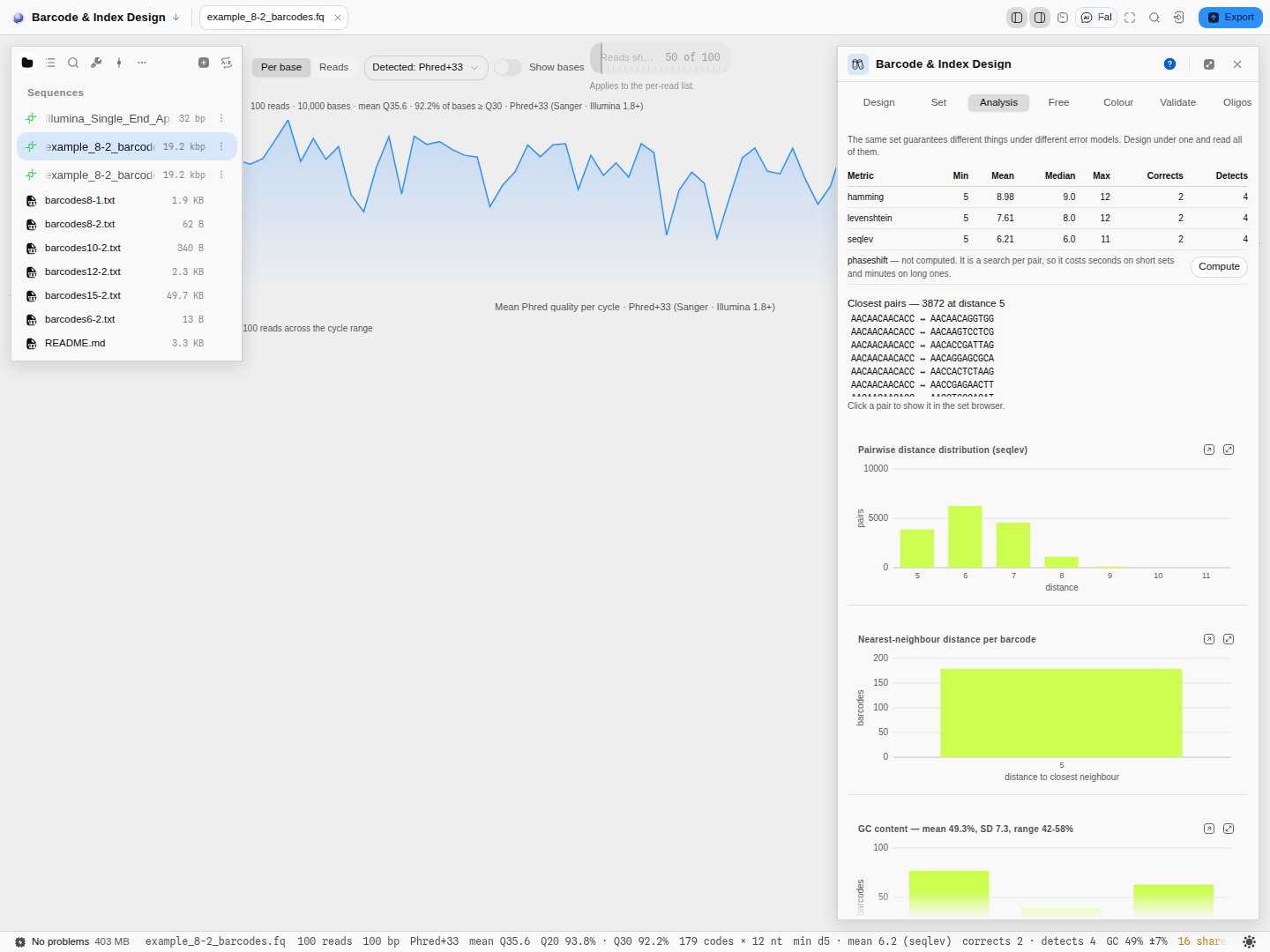
Controls
| Control | What it changes |
|---|---|
| Metric (panel-level) | Which distance definition the pairs are measured under. Changing it redraws the histogram entirely — the same set has a different shape under Hamming than under sequence-Levenshtein. |
| The working set | Add, remove or edit a barcode and the distribution is recomputed from scratch. |
| Detach | Opens the plot as a floating surface beside the canvas, still live. |
The science
Distances come from the four DNABarcodes metrics (Buschmann, Bioinformatics 33(6)
–922, 2017), and each answers a different question about how a read can go wrong:- Hamming — substitutions only. Correct when the barcode's position in the read is known exactly, as it is for a separate index read.
- Levenshtein — substitutions and indels, for a barcode read in isolation.
- Sequence-Levenshtein — substitutions and indels for a barcode read in DNA context, where an indel pulls flanking bases into the window being read. This is the honest metric for inline barcodes on indel-prone chemistries, and it is the panel's default.
- Phaseshift — substitutions plus front-biased indels, for chemistries whose errors cluster at the start of the read.
The guarantee the panel reports is read off the left edge of this plot. For a minimum distance d, guaranteed correction is ⌊(d−1)/2⌋ errors and guaranteed detection is d−1. So a set with minimum distance 3 corrects one error and detects two; a set with minimum distance 4 still corrects one, and detects three.
The metric implementations are checked byte for byte against the original DNABarcodes code, including its cost parameters, so a distance reported here matches the distance that package reports for the same pair.
Limitations
- It is a distribution, not a diagnosis. It tells you how many pairs are close, not which. For that, use the nearest-neighbour histogram beside it, whose bars are clickable, or the closest-pairs list above.
- One metric at a time. A set can look comfortable under Hamming and tight under sequence-Levenshtein; the choice of metric is a claim about your chemistry, not a display option.
- Pair counts grow as the square. The number of pairs, and the time to compute them, scales with n²; very large sets are slow to re-derive on every edit.
Related
In this group: Edit annotation · Enzyme · Insert sequence · Merge features · Manage enzymes · Dot plot · Dot plot grid · Melt curve · Amplification curves · Population genetics · RNA-seq · Site avoidance heat map · Protein coverage · Reference-gene stability · Digital PCR · Codon usage matrix · Nearest-neighbor distances · GC content distribution · Base composition per cycle · Pairwise distance grid · Per-cycle channel occupancy · Grammar assembly plan · Gibson assembly plan · Assembly plan build order · Golden Gate assembly plan · Guide track · Primer binding track · Hydropathy profile · Charge vs pH · Amino-acid composition · Hydrophobic moment · Optimization profiles · Digest gel · Virtual gel · Initiation-window fold · Antibody domain map · Electropherogram · Circuit netlist · Circuit transfer functions · Circuit construct · Construction graph · Protocol · Read Quality Profile · Read Alignment · Raw Signal · Verify vs Reference · Chromosomal microarray · Variant calls · Small molecule
Codon usage matrix
The whole codon table for your region as a heatmap plus a sortable table — five metrics, two layouts, and a click that lands on the codon in the sequence.
Nearest-neighbor distances
For each barcode, how far away its closest rival is — the plot that names the weak links rather than counting them.