
Dot plot grid
Every sequence in a set compared with every other, laid out as one N×N picture.
What it does
A single dot plot answers "where do these two sequences agree?". The grid answers the question you usually have next: "which members of this set share anything, and with which?" — for a family of homologues, a panel of constructs, a set of amplicons, or the contents of a project.
Give it N sequences and it draws N² panels in one coordinate space. The panel in column i, row j is the plot of sequence i (on X) against sequence j (on Y). The leading diagonal is therefore each sequence against itself — its internal repeats — and everything off the diagonal is a real comparison between two different molecules.
Reading it is a scan rather than a study. A pair that shares nothing is a blank panel; a pair that shares a domain is a short segment adrift of the panel's own diagonal; a pair that is essentially the same sequence is a clean diagonal edge to edge. Two minutes over the grid tells you which pairs are worth opening as a single plot.
When you'd use this
- You have a folder of related sequences and no idea how related. Before any alignment, before any tree: the grid shows you whether the set is one family, two families, or one family plus a contaminant. A row that is blank against everything is the sequence that does not belong.
- You suspect a shared cassette across constructs. A promoter, a tag, a resistance marker or a backbone fragment repeated across a plasmid panel appears as the same short segment in the same place in many panels — a pattern no pairwise run makes visible.
- You are checking a set for duplicates. Two entries that are the same molecule under two names draw a full diagonal off the leading diagonal, which is unmistakable.
- Before an all-against-all alignment. Alignment scores tell you how much two sequences agree; the grid tells you which parts, and whether the agreement is one block or the whole length.
What this computes
- An all-against-all grid of dot plots over two or more sequences, in the set's own order, which you can reorder
- A per-sequence table of lines and residues
- A TSV of every match in every cell, keyed by both sequence names, so a match found in the grid is addressable outside it
- Residue-identical duplicates skipped rather than silently plotted twice, and said so
A reading of the whole set, generated from the run. A grid answers a different question from a single plot — which members share anything with which — so it is summarised as a distribution rather than as one plot's statistics: how many of the off-diagonal panels carry a shared word, and which pair is the densest. The leading diagonal is excluded, because a sequence always matches itself and counting that would make every set look connected. Two cautions are earned rather than boilerplate: a member that shares nothing with any other at this word size is named — which is a statement about the word size, not about homology — and the noisiest pair is named with the number of matches two unrelated sequences of those lengths and compositions would show by chance. The noisiest pair rather than an average, because one coincidental pair is enough to make a whole grid look connected, and a mean hides exactly that. Underneath sits the chain: the engine, the set's size in sequences, panels and residues, the word size and where it came from, and how to read a panel.
What it refuses, with the number in the message: more sequences than the plot budget allows (thirteen sequences is already 169 panels, and the message names it), a set whose total residues exceed the run budget, and an empty member — named, so you know which one.
Where it lives
Open Dot Plot from the Tools menu, the command palette, or the Analyze group in the tool launcher, then switch to the All against all tab. It is also on the sequence map's right-click menu under More ▸ Comparison, which can seed the set from the whole project in one action.
Because the grid is a picture rather than a form, it opens on the canvas when a run finishes — beside the sequence it came from, pannable and zoomable, so you can magnify one cell without losing the shape of the whole. The controls stay in the panel; the Controls link on the canvas takes you back to them.
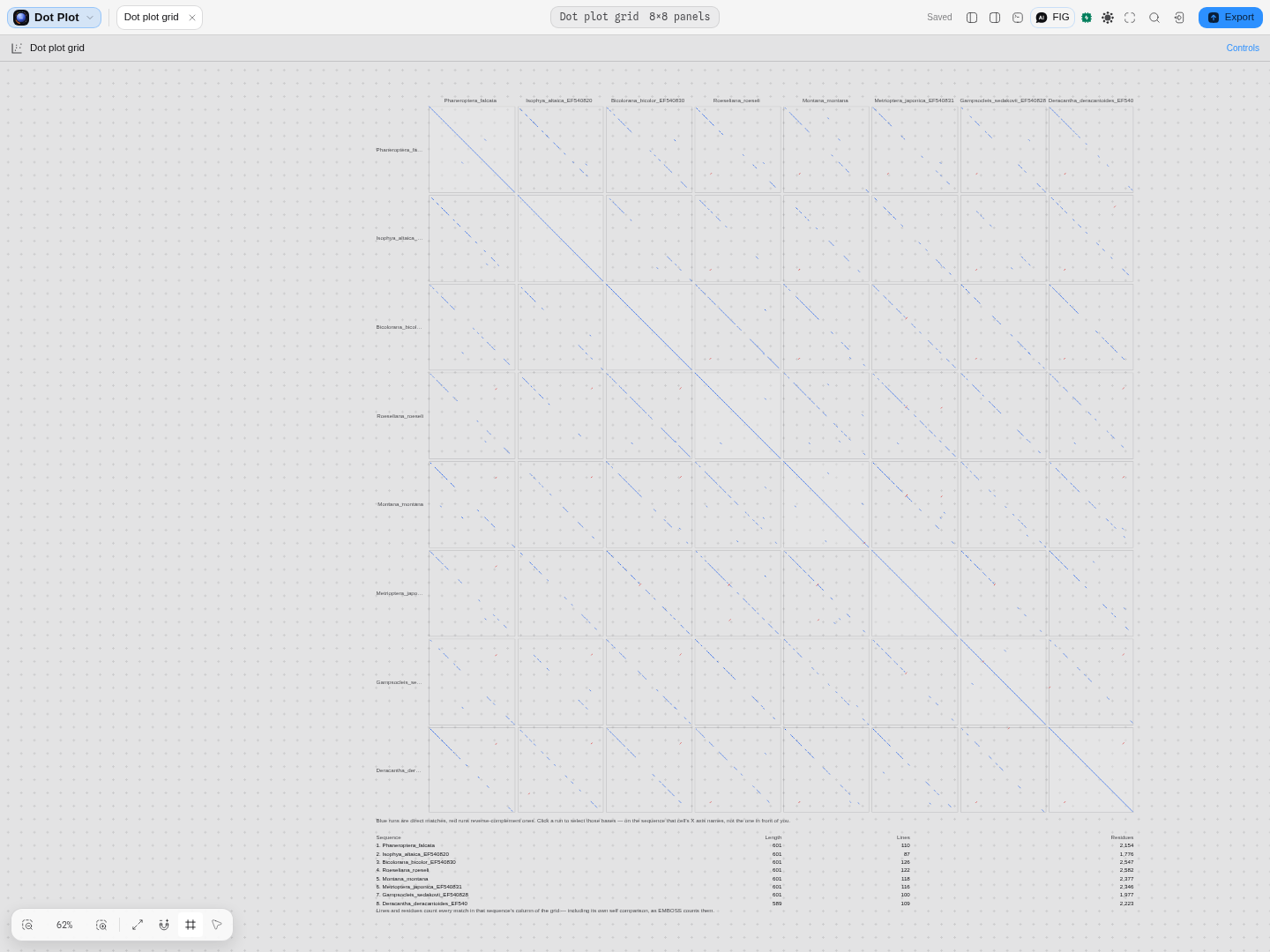
The whole grid is framed to fit when it opens, however many sequences are in the set - eight sequences is 64 panels, and all of them are on screen at once before you zoom into any of them.
Inputs and outputs
In: two or more nucleotide or protein sequences, added from the open project, the active sequence, or the current selection. The set's order is the grid's order, and you can reorder it. Residue-identical duplicates are skipped rather than silently plotted twice, and it says so.
Out: the grid itself; a per-sequence table of lines and residues; and a TSV of every match in every cell keyed by both sequence names.
What it refuses, and says so: more sequences than the plot budget allows (thirteen sequences is already 169 panels, and the message names the number), a set whose total residues exceed the run budget, and an empty member — named, so you know which one. Clicking a run inside a cell selects those bases on the sequence that cell's X axis names, not the document in front of you. A set is usually built from several records of one multi-sequence file, so the record a cell names is often not open yet: it is opened as its own document and the selection is made on it, and the grid stays where it is. A member that was pasted or taken from a selection has no document to select on, and that is stated rather than doing nothing.
Controls
| Control | What it changes |
|---|---|
| The set | Which sequences are compared, and in which order — the order you see is the order the grid draws. |
| Word size (k) | The length of the exact match that counts as a hit. Larger is stricter and faster; smaller finds shorter shared blocks and more noise. |
| Reverse complement | Also compares each sequence against the reverse complement of the other, so inverted repeats and flipped inserts appear as runs on the anti-diagonal. |
| Expand ambiguity codes | Treats IUPAC ambiguity as the bases it stands for, instead of as a mismatch. |
| Unknown residues allowed | How much of a window may be unknown before the window is skipped. |
| Gap | Blank space between neighbouring panels, measured in residues on the shared axis. At zero the panels butt together. |
The science
The grid is a port of EMBOSS's polydot, the fourth of that suite's four dot-plot programs, and it
follows its conventions rather than inventing new ones.
All N² ordered pairs are computed, not the upper triangle. The mirror image is a tempting saving and it is wrong once the reverse-complement pass is on: comparing the reverse complement of A with B is not the same comparison as the reverse complement of B with A, so a mirrored grid would put an inverted match on the wrong side of the diagonal.
The per-sequence table counts a whole COLUMN. Lines is every match drawn anywhere in that
sequence's column of the grid, and residues is their total length — including its own self
comparison. Read a row as "how much of this set does this sequence share", not as a figure for any
one pair. This is EMBOSS's own definition, kept so that numbers you have from polydot still mean
the same thing here.
Matches come from the exact-word engine. The all-against-all mode uses k-mer matching, as EMBOSS does. The windowed-identity and matrix-scored engines answer different questions and are available one pair at a time, in the One comparison tab.
Matches and coordinates are checked against the original EMBOSS and FlexiDot implementations, byte for byte — over the composite grid itself, not only over its individual panels. That distinction is the point: a grid assembled from correct panels can still pair, order or lay them out wrongly, and only a check on the whole picture catches it.
Limitations
- Exact words only. A repeat carrying a substitution every few bases is invisible to k-mer matching at any useful word size. If the set is diverged, compare pairs with the matrix-scored engine instead — it is the only one that knows a conservative substitution from a disruptive one.
- It grows as the square. Doubling the set quadruples the panels. Two ceilings stop a run before it starts — a sequence count and a total residue count — and the panel states where the current set sits against both before you plot, naming which one will refuse it. Neither is fixed: raise them when a large set is genuinely what you want to look at, and expect the wait that N² implies. The residue ceiling is the one that usually matters, since many short records can be cheaper than a few long ones.
- A blank panel is not proof of no relationship — only of no exact shared word at that word size. Lower k before concluding anything.
Related
In this group: Edit annotation · Enzyme · Insert sequence · Merge features · Manage enzymes · Dot plot · Melt curve · Amplification curves · Population genetics · RNA-seq · Site avoidance heat map · Protein coverage · Reference-gene stability · Digital PCR · Codon usage matrix · Pairwise distance distribution · Nearest-neighbor distances · GC content distribution · Base composition per cycle · Pairwise distance grid · Per-cycle channel occupancy · Grammar assembly plan · Gibson assembly plan · Assembly plan build order · Golden Gate assembly plan · Guide track · Primer binding track · Hydropathy profile · Charge vs pH · Amino-acid composition · Hydrophobic moment · Optimization profiles · Digest gel · Virtual gel · Initiation-window fold · Antibody domain map · Electropherogram · Circuit netlist · Circuit transfer functions · Circuit construct · Construction graph · Protocol · Read Quality Profile · Read Alignment · Raw Signal · Verify vs Reference · Chromosomal microarray · Variant calls · Small molecule
Dot plot
The plot itself, on a pannable canvas with room to read it — the marks, what each engine's marks mean, the run statistics, and a click that selects the matching bases.
Melt curve
Helicity against temperature for the chain you selected, with its derivative underneath, so a melt is read as a shape rather than as a single melting temperature.