
Table
| Document kind | table |
| Drawn from | a file — it can also be previewed in the file manager |
| Formats that open here | CSV · TSV · Excel · Excel (legacy) · Parquet |
| Refuses to draw below | 200px wide |
What it draws
A tabular file as a real table: sortable on any column, filterable by typing, virtualized so a large sheet scrolls rather than freezing, and resizable per column.
A document here is N sheets, not one. CSV, TSV and Parquet are single-sheet documents; a workbook is not, and drawing only its first sheet would hide the rest of the file behind no affordance at all. A sheet picker appears exactly when there is more than one thing to pick.
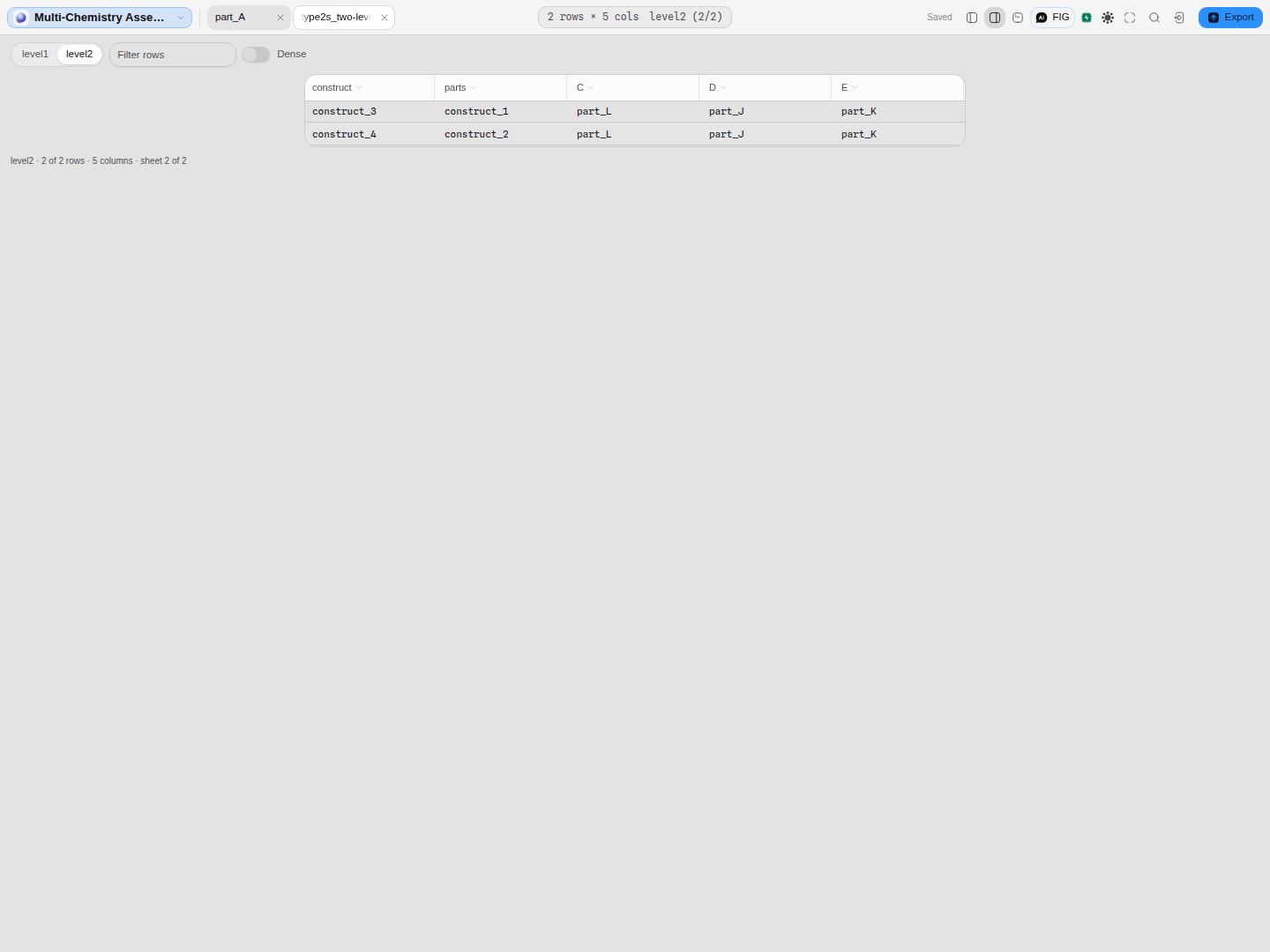 A two-level Type IIS assembly plan, one sheet per level. The picker sits inline with the other controls, the footer names the sheet you are on, and switching sheets clears the row filter, because a filter written for one sheet's columns rarely means anything on the next.
Legacy .xls workbooks open here too, not only .xlsx — the picture above is one.
What opens in it
CSV, TSV, Excel (.xlsx and the legacy .xls) and Parquet.
Files that are tabular by shape but scientific by meaning go elsewhere, and it is worth knowing which: a VCF is a variant call set with a typed header and opens in the variants canvas, not here; a BED file describes intervals on a sequence and lands on the sequence map as annotations. Both would render as columns of text here and lose everything that makes them what they are.
What this computes
Almost nothing. This canvas is a reader, and the values it shows are the values in the file — sorting, filtering and column resizing are views, never edits, and none of them changes a cell.
What it does compute is the small set of facts that decide whether you are looking at the whole file, and they exist because getting them wrong is invisible:
- How many rows are on screen against how many the file holds, stated in the footer. A preview reads a head of the file, and a table quietly showing the first 200 of four million rows as though it were the file is a failure you cannot see — the table looks complete either way.
- How many sheets the document has, and therefore whether a sheet picker is offered at all. CSV, TSV and Parquet are single-sheet documents; a workbook is not, and drawing only its first sheet would hide the rest of the file behind no affordance.
- Which sheet you are on, named in the footer — and switching sheets clears the row filter, because a filter written for one sheet's columns rarely means anything on the next.
Column types are the file's, not this canvas's. Nothing is inferred or coerced here, so a column of numbers stored as text sorts as text. That is a property of how the file was written, and silently retyping it would make the table disagree with every other tool that opens the same file.
Reading it
- The row count is honest. A preview reads a head of the file, and the footer states how many of how many rows are on screen. A table quietly showing the first 200 of four million rows as though it were the file is the failure this avoids — and it is a failure you cannot see, because the table looks complete either way.
- Sorting and filtering are views, not edits. They change what you are looking at, never the file.
- Columns are typed by the file, not by inference here. A column of numbers stored as text sorts as text, which is a property of how the file was written.
Finding a row from a project-wide search
Searching every file in a project reaches into tables too: a match inside a cell is listed with the place it sits, and opening it brings you here with that row scrolled into view, highlighted, and read back in the selection box beside the table.
The address differs by what the file actually has, and the difference is not cosmetic:
- A CSV or TSV hit names a LINE of the file — the line you would scroll to in a text editor. Getting from that line to the row on screen is not counting: a blank line anywhere in the file shifts every record after it, and a quoted field containing a line break makes one record span several lines. So each row remembers, as the file is read, the line it began on, and the match is matched back against that. Arithmetic instead would still land on a row, and it would look entirely right.
- A spreadsheet hit names a SHEET and a ROW, because a worksheet has no lines to point at. If the match is on a sheet you are not looking at, the sheet switches with it.
A row filter is cleared when a row is revealed — a filter written before the search would otherwise hide the very row you asked to see. And if a match sits past the head of a very large file that the preview holds, nothing is highlighted rather than something plausible: the match is in the file, but it is not in the drawing, and pointing at the wrong row would be worse than pointing at none.
Spreadsheets are read with the same reader that draws them, so a search finds text inside cells rather than inside the file's compressed container. A workbook whose cells could not be read says so instead of reporting no matches, which is a different statement.
Controls
| Control | What it does |
|---|---|
| Sheet | Which sheet of a workbook you are viewing. Appears only when the document has more than one. |
| Filter rows | Free-text filter across the table. |
| Dense | Tighter row height, for seeing more at once. |
| Sort | Click a column header. |
| Column widths | Drag to resize. |
What you can take out of it
The sheet you are reading, as CSV or as tab-separated text — not the file you opened. On a workbook those differ: the file holds every sheet, and you are looking at one of them. If a filter is active, only the rows that match it are written, and the file is named to say so rather than sharing a name with the unfiltered set.
Two counts travel with it, because a table export can quietly lose either one:
- how many rows matched your filter, out of the rows on screen; and
- how many rows the sheet really has, when the file was large enough that only a head of it was read. A sheet with more rows than were read says so before you download it, rather than passing a few hundred rows off as the whole thing.
Values containing a comma, a tab, a quote or a line break are quoted, so a cell carrying prose cannot split the row for whatever reads the file next.
Where it appears
As a stage tab, and in the file manager preview. Both use the same renderer and the same table primitive the rest of the workbench uses, so a table here behaves like every other table in the app.
In the preview the box is canvas only: the controls and the row and column counts are published upward and drawn by the host rather than stacked inside a narrow aside on top of the table itself.
Performance and limits
- Rows are virtualized, so scrolling a large sheet costs the same as scrolling a small one.
- A preview reads a head of the file, with the count stated, as above.
- Very large workbooks are bounded by what the browser can hold — this is a local-first application, so the file is read on your machine rather than on a server.
Screenshots
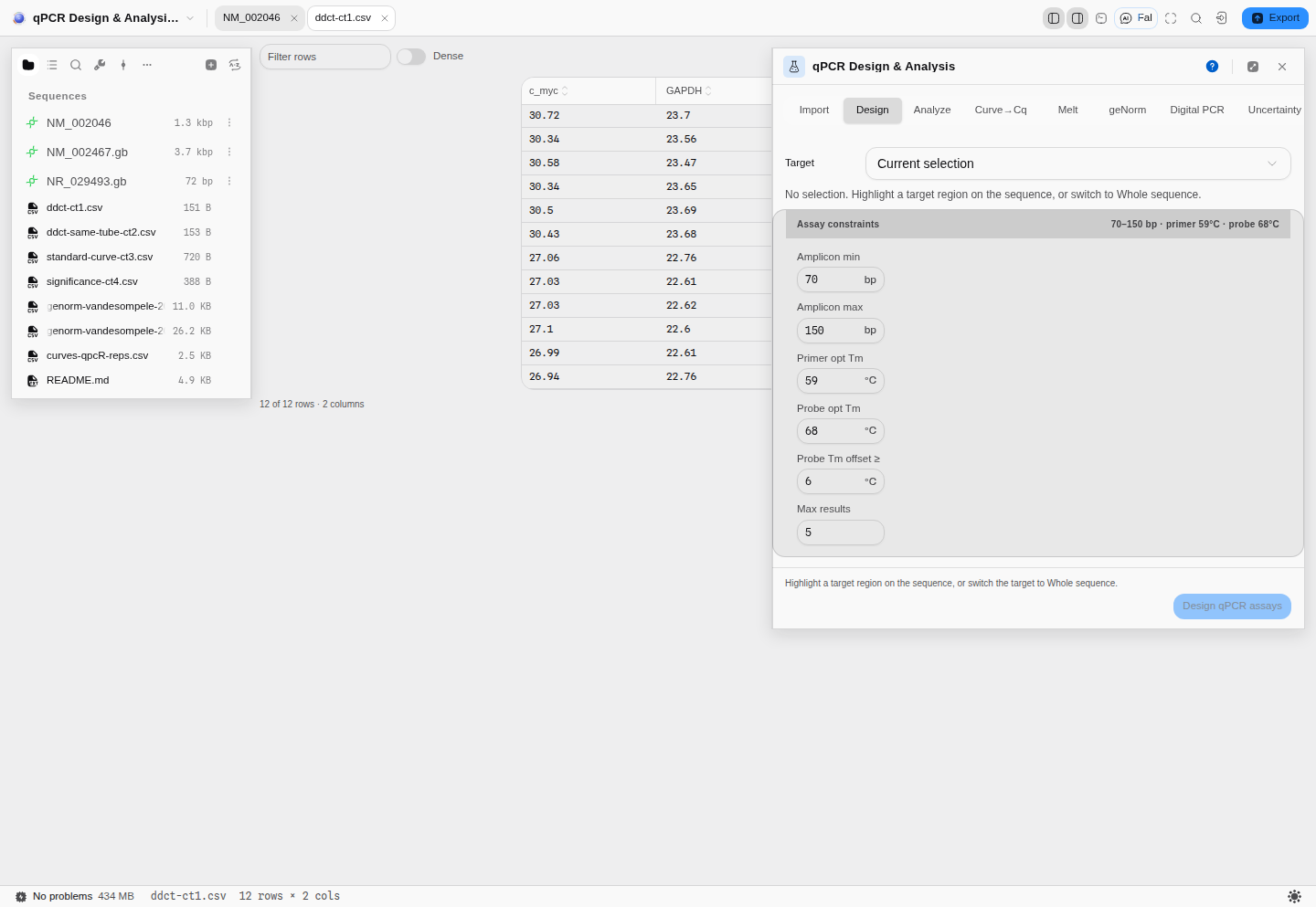
ddct-ct1.csv from the qPCR starter — 12 rows × 2 columns, and the canvas says so twice: under
the table (12 of 12 rows · 2 columns, so a filtered view can never read as a complete one) and in
the status bar. The columns hug their content rather than stretching to the pane, the header carries
per-column sort, and Filter rows and Dense are the two controls that change the drawing. The
same file is what the qPCR panel beside it reads, so the table is the data, not a preview of it.
Related
A table is often the input to something: a spreadsheet of references drives batch Sanger screening, and a table of samples drives the barcode and index tools. It is also a common output — most panels export their results as TSV, and those land here when reopened.